

A/B testing is essential for optimizing website performance. Google Optimize makes it easier.
A/B testing lets you compare two versions of a web page to see which one performs better. Google Optimize is a powerful tool that helps you conduct these tests effortlessly. It provides insights into user behavior, allowing you to make data-driven decisions.
With Google Optimize, you can experiment with different elements on your website, such as headlines, images, or call-to-action buttons. This can lead to higher conversion rates and improved user experience. In this blog post, we will explore the basics of A/B testing and how Google Optimize can help you achieve better results. Let’s dive in and discover the potential of A/B testing with Google Optimize!
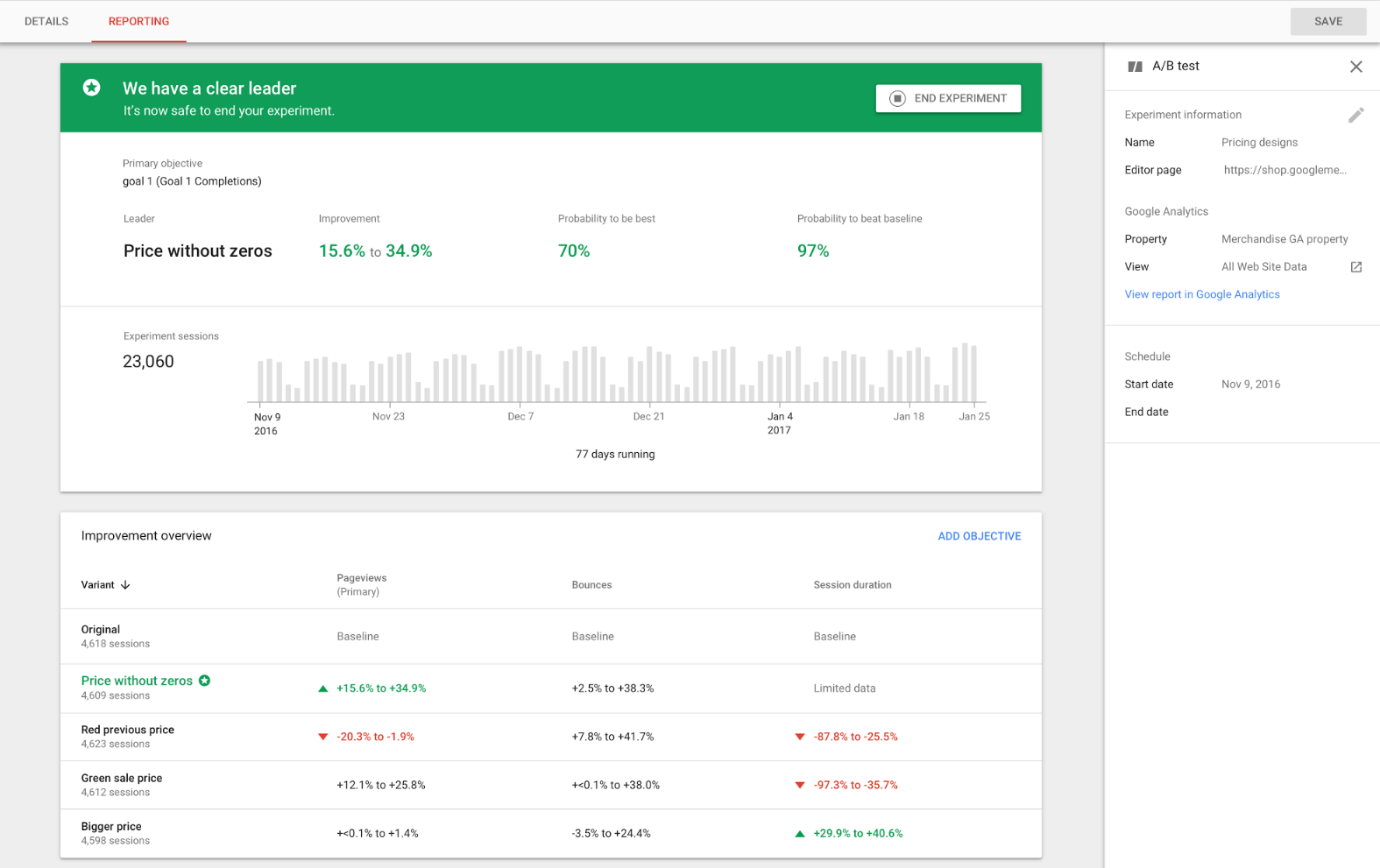
Credit: www.semrush.com
Introduction To A/b Testing
Many businesses use A/B testing to improve their websites and apps. Google Optimize is a tool that helps with this. In this section, we will introduce you to the basics of A/B testing.
What Is A/b Testing?
A/B testing is a method to compare two versions of a webpage. You can see which version performs better. You show version A to one group of users. You show version B to another group. The version with better results is chosen. This helps in making data-driven decisions.
Importance Of A/b Testing
A/B testing is crucial for many reasons:
- Increases Conversion Rates: It helps find the best design to convert visitors into customers.
- Improves User Experience: You can test different designs to see which one users like more.
- Reduces Risk: You can test changes on a small group before applying them to the entire site.
- Data-Driven Decisions: It provides clear data on what works and what does not.
Many businesses use A/B testing to make their websites more effective. It helps them understand what their users prefer. This makes their decisions more reliable.
Getting Started With Google Optimize
Google Optimize helps you run experiments on your website. You can compare different versions of your site to see which one performs better. This is called A/B testing. It’s a powerful tool to improve your website’s performance.
Setting Up Google Optimize
First, you need a Google account. If you don’t have one, create it. Then, follow these steps to set up Google Optimize:
- Go to the Google Optimize website and sign in with your Google account.
- Click on “Get started” and follow the prompts to create your Optimize account.
- After creating your account, you’ll be prompted to create a new container. A container holds all your experiments. Name your container and click “Create.”
- Next, you need to install the Optimize snippet on your website. This snippet allows Optimize to run experiments on your site. You can find the snippet in the “Container setup” section.
Here’s an example of the Optimize snippet:
Replace YOUR_CONTAINER_ID with your actual container ID from Optimize.
Integrating With Google Analytics
Integrating Google Optimize with Google Analytics gives you better insights. Follow these steps to integrate:
- Open Google Analytics and go to the Admin section.
- Under the “Property” column, click on “Google Optimize.”
- Click “Link” and choose your Optimize container from the list.
- Click “Link” again to complete the integration.
Now, your Optimize and Analytics accounts are connected. This allows you to see detailed reports of your experiments.
To see experiment data in Google Analytics, go to the “Behavior” section, then click on “Experiments.” Here, you can analyze the performance of your different website versions.
Creating Your First A/b Test
Ready to dive into A/B testing with Google Optimize? This guide helps you get started. A/B testing allows you to compare two versions of a web page. You can see which one performs better. Follow these steps to set up your first test.
Choosing A Test Objective
First, decide what you want to test. This is your test objective. Do you want more clicks on a button? Or, do you want to see if changing a headline improves engagement?
- Identify your goal. This could be click-through rate, bounce rate, or conversions.
- Make sure your objective is clear and measurable.
For example, if you want to increase newsletter sign-ups, your objective is clear. You will measure the number of sign-ups.
Setting Up Variants
Now, create the versions of the page you want to test. These are called variants.
- Original: This is your current page.
- Variant 1: This is the new version you will test against the original.
Use Google Optimize to set up these variants. You can change text, images, or layout. Make sure each variant has only one change. This helps you know which change made a difference.
Here’s a simple example:
| Element | Original | Variant |
|---|---|---|
| Button Text | Sign Up Now | Join Us Today |
With these steps, you are ready to create your first A/B test. Choose your test objective and set up your variants. You are now on your way to improving your website’s performance with data-driven decisions.
Defining Success Metrics
Defining success metrics is crucial for effective A/B testing with Google Optimize. Knowing what to measure helps in evaluating the performance of your experiments. This ensures that you make data-driven decisions that improve your website’s user experience and conversions.
Primary Metrics
Primary metrics are the main indicators of success in your A/B tests. These metrics directly reflect your business goals.
- Conversion Rate: The percentage of visitors who complete a desired action.
- Click-Through Rate (CTR): The ratio of users who click on a specific link.
- Revenue: The total income generated from conversions.
Choose primary metrics that align with your key performance indicators (KPIs). This helps in measuring the direct impact of the changes you make.
Secondary Metrics
Secondary metrics provide additional insights that support your primary metrics. They help you understand user behavior in more detail.
- Bounce Rate: The percentage of visitors who leave after viewing one page.
- Average Session Duration: The average time users spend on your site.
- Pages per Session: The average number of pages viewed during a single session.
These metrics help you identify potential issues and opportunities for further optimization.
Here is a table summarizing primary and secondary metrics:
| Metric Type | Examples |
|---|---|
| Primary Metrics | Conversion Rate, CTR, Revenue |
| Secondary Metrics | Bounce Rate, Average Session Duration, Pages per Session |
By clearly defining your success metrics, you can effectively measure the impact of your A/B tests with Google Optimize. This ensures that your website improvements are based on solid data.
Running The A/b Test
Running an A/B test with Google Optimize is an essential practice for any website looking to improve user experience and conversion rates. This process involves launching the test, monitoring its performance, and making data-driven decisions based on the results. Below, we break down these steps to help you understand how to run an effective A/B test.
Launching The Test
Before launching your A/B test, ensure you have a clear hypothesis. This will guide your test design and objectives. Here are the steps to launch your test:
- Log in to your Google Optimize account.
- Select the experiment type as A/B test.
- Define the variants you want to test. Each variant should have one change.
- Set up the targeting rules. This determines who sees each variant.
- Integrate Google Analytics to track your test’s performance.
- Review your setup and launch the test.
Monitoring Performance
Once your test is live, monitoring its performance is crucial. This helps you understand which variant is performing better. Here are some tips for monitoring:
- Check the Google Optimize dashboard regularly. It provides real-time data on test performance.
- Use the Google Analytics integration to track key metrics like conversion rates, bounce rates, and session duration.
- Look for significant differences in performance between the variants. This indicates which changes are effective.
- Ensure you have enough data. A small sample size can lead to inaccurate conclusions.
- Consider running the test for a minimum of two weeks. This accounts for variations in user behavior over time.
Monitoring these factors will help you make informed decisions and improve your website’s performance.
Analyzing Test Results
After running an A/B test with Google Optimize, it’s time to analyze the results. This step helps you understand which version of your webpage performs better. Proper analysis can lead to better decision-making and improved website performance.
Interpreting Data
When you view the test results, you will see various metrics. These metrics include:
- Conversion Rate: The percentage of visitors who complete the desired action.
- Bounce Rate: The percentage of visitors who leave the site after viewing only one page.
- Engagement: The amount of time visitors spend on the page.
Compare these metrics between the control and the variant. Look for patterns and significant differences. A higher conversion rate in the variant suggests it may be more effective.
Statistical Significance
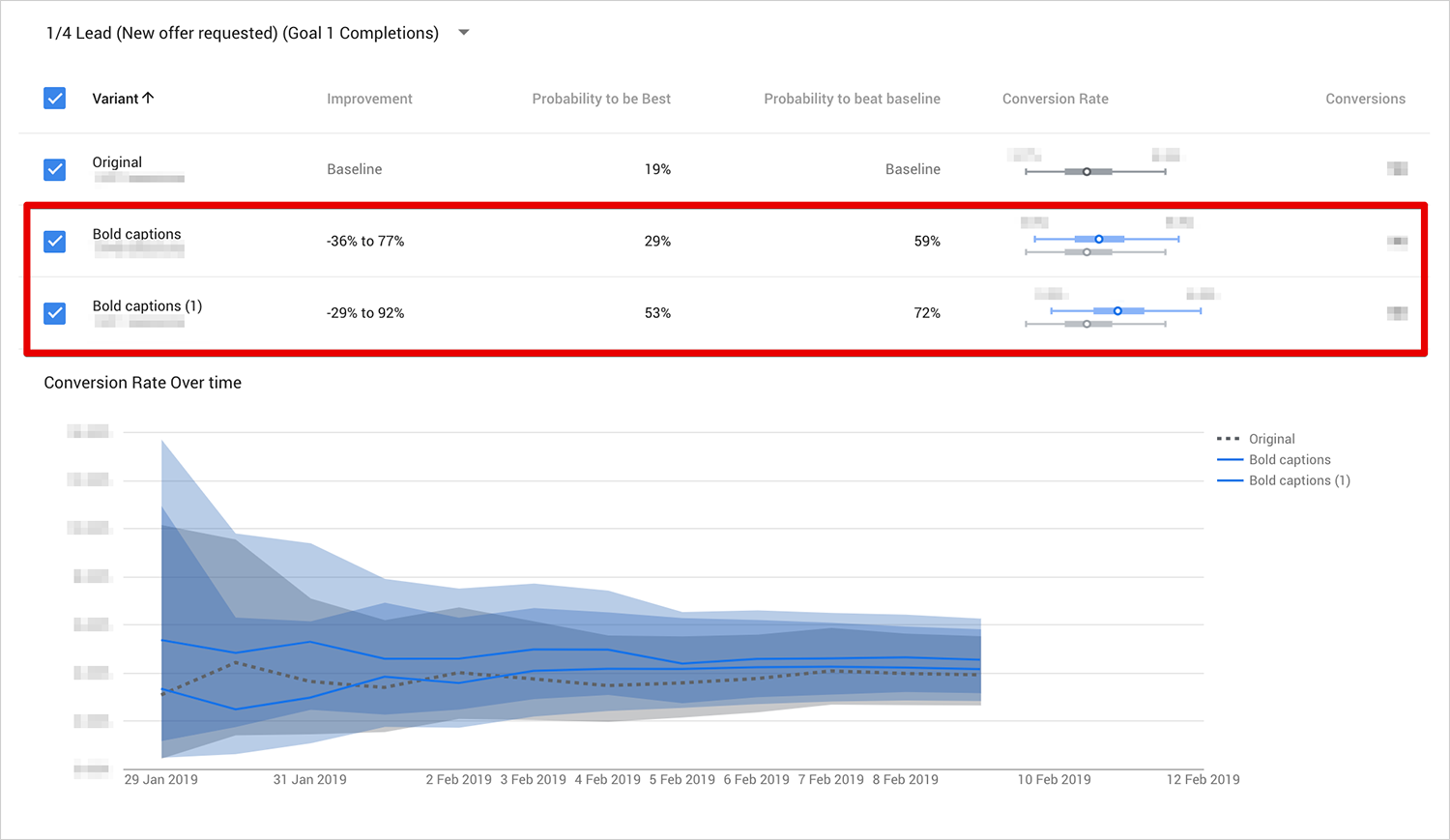
Statistical significance tells you if the test results are not due to chance. Google Optimize provides a probability to help you understand this. It shows the probability that one variant is better than the other.
Here’s a simple table to explain:
| Probability | Action |
|---|---|
| 90% – 95% | Consider the variant as better. |
| 95% – 99% | Highly likely the variant is better. |
| 99% and above | The variant is almost certainly better. |
A probability above 95% is generally considered statistically significant. This means you can be confident in the results.
Remember, even with statistical significance, consider other factors. User experience and feedback are also important. Use the data to make informed decisions but keep the bigger picture in mind.
Optimizing Based On Insights
Optimizing based on insights is a crucial step in improving your website’s performance. A/B Testing with Google Optimize provides valuable data. This data helps make informed decisions. By understanding user behavior, you can make changes that enhance user experience and conversions.
Implementing Changes
After running A/B tests, analyze the results. Identify which variations perform better. Implement these changes on your website.
Use a clear and structured approach for making changes. This ensures consistency and reliability. Create a checklist:
- Review test results
- Identify winning variations
- Document changes to be made
- Update website accordingly
- Monitor performance post-implementation
Continuous Improvement
Optimization is an ongoing process. Regularly review and refine your strategy. Use the insights gained from A/B tests to drive further improvements.
Create a plan for continuous improvement:
- Set new goals based on previous tests
- Design new A/B tests to address different aspects
- Analyze results and adjust strategies
- Repeat the process for consistent growth
By focusing on continuous improvement, your website will stay relevant and effective. Keep testing and refining to achieve the best results.
Common Pitfalls And Solutions
A/B testing with Google Optimize can bring valuable insights. But, it’s easy to fall into common pitfalls. Knowing these pitfalls and their solutions can save time and effort. Here, we discuss some frequent issues and how to avoid them.
Avoiding Bias
Bias can skew test results. This makes data unreliable. Here are some ways to avoid it:
- Randomize Traffic: Ensure traffic is split randomly. This creates a balanced comparison.
- Avoid Personalization: Personalization can introduce bias. Keep the test environment neutral.
- Consistent Timing: Run tests at the same time. Different times can affect user behavior.
Handling Low Traffic
Low traffic can delay results. Here are some strategies to handle it:
- Longer Test Duration: Run tests longer. This compensates for low traffic volumes.
- Broader Audience: Widen the audience. This increases the sample size.
- Focus on High-Impact Changes: Test significant changes. Smaller changes need more data to show impact.
By addressing these common pitfalls, your A/B tests will be more accurate and reliable. Happy testing!
Case Studies And Success Stories
A/B testing with Google Optimize can significantly enhance your website’s performance. Real-world examples and success stories provide valuable insights and inspire new strategies. Discover how businesses have leveraged A/B testing to achieve remarkable results.
Real-world Examples
Many companies have successfully used Google Optimize to refine their websites. These real-world examples illustrate how A/B testing can lead to improved conversions and user experiences.
- Example 1: An e-commerce store increased their conversion rate by 25% by testing different call-to-action buttons.
- Example 2: A travel website boosted sign-ups by 20% through testing various landing page designs.
- Example 3: A blog saw a 30% increase in newsletter subscriptions by experimenting with headline variations.
Lessons Learned
Examining these case studies provides valuable lessons. Here are key takeaways from successful A/B testing with Google Optimize.
| Lesson | Description |
|---|---|
| Start Small | Begin with minor changes like button colors or text to see quick results. |
| Test One Variable at a Time | Isolate variables to identify what impacts performance the most. |
| Monitor Results Regularly | Track performance frequently to understand trends and make adjustments. |
| Use Data to Guide Decisions | Let empirical data, not assumptions, drive your choices. |
These insights help businesses optimize their websites effectively. Implementing A/B testing with Google Optimize can lead to substantial improvements.

Credit: goodish.agency
Credit: olgashavrina.com
Frequently Asked Questions
What Is A/b Testing In Google Optimize?
A/B testing in Google Optimize is a method to compare two versions of a webpage. It helps determine which version performs better. This is done by splitting the traffic and measuring performance metrics.
How Does Google Optimize Work?
Google Optimize works by creating different variants of your website. It then divides traffic among these variants. Performance metrics are tracked to identify the best-performing version.
Why Use Google Optimize For A/b Testing?
Google Optimize is user-friendly and integrates with Google Analytics. It provides valuable insights and helps improve website performance. It also offers various testing options and customization features.
Is Google Optimize Free To Use?
Yes, Google Optimize offers a free version. The free version provides basic A/B testing features. For advanced features, a paid version called Optimize 360 is available.
Conclusion
A/B testing with Google Optimize can boost your site’s performance. It helps you understand user behavior better. Small changes can lead to big improvements. Keep testing different elements on your site. Analyze the results carefully. Implement the winning variations. This process is continuous.
Stay patient and persistent. Your efforts will pay off. Remember, the goal is to create a better user experience. Happy testing!