

Creating viral-worthy video clips can be challenging and time-consuming. You need the right tools to make it easier and more efficient.
Snapcut is an AI-powered tool designed to transform long-form videos into short, engaging clips perfect for social media. Snapcut identifies the most engaging moments in your videos. It automatically adjusts aspect ratios and adds accurate captions in multiple languages. This tool helps you save time and increase viewer engagement by optimizing your videos for virality. Whether you’re a marketer, videographer, or content creator, Snapcut offers a versatile solution to elevate your video content. With a lifetime deal available, Snapcut provides an affordable way to access these powerful features and make your videos stand out. Ready to simplify your video editing process? Check out Snapcut’s lifetime deal here.
Introduction To Snapcut
Snapcut is an AI-powered tool designed to transform long-form video content into short, engaging clips optimized for social media platforms. It helps content creators produce viral-worthy video clips in seconds. This tool promises to make video editing effortless and time-saving.
Overview Of Snapcut
Snapcut comes equipped with a suite of powerful features:
- AI Hook Selection: Identifies the most engaging moments in your videos.
- Auto Reframe: Automatically adjusts video aspect ratios (9:16, 16:9, 1:1) for different platforms.
- Smart Captions: Adds animated captions with over 97% accuracy in 34 languages.
- Auto-Translation: Translates captions to reach a global audience.
- No Clipping: Maintains the original video length while applying edits.
- Multiple Aspect Ratios: Supports various aspect ratios for optimal social media posting.
- 4K Video Resolution: Renders videos in up to 4K resolution.
- Editing Features: Allows customization of captions and other video elements.
Snapcut’s features make it a versatile tool for anyone looking to enhance their video content quickly and efficiently.
Purpose And Target Audience
Snapcut is designed for a broad range of users who create video content:
- Marketers: To create engaging promotional clips.
- Videographers: To save time on editing and focus on creativity.
- YouTubers: To produce eye-catching video snippets for social media.
- Media Companies: To streamline the process of creating short, shareable content.
The tool is especially beneficial for those who want to reach a global audience quickly and effectively. With its time-saving features, Snapcut helps users increase their engagement and reach on social media platforms.
| License Tier | Price | Processing Minutes Per Month |
|---|---|---|
| License Tier 1 | $49 (Original price $136) | 200 |
| License Tier 2 | $109 (Original price $340) | 500 |
| License Tier 3 | $229 (Original price $1,122) | 1,650 |
Snapcut offers a 60-day money-back guarantee. Users can try it for 2 months and get a refund if it doesn’t meet their needs. The tool also provides lifetime access with a one-time payment, and users can upgrade or downgrade between the three license tiers within 60 days of purchase.
For more information, visit the official Snapcut page.
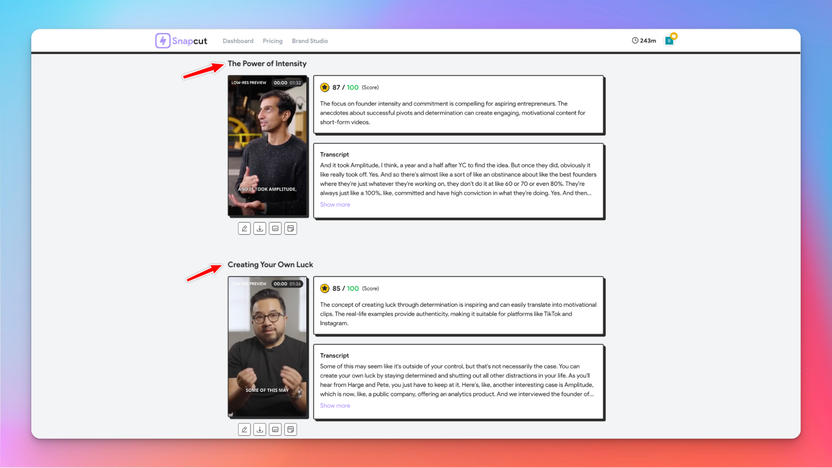
Credit: appsumo.com
Key Features Of Snapcut
Snapcut is a tool designed to help you create viral-worthy video clips in seconds. This AI-powered tool comes packed with features that make video editing easy and efficient. Let’s dive into some of the key features that set Snapcut apart.
Snapcut boasts a user-friendly interface that allows even beginners to navigate and create amazing video clips effortlessly. The intuitive design ensures a smooth workflow, making it easy to access all the editing tools and features without any hassle.
With Snapcut, you get access to a range of advanced editing tools. These include:
- AI Hook Selection: Identifies the most engaging moments in your videos.
- Auto Reframe: Adjusts video aspect ratios (9:16, 16:9, 1:1) for different platforms.
- Smart Captions: Adds animated captions with over 97% accuracy in 34 languages.
- Auto-Translation: Translates captions to reach a global audience.
- 4K Video Resolution: Renders videos in up to 4K resolution.
- Customization options for captions and other video elements.
The AI capabilities of Snapcut make it stand out. The tool’s AI-powered clip suggestions ensure you get the most engaging clips from your long-form videos. This feature helps in saving time by automating the process of finding the best moments.
Snapcut supports multiple aspect ratios, making it easy to post on various social media platforms. The tool ensures your video clips are optimized for virality, potentially boosting viewer engagement by up to 80%. Whether it’s Instagram, Facebook, or YouTube, Snapcut has you covered.
Snapcut also offers significant benefits, including:
- Time-Saving: Automates the process of creating short clips from long-form videos.
- Increased Engagement: Optimizes videos for social media platforms.
- Global Reach: Captions and translations make content accessible worldwide.
- Versatility: Suitable for marketers, videographers, YouTubers, and media companies.
User-friendly Interface
Snapcut offers a user-friendly interface that simplifies video editing. Transforming long videos into viral clips becomes easy and efficient. Let’s dive into its features:
Intuitive Design And Navigation
The interface is designed with users in mind. Everything is placed logically, making it easy to find tools and options. Even beginners can navigate with ease. The design is clean and straightforward. This means less time spent learning and more time editing.
Customizable Workspace
Snapcut allows customization of the workspace. You can arrange tools and panels to suit your needs. This flexibility boosts productivity and makes the editing process smoother. Tailor your workspace to your workflow for maximum efficiency.
Time-saving Templates
The platform offers time-saving templates that speed up the editing process. Choose from various templates designed for different social media platforms. These templates ensure your videos meet platform requirements. This feature is a game-changer for busy content creators.
| Feature | Benefit |
|---|---|
| AI Hook Selection | Identifies engaging moments |
| Auto Reframe | Adjusts aspect ratios |
| Smart Captions | Animated captions with 97% accuracy |
Snapcut’s user-friendly interface, customizable workspace, and time-saving templates make video editing a breeze. Create viral-worthy clips with minimal effort.
Advanced Editing Tools
Snapcut offers a suite of advanced editing tools to create viral-worthy video clips. These tools are designed to help you transform long-form content into engaging social media snippets quickly and efficiently.
Precision Cutting And Trimming
Snapcut allows for precision cutting and trimming of your videos. The AI Hook Selection identifies the most engaging moments, ensuring your clips capture attention. This feature simplifies the editing process, making it easy to pinpoint and extract the best parts of your content.
With the Auto Reframe functionality, Snapcut adjusts video aspect ratios (9:16, 16:9, 1:1) automatically. This ensures that your clips are optimized for various social media platforms, saving you time and effort in manual adjustments.
Special Effects And Filters
Enhance your videos with Snapcut’s special effects and filters. The platform offers customization options for captions and other video elements, allowing you to add a unique touch to your clips. Smart Captions feature adds animated captions with over 97% accuracy in 34 languages, making your content more engaging and accessible.
The Auto-Translation feature translates captions, enabling you to reach a global audience. This makes your videos versatile and ready for a diverse viewer base, increasing the potential for wider engagement.
Audio Editing And Enhancement
Snapcut includes powerful tools for audio editing and enhancement. You can edit and enhance the audio tracks of your videos to ensure clear and high-quality sound. This is crucial for maintaining viewer attention and ensuring your message is conveyed effectively.
Whether you are adjusting background music, removing noise, or fine-tuning voiceovers, Snapcut provides the necessary tools to create professional-grade video clips. The platform supports 4K video resolution, ensuring that both your visuals and audio are top-notch.
Ai-powered Clip Suggestions
Snapcut leverages advanced AI technology to transform long videos into engaging short clips. One of its standout features is the AI-powered clip suggestions. This ensures users can create viral-worthy content effortlessly.
Automated Clip Generation
Snapcut’s automated clip generation helps users save valuable time. The tool scans through long-form content to identify the most captivating moments. This feature eliminates the need for manual editing, making the process quick and efficient.
For example, the AI Hook Selection identifies engaging segments within your video. It automatically trims and prepares these clips for social media. Moreover, the Auto Reframe adjusts the video aspect ratios to fit different platforms seamlessly.
Content Analysis And Recommendations
Another impressive aspect is Snapcut’s content analysis and recommendations. The AI analyzes the video to understand its context and suggests the best snippets. This ensures each clip is optimized for maximum engagement.
The Smart Captions feature adds animated captions with over 97% accuracy in 34 languages. This enhances the video’s appeal and accessibility. Additionally, the Auto-Translation feature allows you to reach a global audience by translating captions.
Enhancing Creativity And Efficiency
Snapcut enhances both creativity and efficiency. With its 4K Video Resolution support, videos maintain high quality. Users can customize captions and other elements, adding a personal touch to each clip.
Here’s a quick summary of how these features contribute:
- AI Hook Selection: Identifies engaging moments
- Auto Reframe: Adjusts aspect ratios
- Smart Captions: Adds accurate captions
- Auto-Translation: Translates captions for global reach
This table further breaks down the benefits:
| Feature | Benefit |
|---|---|
| AI Hook Selection | Finds engaging moments |
| Auto Reframe | Adjusts video for platforms |
| Smart Captions | Accurate, animated captions |
| Auto-Translation | Global audience reach |
Overall, Snapcut’s AI-powered clip suggestions streamline the video editing process. It makes creating viral-worthy content simple and efficient for users.
Seamless Social Media Integration
Snapcut is not just an AI-powered video editing tool; it’s a powerful ally for content creators. It integrates seamlessly with social media platforms. This ensures your content is not only engaging but also easily shareable across networks.
Direct Sharing To Popular Platforms
Snapcut offers direct sharing options to popular social media platforms. This includes Facebook, Instagram, Twitter, and TikTok. You can share your edited clips with just a few clicks. This eliminates the need for downloading and uploading videos separately.
Optimized Formats For Each Network
The Auto Reframe feature adjusts video aspect ratios automatically. Whether you need 9:16 for Instagram Stories, 16:9 for YouTube, or 1:1 for Facebook, Snapcut has you covered. This ensures your videos look their best on every platform.
Scheduling And Analytics
With Snapcut, you can schedule your video posts in advance. This feature is a time-saver, allowing you to plan your content strategy. Additionally, Snapcut provides basic analytics. You can track the performance of your clips, making it easier to understand what works best for your audience.
Here’s a quick summary of Snapcut’s social media features:
| Feature | Details |
|---|---|
| Direct Sharing | Share to Facebook, Instagram, Twitter, TikTok |
| Optimized Formats | 9:16, 16:9, 1:1 aspect ratios |
| Scheduling | Plan and schedule posts in advance |
| Analytics | Track video performance |
By using Snapcut, you can ensure that your video content is optimized and easily shareable. This saves you time and increases your engagement.
Pricing And Affordability
The Snapcut Lifetime Deal offers excellent value for those who create a lot of video content. It provides a range of pricing options to suit different budgets and needs. Let’s delve into the pricing details and see how it stacks up against competitors.
Lifetime Deal Overview
Snapcut offers three license tiers, each providing different levels of access and capabilities. Here is a breakdown:
| License Tier | Price | Processing Minutes per Month | Original Price |
|---|---|---|---|
| License Tier 1 | $49 | 200 minutes | $136 |
| License Tier 2 | $109 | 500 minutes | $340 |
| License Tier 3 | $229 | 1,650 minutes | $1,122 |
Each license tier includes lifetime access, no watermarks, premium templates, 90-day storage, and all future Pro Plan updates. Plus, you can upgrade or downgrade within 60 days.
Cost Comparison With Competitors
Snapcut’s pricing is highly competitive when compared to similar tools on the market. Let’s compare:
| Feature | Snapcut | Competitor A | Competitor B |
|---|---|---|---|
| License Tier 1 | $49 (200 mins/month) | $99 (100 mins/month) | $79 (150 mins/month) |
| License Tier 2 | $109 (500 mins/month) | $199 (300 mins/month) | $149 (350 mins/month) |
| License Tier 3 | $229 (1,650 mins/month) | $499 (1,000 mins/month) | $299 (1,200 mins/month) |
Snapcut clearly offers more processing minutes at a lower cost compared to its competitors, making it a cost-effective choice.
Value For Money
Snapcut not only offers competitive pricing but also provides significant value for money. Here are some key points:
- AI Hook Selection: Automatically finds the best moments in your videos.
- Auto Reframe: Adjusts aspect ratios for different platforms.
- Smart Captions: Adds accurate animated captions in 34 languages.
- Auto-Translation: Translates captions to reach a global audience.
- 4K Video Resolution: Renders videos in up to 4K.
- Editing Features: Customizes captions and other video elements.
These features save time and increase engagement, making Snapcut a worthwhile investment for content creators.
Pros And Cons Of Snapcut
Snapcut offers an AI-powered solution for transforming long-form video content into short, engaging clips. Let’s explore the advantages and drawbacks of using Snapcut.
Advantages Of Using Snapcut
| Feature | Benefit |
|---|---|
| AI Hook Selection | Identifies the most engaging moments in your videos. |
| Auto Reframe | Automatically adjusts video aspect ratios for different platforms. |
| Smart Captions | Adds animated captions with over 97% accuracy in 34 languages. |
| Auto-Translation | Translates captions to reach a global audience. |
| Multiple Aspect Ratios | Supports various aspect ratios for optimal social media posting. |
| 4K Video Resolution | Renders videos in up to 4K resolution. |
| Editing Features | Allows customization of captions and other video elements. |
Using Snapcut can significantly reduce editing time by automating the creation of short clips. This can increase engagement, making your videos more shareable. The tool is suitable for a wide range of users, including marketers, videographers, YouTubers, and media companies.
Drawbacks To Consider
- Processing Minutes: Each license tier limits the number of processing minutes per month.
- Storage Limitation: Edited videos are stored for a maximum of 90 days.
- Customization Options: While customization is available, advanced users may find the options limited.
While Snapcut offers many benefits, there are some limitations to consider. The number of processing minutes available each month could be restrictive for heavy users. Additionally, the 90-day storage period may require you to back up your videos elsewhere. Finally, customization options might not meet the needs of users seeking more advanced features.
Specific Recommendations For Ideal Users
Snapcut is an AI-powered tool designed for creating engaging short video clips from long-form content. It is especially useful for various user groups who aim to enhance their social media presence and streamline their video editing process. Here are some specific recommendations for the ideal users of Snapcut.
Content Creators And Influencers
For content creators and influencers, Snapcut offers several features that make it a valuable tool:
- AI Hook Selection: Automatically identifies the most engaging moments in your videos, helping to capture your audience’s attention quickly.
- Smart Captions: Adds accurate and animated captions in 34 languages, making your content more accessible and engaging.
- Auto Reframe: Adjusts video aspect ratios to fit various social media platforms, ensuring your clips are optimized for maximum reach.
- 4K Video Resolution: Renders high-quality videos that maintain a professional look.
Small Business Owners
Small business owners can greatly benefit from Snapcut’s features:
- Time-Saving: The automated editing process significantly reduces the time needed to create promotional clips from longer videos.
- Increased Engagement: Optimized videos for social media can boost viewer engagement by up to 80%, helping to attract more customers.
- Auto-Translation: Captions can be translated to reach a global audience, broadening your business’s market.
- Multiple Aspect Ratios: Supports various aspect ratios, making it easier to post on different social media platforms.
Marketing Professionals
Marketing professionals will find Snapcut to be a powerful tool for their campaigns:
- Smart Captions: Enhances video content with accurate and animated captions, making it more engaging and easier to follow.
- Auto Reframe: Ensures that videos are perfectly sized for each social media platform, maximizing their impact.
- No Clipping: Keeps the original video length while applying edits, preserving the intended message.
- Global Reach: Translated captions make content accessible to a worldwide audience, increasing the potential reach of marketing campaigns.
Snapcut is designed to cater to these user groups, providing tools and features to enhance their video content and streamline the editing process.

Credit: clientamp.com

Credit: www.youtube.com
Frequently Asked Questions
What Is Snapcut?
Snapcut is a video editing tool that helps users create viral-worthy video clips quickly and easily.
How Does Snapcut Work?
Snapcut uses advanced algorithms to simplify video editing. Users can easily trim, merge, and add effects to their videos.
Is Snapcut Beginner-friendly?
Yes, Snapcut is designed for users of all skill levels. Its intuitive interface makes video editing accessible to everyone.
Can Snapcut Create Viral Videos?
Snapcut offers features that enhance video appeal. These include trendy effects and easy sharing options, making viral videos achievable.
Conclusion
Snapcut makes video editing quick and easy. Its AI features identify the best moments. This tool saves time and boosts engagement by up to 80%. Perfect for marketers, YouTubers, and media companies. Try Snapcut today with its 60-day money-back guarantee. For more details, visit Snapcut and start creating viral-worthy clips.