

In today’s fast-paced digital world, editing photos quickly and effectively is crucial. Enter SnapEdit, an AI-powered photo editor that promises to transform your images in seconds.
This blog post delves into the SnapEdit Lifetime Deal, offering a comprehensive review of how this tool can elevate your photo editing game. Whether you are a content creator, graphic designer, or someone who loves perfect photos, SnapEdit has something for everyone. The AI enhancements, object removal, and background replacement features are just the beginning. With its user-friendly interface and batch processing capabilities, SnapEdit is designed to save you time while delivering professional-quality results. Read on to find out more about this exciting tool and how it can help you create stunning visuals effortlessly. Click here to learn more about SnapEdit.

Credit: www.youtube.com
Introduction To Snapedit
Welcome to our detailed review of the SnapEdit Lifetime Deal. SnapEdit is an AI-powered photo editor designed to transform low-quality images into professional-grade visuals quickly and easily. In this section, we will provide an overview of SnapEdit, its purpose, target audience, and the lifetime deal available for this powerful tool.
What Is Snapedit?
SnapEdit is an advanced photo editing tool that leverages AI technology to enhance image quality. It provides automated and manual editing tools to improve photo clarity, remove unwanted elements, and replace backgrounds efficiently. The user-friendly interface makes it suitable for both professionals and beginners.
Purpose And Target Audience
SnapEdit aims to help users create high-resolution, polished images suitable for digital and print use. It is ideal for:
- Content creators
- Graphic designers
- Photographers
- Anyone needing quick and easy photo enhancements
The tool is designed to save time by automating repetitive tasks and allowing batch processing of multiple images.
Overview Of The Lifetime Deal
The SnapEdit Lifetime Deal offers various pricing tiers to accommodate different needs:
| License Tier | Price | Credits/Month | Bonus Credits |
|---|---|---|---|
| License Tier 1 | $49 (originally $96) | 2,500 | – |
| License Tier 2 | $129 (originally $240) | 7,500 | 500 |
| License Tier 3 | $249 (originally $480) | 20,000 | 1,500 |
| License Tier 4 | $399 (originally $720) | 40,000 | 3,000 |
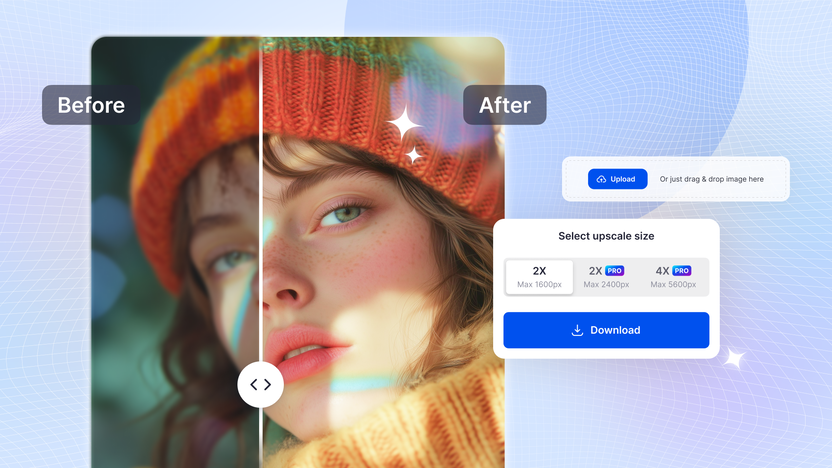
All plans include features like 4X upscale image, object removal, background replacement, no watermark, ad-free experience, and access to the iOS and Android app Pro version. Plus, there is a 60-day money-back guarantee if you are not satisfied with the product.
Credit: appsumo.com
Key Features Of Snapedit
Snapedit offers a range of features designed to make photo editing quick and easy. It uses AI to improve image quality and provide professional results. Here are the key features that make Snapedit stand out:
Ai-powered Image Editing
Snapedit uses advanced AI technology to enhance your photos. The AI enhancement feature improves pixel quality, color, and detail. This makes your images clearer and more vibrant. With automated tools, you can transform low-quality images into professional-grade visuals.
One-click Background Removal
Removing backgrounds has never been easier. Snapedit allows you to remove backgrounds with a single click. Choose from over 1000 templates or use your own images. The background replacement feature is perfect for creating stunning visuals quickly.
Advanced Filters And Effects
Enhance your photos with a variety of filters and effects. Snapedit offers tools to add text, shadows, and compress images. You can also convert image formats to suit your needs. These additional tools help you achieve a polished, professional look for your photos.
Batch Processing Capabilities
Save time by editing multiple photos at once. Snapedit’s batch processing feature lets you edit multiple images simultaneously. This is ideal for content creators and photographers who need to process large numbers of photos quickly.
User-friendly Interface
Snapedit is designed to be easy to use. The interface is user-friendly, with both automatic and manual editing options. Whether you’re a professional photographer or a beginner, you’ll find Snapedit intuitive and straightforward to use.
| License Tier | Credits/Month | Bonus Credits for Batch Processing | Price |
|---|---|---|---|
| License Tier 1 | 2,500 | None | $49 (originally $96) |
| License Tier 2 | 7,500 | 500 | $129 (originally $240) |
| License Tier 3 | 20,000 | 1,500 | $249 (originally $480) |
| License Tier 4 | 40,000 | 3,000 | $399 (originally $720) |
All plans include features such as 4X upscale image, object removal, background replacement, best image quality, no watermark, ad-free experience, iOS and Android app Pro access, and unlimited non-AI features.
Pricing And Affordability
SnapEdit offers an attractive pricing structure, making it accessible to a wide audience. With a variety of lifetime deals, users can enjoy advanced photo editing features without recurring costs. This section breaks down the pricing options and compares them to standard subscription plans, highlighting the value for money.
Lifetime Deal Breakdown
SnapEdit provides four different lifetime license tiers to cater to different needs and budgets. Each plan includes comprehensive features that enhance photo quality and provide professional-grade editing tools. Here is a detailed breakdown:
| License Tier | Price | Credits/Month | Bonus Credits | Original Price |
|---|---|---|---|---|
| License Tier 1 | $49 | 2,500 | None | $96 |
| License Tier 2 | $129 | 7,500 | 500 | $240 |
| License Tier 3 | $249 | 20,000 | 1,500 | $480 |
| License Tier 4 | $399 | 40,000 | 3,000 | $720 |
All plans include features such as 4X upscale image, object removal, and background replacement. Additionally, users enjoy an ad-free experience and access to iOS and Android app Pro versions.
Comparison With Subscription Plans
Many photo editing tools operate on subscription models, charging users monthly or annually. SnapEdit’s lifetime deals offer a significant financial advantage:
- No recurring fees: Pay once and get lifetime access.
- Cost-effective: Save money over time compared to monthly or yearly subscriptions.
- Full feature access: All lifetime plans offer comprehensive features without additional costs.
For instance, a typical subscription plan might cost $10 per month. Over five years, this adds up to $600. In contrast, SnapEdit’s highest tier costs $399 for lifetime access, providing substantial savings.
Value For Money
SnapEdit’s lifetime deals offer excellent value for money. Users get advanced AI photo editing tools at a one-time cost. Here are the key benefits:
- Professional Quality: Achieve high-resolution, polished images effortlessly.
- Time Efficiency: Automate tasks and edit photos in bulk.
- User-Friendly: Suitable for beginners and professionals with an easy-to-use interface.
Each license tier is designed to suit different user needs, from casual editors to professional photographers. The flexibility and comprehensive features make SnapEdit a cost-effective solution for high-quality photo editing.
Pros And Cons Of Snapedit
SnapEdit is an AI-powered photo editor that offers various tools to enhance image quality efficiently. This section will discuss the strengths and benefits, as well as the limitations and areas for improvement of SnapEdit.
Strengths And Benefits
SnapEdit boasts several advantages that make it a valuable tool for photo editing:
- AI Enhancement: The AI technology significantly improves pixel quality, color, and detail.
- Object Removal: Automatically detects and removes unwanted objects, people, or text.
- Background Replacement: Offers over 1000 templates or the option to use your own images for background replacement.
- Batch Processing: Allows editing multiple photos at once, saving time.
- Additional Tools: Includes text addition, shadows, image compression, and format conversion.
- Professional Quality: Produces high-resolution, polished images suitable for various uses.
- Time Efficiency: Automates repetitive tasks, making the editing process quicker.
- Versatility: Suitable for content creators, graphic designers, and photographers.
- User-Friendly: The interface is easy to navigate with both automatic and manual editing options.
- Cost-Effective: Offers a lifetime access with a one-time payment and various pricing tiers to suit different needs.
Limitations And Areas For Improvement
While SnapEdit is a robust tool, it does have some limitations:
- Learning Curve: New users may require some time to master all features.
- Credit System: Editing capabilities are limited by the number of credits available per month.
- Mobile App Accessibility: Features may vary between the desktop and mobile app versions.
- Batch Processing Limits: Higher tiers are required for extensive batch processing.
- Feature Updates: Users rely on future enhancements for additional features.
Understanding these strengths and limitations helps users decide if SnapEdit meets their photo editing needs.
Ideal Users And Scenarios
SnapEdit is a versatile AI-powered photo editor designed to enhance your photo editing experience. This section explores the ideal users and scenarios for SnapEdit, ensuring you understand who will benefit most and how to make the most of its features.
Who Will Benefit Most?
SnapEdit is perfect for a range of users who seek to improve their photo quality efficiently. Here are the primary groups who will find SnapEdit most beneficial:
- Content Creators: Ideal for bloggers, vloggers, and social media influencers who need high-quality visuals.
- Graphic Designers: Excellent for designers who need to enhance images or create detailed compositions.
- Photographers: Useful for professionals and hobbyists to quickly improve photo clarity and remove unwanted elements.
- E-commerce Sellers: Perfect for online sellers to create appealing product images that attract buyers.
Use Cases And Practical Applications
SnapEdit offers numerous use cases and practical applications that fit various needs. Below is a table showcasing some of the most common scenarios where SnapEdit proves to be invaluable:
| Use Case | Application |
|---|---|
| Image Enhancement | Improve pixel quality, color, and detail for clearer images. |
| Object Removal | Automatically remove unwanted objects, people, or text from photos. |
| Background Replacement | Replace backgrounds using over 1000 templates or custom images. |
| Batch Processing | Edit multiple photos simultaneously, saving time and effort. |
| Additional Tools | Add text, shadows, compress images, convert formats, and more. |
Each of these features is designed to streamline the editing process, making SnapEdit a powerful tool for anyone looking to improve their photo editing capabilities.
Credit: lifetimo.com
Frequently Asked Questions
What Is Snapedit?
Snapedit is an AI-powered image editing tool. It allows users to edit images in seconds.
How Does Snapedit Work?
Snapedit uses advanced AI algorithms. It quickly enhances and modifies images with minimal user input.
Is Snapedit Easy To Use?
Yes, Snapedit is user-friendly. Its intuitive interface makes editing images simple for all skill levels.
What Features Does Snapedit Offer?
Snapedit offers various features. These include background removal, color correction, and object removal.
Conclusion
SnapEdit offers a powerful solution for quick, easy photo editing. Its AI tools enhance image quality and remove unwanted elements seamlessly. Users enjoy professional-grade results without complex steps. The lifetime deal provides excellent value, with a range of features and flexibility. Perfect for photographers, designers, and content creators. For more details, check out SnapEdit’s lifetime deal on this link. Transform your photos in seconds with SnapEdit’s AI capabilities.