

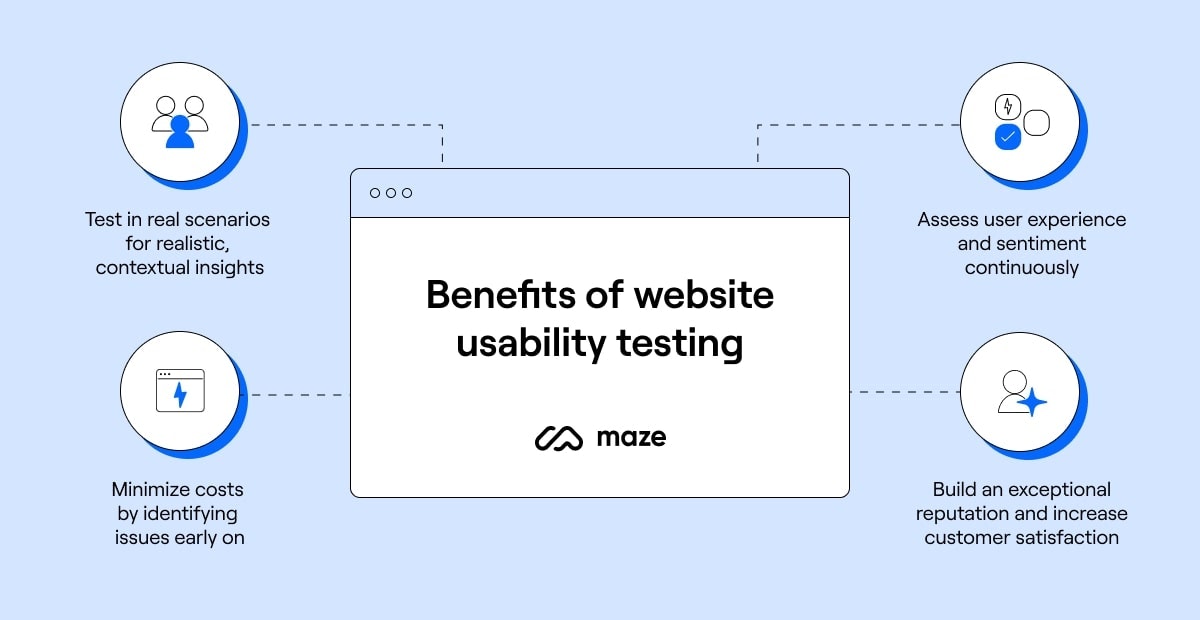
Website usability testing ensures your site meets user needs. It identifies issues and improves user experience.
In today’s digital age, a user-friendly website is crucial. If visitors struggle to navigate, they leave, and you lose potential customers. Usability testing helps prevent this. By observing real users, you uncover problems and make necessary changes. This process boosts satisfaction and increases conversions.
In this blog, we will explore the importance of website usability testing. We’ll discuss how it benefits your site and enhances user experience. Let’s dive into the world of usability testing and learn how it can transform your website.
Introduction To Website Usability Testing
Website usability testing is a process to evaluate how easily users can navigate and use a website. The goal is to identify any issues users may face and improve their overall experience. Usability testing ensures that your website is user-friendly and meets the needs of your target audience.
Importance Of Usability Testing
Usability testing is crucial for several reasons:
- Identifies user pain points: Testing helps find areas where users struggle.
- Improves user satisfaction: A smoother experience leads to happier users.
- Increases conversion rates: Easier navigation encourages users to take action.
- Reduces support costs: Fewer user issues mean fewer support requests.
Impact On User Experience
Usability testing directly affects the user experience:
- Enhanced navigation: Users can find what they need quickly.
- Better engagement: A user-friendly site keeps visitors engaged longer.
- Higher retention: Satisfied users are more likely to return.
- Positive reputation: A well-designed site builds trust and credibility.
| Benefit | Explanation |
|---|---|
| Improved Accessibility | Ensures all users can access content easily. |
| Streamlined Processes | Makes tasks simpler and faster for users. |
| Increased Efficiency | Reduces time spent on finding information. |
In summary, website usability testing is an essential part of website development. It ensures that users have a positive experience, which ultimately leads to better engagement and higher conversion rates.
Key Components Of Usability Testing
Usability testing is a critical part of website development. It helps identify how easily users can navigate and interact with your site. By focusing on key components, you can ensure a smooth and enjoyable user experience. Two important aspects of usability testing are User Interface Design and Navigation and Structure.
User Interface Design
The User Interface (UI) Design is the first thing visitors see. It includes colors, fonts, buttons, and images. A good UI design is visually appealing and easy to understand. Here are some key elements:
- Consistency: Use the same fonts, colors, and buttons across all pages.
- Clarity: Make sure text is readable and buttons are easy to find.
- Feedback: Provide visual feedback when users interact with elements.
In usability testing, check if users find the design intuitive. Note any confusion or difficulties they experience.
Navigation And Structure
Navigation and Structure refer to how users move through your website. An easy-to-use navigation system helps users find what they need quickly. Key components include:
- Menu Design: Use clear labels and organize items logically.
- Breadcrumbs: Show users their current location and path within the site.
- Search Function: Include a search bar for quick access to information.
During usability testing, observe if users can easily find their way around. Track the time it takes to locate specific information.
Effective navigation and structure improve user satisfaction and keep visitors on your site longer.
| Component | Key Elements |
|---|---|
| User Interface Design |
|
| Navigation and Structure |
|
By focusing on these key components, your website will offer a better user experience. This can lead to higher engagement and satisfaction.
Types Of Usability Testing Methods
Website usability testing ensures users can easily navigate and interact with your site. Different methods can help gather insights and improve user experience. These methods can be categorized based on moderation and location.
Moderated Vs Unmoderated
Moderated usability testing involves a facilitator guiding the participants. The facilitator asks questions, provides tasks, and observes the participants’ behavior. This method allows real-time feedback and deeper insights.
Unmoderated usability testing does not involve a facilitator. Participants complete tasks on their own, usually through online tools. This method is cost-effective and can involve a larger number of participants.
| Moderated | Unmoderated |
|---|---|
| Facilitator present | No facilitator |
| Real-time feedback | Automated feedback |
| Smaller sample size | Larger sample size |
| Expensive | Cost-effective |
Remote Vs In-person
Remote usability testing allows participants to test the website from their location. This method uses screen sharing and video calls to gather feedback. It is convenient and reaches a diverse audience.
In-person usability testing requires participants to be physically present. This method provides direct interaction and allows for more detailed observations. It helps in understanding non-verbal cues and user emotions.
- Remote: Flexible, diverse participants, convenient
- In-person: Direct interaction, detailed observation, better understanding of emotions
Steps To Conduct Usability Testing
Conducting usability testing ensures your website is user-friendly and efficient. The process involves several steps to gather valuable feedback from real users. Here are the essential steps to conduct usability testing effectively.
Planning The Test
Begin by defining the goals of your usability test. What do you want to learn? Identify the key areas of your website to test. Create a list of tasks for participants to complete. These tasks should reflect common actions users will perform on your site.
Next, choose the right testing method. Options include in-person testing, remote testing, or using a usability testing tool. Decide on the metrics you’ll use to measure success. Common metrics include task completion rate, time on task, and user satisfaction.
Recruiting Participants
Find participants who match your target audience. This ensures the feedback you receive is relevant. Aim for a diverse group to cover different user perspectives.
Use various recruitment methods. These can include email invitations, social media posts, or using a recruiting service. Offer an incentive to encourage participation. This could be a small gift card or a discount on your product.
Once you have your participants, schedule the testing sessions. Ensure each session has a clear start and end time.
By following these steps, you can conduct effective usability testing and improve your website’s user experience.
Tools For Usability Testing
Website usability testing is crucial for understanding user behavior and improving user experience. Selecting the right tools can make this process efficient and effective. Below, we explore some popular usability testing tools and offer tips for choosing the right one for your needs.
Popular Usability Testing Tools
There are many tools available to help you conduct usability tests. Here are some of the most popular ones:
- UserTesting: Offers real-time feedback from real users. Provides videos of users interacting with your site.
- Hotjar: Combines heatmaps, session recordings, and surveys. Helps visualize user interactions.
- Crazy Egg: Uses heatmaps, scrollmaps, and click reports. Identifies where users click and how they navigate.
- Optimal Workshop: Focuses on tree testing and card sorting. Great for organizing site structure.
- Lookback: Allows moderated and unmoderated tests. Captures user reactions and comments.
Choosing The Right Tool
Choosing the right usability testing tool depends on your specific needs. Consider the following factors:
- Budget: Some tools offer free versions or trials, while others require a subscription.
- Features: Identify the features you need, like heatmaps, session recordings, or surveys.
- Ease of Use: Choose a tool that is easy to set up and use. This ensures quick deployment and minimal learning curve.
- Audience: Ensure the tool can reach your target audience. Some tools offer a diverse user panel.
- Support: Opt for tools that provide good customer support and resources.
Here is a comparison table of these popular tools:
| Tool | Free Version | Main Features |
|---|---|---|
| UserTesting | No | Real-time feedback, User videos |
| Hotjar | Yes | Heatmaps, Session recordings, Surveys |
| Crazy Egg | No | Heatmaps, Scrollmaps, Click reports |
| Optimal Workshop | Yes | Tree testing, Card sorting |
| Lookback | No | Moderated and unmoderated tests, User reactions |
Analyzing Usability Test Results
After conducting usability tests, the next step is to analyze the results. This process helps to uncover any issues users encounter. It also shows areas of the website that need improvement. Effective analysis can lead to a better user experience.
Identifying Common Issues
Start by reviewing the data collected. Look for patterns or recurring problems. Common issues may include:
- Slow loading times
- Confusing navigation
- Broken links
- Unclear call-to-action buttons
Use a table to summarize the issues:
| Issue | Frequency | Impact |
|---|---|---|
| Slow loading times | 10 times | High |
| Confusing navigation | 8 times | Medium |
| Broken links | 5 times | High |
| Unclear call-to-action buttons | 6 times | Low |
Prioritizing Fixes
Once you have identified the common issues, you need to prioritize them. Focus on the issues that have the highest impact on user experience. Use the following steps:
- List all identified issues.
- Assign a priority level (High, Medium, Low).
- Address high-priority issues first.
Here’s an example of how to prioritize:
- High: Slow loading times, broken links
- Medium: Confusing navigation
- Low: Unclear call-to-action buttons
Fixing high-priority issues will improve the user experience quickly. Always test changes to ensure they solve the problem.
Improving User Experience
Improving user experience on your website is essential. It ensures visitors can navigate easily and find what they need. This not only improves satisfaction but also increases conversion rates. Website usability testing plays a key role in identifying and fixing issues that may hinder user experience.
Enhancing Website Design
Good design attracts users and keeps them engaged. During usability testing, focus on:
- Visual appeal: Ensure your design is aesthetically pleasing.
- Consistency: Maintain a consistent look and feel across all pages.
- Responsiveness: Make sure your site works well on all devices.
Use a table to organize visual elements:
| Element | Purpose |
|---|---|
| Color scheme | Create a mood and brand identity |
| Typography | Ensure readability and hierarchy |
| Images | Engage and inform users |
Streamlining Navigation
Easy navigation helps users find information quickly. Consider these points during usability testing:
- Clear menu structure: Use clear and descriptive labels.
- Search functionality: Implement a search bar that works well.
- Breadcrumbs: Provide breadcrumbs for better orientation.
Organizing your navigation elements is crucial:
- Keep the main menu simple.
- Avoid too many submenus.
- Use logical categories.
Remember, the goal is to make everything easy to find and use.
Credit: maze.co
Boosting Conversions Through Usability
Website usability testing is crucial for improving user experience and boosting conversions. By understanding how users interact with your site, you can make informed decisions to enhance usability. This, in turn, can significantly increase your conversion rates. Two key areas to focus on are optimizing call-to-actions and simplifying checkout processes.
Optimizing Call-to-actions
Call-to-Actions (CTAs) are critical in guiding users to take the desired actions on your website. To make CTAs more effective, consider these tips:
- Clear and concise text: Use simple, direct language that tells users exactly what to do.
- Strategic placement: Place CTAs where users are likely to see them, such as above the fold or at the end of content.
- Contrasting colors: Ensure CTAs stand out by using colors that contrast with the rest of the page.
- Responsive design: Make sure CTAs are easily clickable on all devices, including mobile phones and tablets.
Simplifying Checkout Processes
A complicated checkout process can lead to cart abandonment. Simplifying the checkout process can help boost conversions. Here are some suggestions:
- Minimize steps: Reduce the number of steps required to complete a purchase. Fewer steps mean less chance of users dropping off.
- Guest checkout: Allow users to checkout without creating an account. This can speed up the process and reduce friction.
- Auto-fill options: Enable auto-fill for common fields, such as address and payment information. This saves users time and effort.
- Progress indicators: Show users where they are in the checkout process with a progress bar. This helps manage expectations and reduces anxiety.
By focusing on these areas, you can improve your website’s usability and ultimately boost conversions. Remember to conduct regular usability testing to ensure your website remains user-friendly and effective.
Case Studies And Success Stories
Website Usability Testing can make or break a user’s experience on your site. Real-world examples show the importance of usability testing in improving user satisfaction and boosting business results. This section explores case studies and success stories that highlight effective usability testing practices.
Real-world Examples
Here are some real-world examples that demonstrate the power of usability testing:
- Amazon: Amazon’s continuous usability testing has resulted in a seamless shopping experience. They test every element, from the search bar to the checkout process. This focus on usability has helped them maintain high customer satisfaction.
- Airbnb: Airbnb conducted usability tests to improve its booking process. They identified pain points and simplified the steps. This led to a significant increase in bookings and user retention.
- Dropbox: Dropbox used usability testing to refine its user interface. They gathered feedback from real users and made necessary adjustments. This approach helped them create a more intuitive and user-friendly platform.
Lessons Learned
From these case studies, we can learn several key lessons:
- Continuous Improvement: Regular usability testing helps identify and fix issues promptly. This ensures a consistent and positive user experience.
- User Feedback: Listening to user feedback is crucial. Real user insights can reveal hidden problems and provide valuable suggestions for improvement.
- Simple Interfaces: A clean and simple interface enhances usability. Reducing clutter and focusing on essential elements make navigation easier for users.
- Iterative Testing: Conducting iterative tests allows for gradual improvements. Small, incremental changes based on testing results lead to better overall usability.
By applying these lessons, you can enhance your website’s usability and provide a better experience for your users.
Credit: usabilitygeek.com

Credit: www.hotjar.com
Frequently Asked Questions
What Is Website Usability Testing?
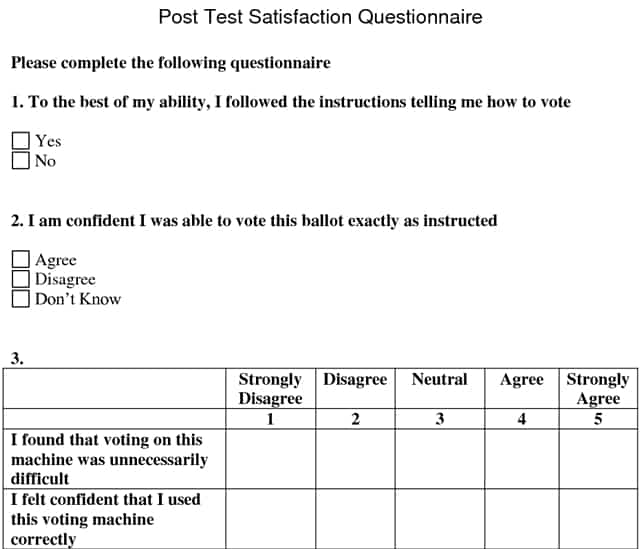
Website usability testing evaluates how easy a website is to use. It involves real users performing tasks and providing feedback. This helps identify usability issues and improve user experience.
Why Is Usability Testing Important?
Usability testing is crucial for improving user satisfaction. It helps identify issues that can hinder user experience, leading to better engagement and higher conversion rates.
How To Conduct Website Usability Testing?
Conduct usability testing by recruiting real users. Have them perform specific tasks on your website. Collect feedback and analyze the results to identify areas for improvement.
What Tools Are Used For Usability Testing?
Popular usability testing tools include UserTesting, Hotjar, and Crazy Egg. These tools help record user interactions, gather feedback, and analyze data to improve website usability.
Conclusion
Effective website usability testing is crucial for a user-friendly experience. It helps identify issues and improve functionality. Regular testing ensures your site meets user needs. This leads to higher satisfaction and engagement. Don’t overlook this important step. Prioritize usability testing in your development process.
Your users will thank you. A well-tested website benefits everyone.