

**Zcal Lifetime Deal Review – Create Typeform-Inspired Scheduling Pages** Scheduling can be challenging. Finding a tool that aligns with your brand is even harder.
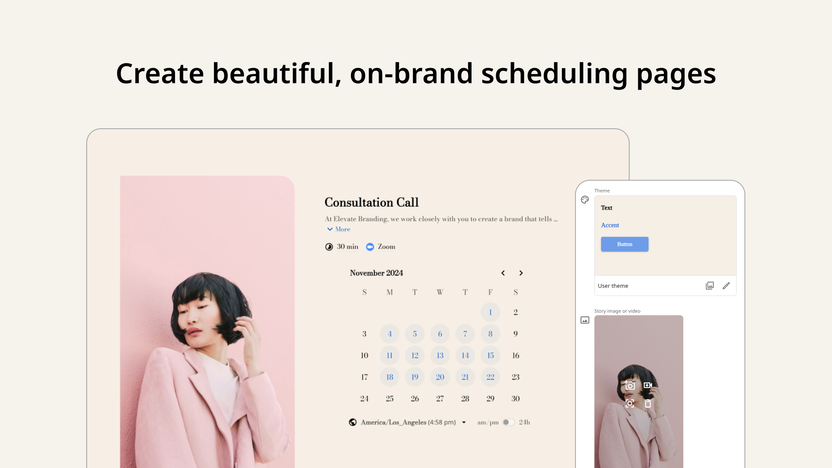
Enter zcal, a design-first scheduling platform that promises to enhance your booking experience. Zcal offers a unique approach to scheduling by allowing you to create customized, client-facing booking pages. These pages reflect your brand’s identity, making them visually appealing and engaging. With features like video introductions, customizable layouts, and advanced scheduling options, zcal ensures a seamless experience for both individuals and teams. It integrates with popular calendars and conferencing tools, making it a versatile choice. Explore how zcal can improve your scheduling process and enhance client interaction. For more details, visit zcal Lifetime Deal.
Credit: www.planetizen.com
Introduction To Zcal
In today’s fast-paced world, efficient scheduling can be a game-changer. Zcal is a design-first scheduling platform that allows users to create stunning, client-facing booking pages. These pages not only reflect your brand’s identity but also enhance the customer experience.
What Is Zcal?
Zcal is a platform designed to streamline the scheduling process. It offers customizable booking pages that allow users to showcase their brand through custom fonts, colors, layouts, and media. With Zcal, you can create visually appealing and personalized booking pages that engage clients right from the start.
Purpose Of Zcal
The main purpose of Zcal is to simplify and enhance the scheduling process for individuals and teams. Whether you need to schedule one-on-one meetings or manage team schedules, Zcal provides advanced features to ensure a seamless experience. The platform integrates with popular calendar services and video conferencing tools, making it easy to coordinate meetings without the usual hassle.
Overview Of The Lifetime Deal
Zcal offers an attractive lifetime deal with three different license tiers. Each tier comes with its own set of features, providing flexibility based on your needs:
| License Tier | Price | Features |
|---|---|---|
| License Tier 1 | $49 (originally $252) |
|
| License Tier 2 | $129 (originally $840) |
|
| License Tier 3 | $199 (originally $4,200) |
|
Each license tier includes lifetime access to Zcal, a 60-day money-back guarantee, and the ability to upgrade or downgrade between tiers within 60 days of purchase. All future Pro Plan updates are included, ensuring you stay up-to-date with new features.
Key Features Of Zcal
Zcal is a powerful scheduling platform that helps users create beautiful, customizable booking pages. Let’s explore some of the key features that make Zcal stand out.
Typeform-inspired Design
Zcal adopts a Typeform-inspired design for its scheduling pages. This means the pages are visually appealing and interactive. Users can enjoy a seamless booking experience.
User-friendly Interface
The platform boasts a user-friendly interface. It is easy to navigate and requires no advanced technical skills. Users can set up their scheduling pages quickly and efficiently.
Customizable Scheduling Pages
Zcal offers highly customizable scheduling pages. Users can modify fonts, colors, layouts, and add media. This ensures the pages reflect the brand’s identity. Video introductions can also be added to make the pages more engaging.
Integration With Popular Calendars
Zcal integrates seamlessly with popular calendars like Google Calendar, Google Meet, Microsoft Teams, Outlook Calendar, and Zoom. This makes it easy to manage appointments and avoid scheduling conflicts.
Automated Reminders And Notifications
The platform sends automated email reminders to clients. This helps reduce no-shows and keeps clients informed. Notifications ensure both parties are always updated.
Advanced Time Zone Detection
Zcal includes advanced time zone detection. It automatically adjusts the booking times based on the client’s location. This ensures accurate scheduling and avoids confusion.
| Feature | Description |
|---|---|
| Typeform-Inspired Design | Visually appealing and interactive scheduling pages |
| User-Friendly Interface | Easy to navigate and set up |
| Customizable Scheduling Pages | Modify fonts, colors, layouts, and add media |
| Integration with Popular Calendars | Google Calendar, Google Meet, Microsoft Teams, Outlook Calendar, and Zoom |
| Automated Reminders and Notifications | Reduce no-shows with email reminders |
| Advanced Time Zone Detection | Automatically adjusts booking times |
Zcal’s features are designed to enhance client engagement and simplify scheduling. From customizable pages to automated reminders, Zcal offers a comprehensive solution for businesses.
Benefits Of Using Zcal
zcal offers a comprehensive scheduling solution that prioritizes design and customization. Let’s explore the key benefits of using zcal.
Enhanced User Experience
zcal enhances client engagement with visually appealing and personalized booking pages. These pages reflect your brand’s identity through custom fonts, colors, layouts, and media. Clients can also connect with you through video introductions, creating a more personal touch.
Time-saving For Scheduling
zcal integrates with Google Calendar, Google Meet, Microsoft Teams, Outlook Calendar, and Zoom. This ensures seamless scheduling without the need for constant back-and-forth emails. The automated email reminders further save time by notifying clients of upcoming meetings.
Professional Appearance
With zcal, you can create customized, client-facing booking pages that look professional and polished. The embedded scheduling pages for websites ensure a seamless client experience, while Stripe payment integration allows for easy transaction management.
Increased Efficiency In Booking Meetings
zcal simplifies team scheduling with collective and round-robin options. The advanced scheduling features, including buffer times, meeting limits, and minimum notice, prevent scheduling conflicts and burnout. This leads to increased booking efficiency and higher customer satisfaction.
| Feature | Description |
|---|---|
| Customizable Booking Pages | Custom fonts, colors, layouts, and media |
| Video Introductions | Personalize scheduling pages with videos |
| Integration with Calendars | Google Calendar, Google Meet, Microsoft Teams, Outlook Calendar, Zoom |
| Advanced Scheduling Options | Buffer times, meeting limits, minimum notice |
| Team Scheduling Capabilities | Collective and round-robin scheduling |
| Stripe Payment Integration | Easy transaction management |
| Automated Email Reminders | Notify clients of upcoming meetings |
zcal’s features help enhance client engagement and increase booking efficiency. It’s a smart investment for businesses looking to improve their scheduling processes.
Credit: appsumo.com
Pricing And Affordability
Affordability is a key factor when considering a new tool. zcal’s pricing structure is designed to offer great value. Let’s explore the details of the lifetime deal, compare it with competitors, and analyze its value for money.
Details Of The Lifetime Deal
| License Tier | Price | Features |
|---|---|---|
| License Tier 1 | $49 (originally $252) |
|
| License Tier 2 | $129 (originally $840) |
|
| License Tier 3 | $199 (originally $4,200) |
|
Each tier offers lifetime access and includes all future Pro Plan updates. You can upgrade or downgrade within 60 days of purchase, making it a flexible and secure investment.
Comparison With Competitors
Let’s compare zcal’s pricing with some popular scheduling tools.
| Feature | zcal (Tier 1) | Competitor A | Competitor B |
|---|---|---|---|
| Price | $49 (one-time) | $10/month | $12/month |
| Users | 3 | 1 | 1 |
| Custom Branding | Yes | No | No |
| Video Introductions | Yes | No | No |
| Integration with Google Calendar | Yes | Yes | Yes |
zcal offers more features at a lower cost than many competitors, especially with the lifetime deal.
Value For Money Analysis
zcal’s lifetime deal provides significant savings. Here are some key points:
- One-time payment avoids monthly subscription fees.
- Advanced features improve scheduling efficiency.
- Customizable booking pages enhance client engagement.
- Integrations with popular tools like Google Calendar and Zoom.
- 60-day money-back guarantee ensures a risk-free purchase.
The combination of affordability, features, and flexibility makes zcal a valuable investment.
Pros And Cons
Understanding the pros and cons of any product is vital for making an informed decision. Here, we’ll dive into the strengths and weaknesses of zcal based on user feedback and real-world usage.
Pros Based On User Feedback
Users have highlighted several positive aspects of zcal:
- Customization: zcal allows for extensive customization of booking pages, including fonts, colors, layouts, and media, which helps in maintaining brand identity.
- Video Introductions: The ability to add video introductions to scheduling pages enhances client engagement and personal connection.
- Team Scheduling: Collective and round-robin scheduling options make it easy to manage bookings for multiple team members.
- Integration: Seamless integration with Google Calendar, Google Meet, Microsoft Teams, Outlook Calendar, and Zoom ensures smooth scheduling processes.
- Advanced Features: Features like buffer times, meeting limits, and minimum notice prevent scheduling conflicts and burnout.
- Payment Integration: Stripe integration simplifies the payment process for clients.
- Automated Reminders: Automated email reminders reduce no-shows and improve appointment adherence.
- Analytics: Analytics integrations provide valuable insights into booking patterns and client behavior.
Cons Based On Real-world Usage
While zcal has many strengths, some users have noted a few drawbacks:
- Learning Curve: Some users find the initial setup and customization process time-consuming and complicated.
- Limited Free Features: The free tier offers limited features, pushing users to opt for paid plans for full functionality.
- Integration Issues: Occasional issues with calendar synchronization and integration bugs have been reported.
- Support Response Time: Users have mentioned slower response times from customer support during peak periods.
Overall Performance
Overall, zcal provides a robust and visually appealing scheduling solution:
| Aspect | Rating |
|---|---|
| Customization | ⭐⭐⭐⭐⭐ |
| Integration | ⭐⭐⭐⭐ |
| Advanced Features | ⭐⭐⭐⭐⭐ |
| Usability | ⭐⭐⭐ |
| Support | ⭐⭐⭐ |
With its strong customization options and advanced features, zcal is a powerful tool for enhancing booking efficiency and client satisfaction. Despite some drawbacks, its overall performance makes it a valuable asset for businesses looking to improve their scheduling processes.

Credit: appsumo.com
Ideal Users And Scenarios
Understanding the ideal users and scenarios for zcal helps determine if this scheduling platform fits your needs. Designed for businesses prioritizing branding and client experience, zcal offers a variety of features that cater to diverse users.
Who Will Benefit Most From Zcal?
zcal is perfect for:
- Freelancers: Enhance your professional image with customized booking pages and video introductions.
- Small Businesses: Schedule efficiently with round-robin and collective scheduling for teams.
- Consultants: Use advanced scheduling options like buffer times and meeting limits to manage client appointments.
- Educators and Trainers: Integrate zcal with platforms like Google Meet and Zoom for seamless online sessions.
- Customer Service Teams: Use team scheduling capabilities to streamline client interactions.
Best Use Cases For Zcal
Some of the best use cases for zcal include:
- Client Meetings: Create visually appealing, branded scheduling pages that reflect your business identity.
- Team Coordination: Utilize collective scheduling to manage multiple team members’ availability.
- Online Consultations: Integrate with Zoom and Google Meet for easy virtual meetings.
- Service Bookings: Use Stripe payment integration for seamless transaction processing.
- Workshops and Webinars: Schedule and manage events with automated email reminders and analytics integration.
Scenarios Where Zcal Excels
| Scenario | How zcal Excels |
|---|---|
| High Client Engagement | Video introductions and customizable booking pages enhance client interaction. |
| Team Scheduling | Collective and round-robin scheduling streamline booking processes for teams. |
| Preventing Conflicts | Advanced scheduling features like buffer times and meeting limits prevent overlaps and burnout. |
| Website Integration | Embed scheduling pages directly into your website for a seamless user experience. |
| Payment Processing | Stripe payment integration ensures secure and efficient transactions. |
Frequently Asked Questions
What Is Zcal?
Zcal is a scheduling tool that creates Typeform-inspired scheduling pages. It aims to streamline appointment booking with a user-friendly interface.
How Does Zcal Work?
Zcal allows users to create customizable scheduling pages. These pages simplify the process of booking appointments and managing schedules efficiently.
What Are The Benefits Of Using Zcal?
Zcal offers an intuitive interface, easy customization, and efficient scheduling. It enhances user experience and saves time by simplifying appointment management.
Can Zcal Integrate With Other Tools?
Yes, Zcal integrates with popular calendar and productivity tools. This ensures seamless scheduling and improved workflow for users.
Conclusion
Zcal offers a great way to create stylish scheduling pages. Its features like custom fonts, video introductions, and team scheduling stand out. Integration with major calendars and payment systems enhances efficiency. The flexible pricing and refund policy make it a low-risk choice. Interested? Check out the zcal Lifetime Deal for more details. This tool can truly elevate your booking process and customer experience. Consider zcal for a seamless scheduling solution.