

A/B testing helps businesses make better decisions. It compares two versions of a webpage or app to see which one performs better.
But, finding the right tools can be tricky. User-friendly A/B testing tools simplify the process. They make it easy for anyone to run tests, understand results, and improve their site or app. No need for deep technical skills or complex setups.
These tools help you make data-driven decisions quickly. Whether you’re a marketer, designer, or business owner, using the right A/B testing tool can boost your success. This blog will explore the best user-friendly A/B testing tools available, guiding you to make the best choice for your needs. Get ready to enhance your website’s performance with ease.
Introduction To A/b Testing
A/B testing is a powerful tool for optimizing your website’s performance. It helps you understand what works best for your audience. By comparing two versions of a webpage, you can see which one performs better. This process helps in making informed decisions to improve user experience and conversion rates.
What Is A/b Testing?
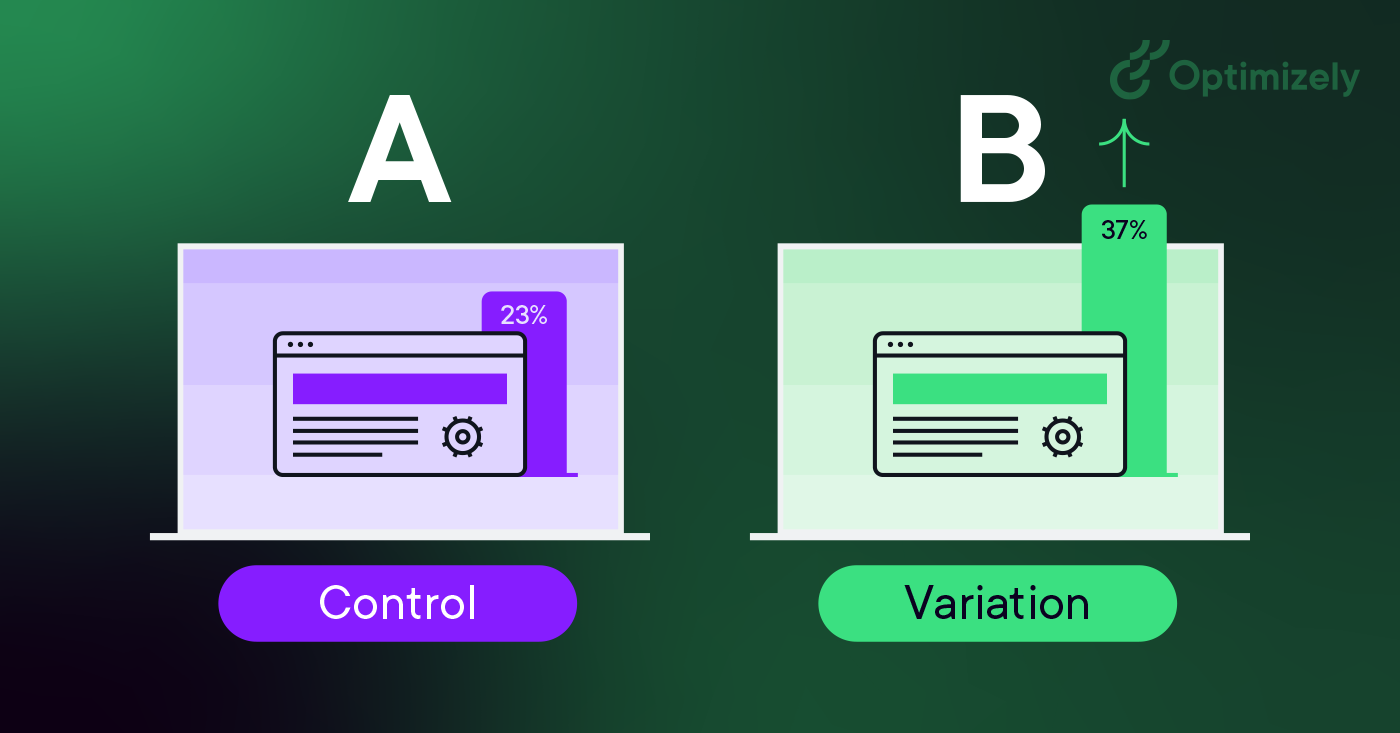
A/B testing is a method of comparing two versions of a webpage to see which one performs better. One version is the control (A) and the other is the variation (B). Users are randomly shown either version. Metrics such as clicks, sign-ups, or purchases are tracked to determine the winner.
For example, you might test two different headlines for the same page. Half of your visitors see Headline A, and the other half see Headline B. The headline that gets more clicks is the winner.
Importance Of A/b Testing
A/B testing is crucial for several reasons:
- Improves user experience: By testing different elements, you can find what users prefer, enhancing their experience on your site.
- Increases conversions: Small changes can lead to higher conversion rates, whether it’s more sign-ups, sales, or clicks.
- Data-driven decisions: A/B testing provides concrete data to back up your decisions, reducing guesswork.
- Reduces risk: Testing changes before fully implementing them ensures that you don’t negatively impact your site’s performance.
In short, A/B testing helps you make informed decisions that can lead to significant improvements in your website’s performance.
Choosing The Right A/b Testing Tool
Choosing the right A/B testing tool can be a game-changer for your business. It helps you understand which changes on your website bring better results. But with so many options available, how do you pick the right one?
Factors To Consider
When selecting an A/B testing tool, keep these factors in mind:
- Ease of Use: The tool should be easy to set up and use.
- Integration: Ensure it integrates well with your existing systems.
- Cost: Consider your budget. Many tools offer free trials.
- Support: Look for tools with good customer support and documentation.
- Features: Check if the tool offers all the features you need.
Popular A/b Testing Tools
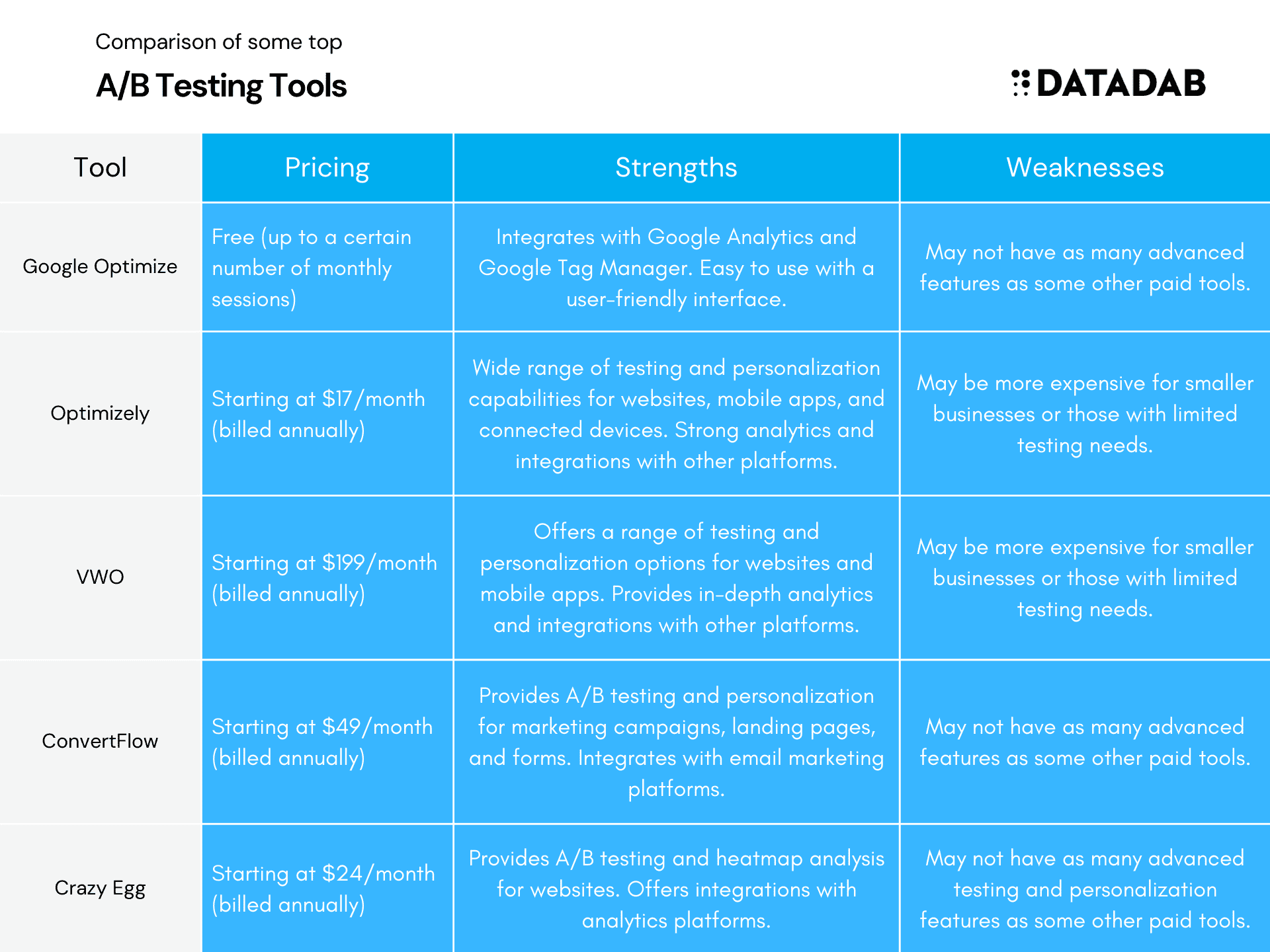
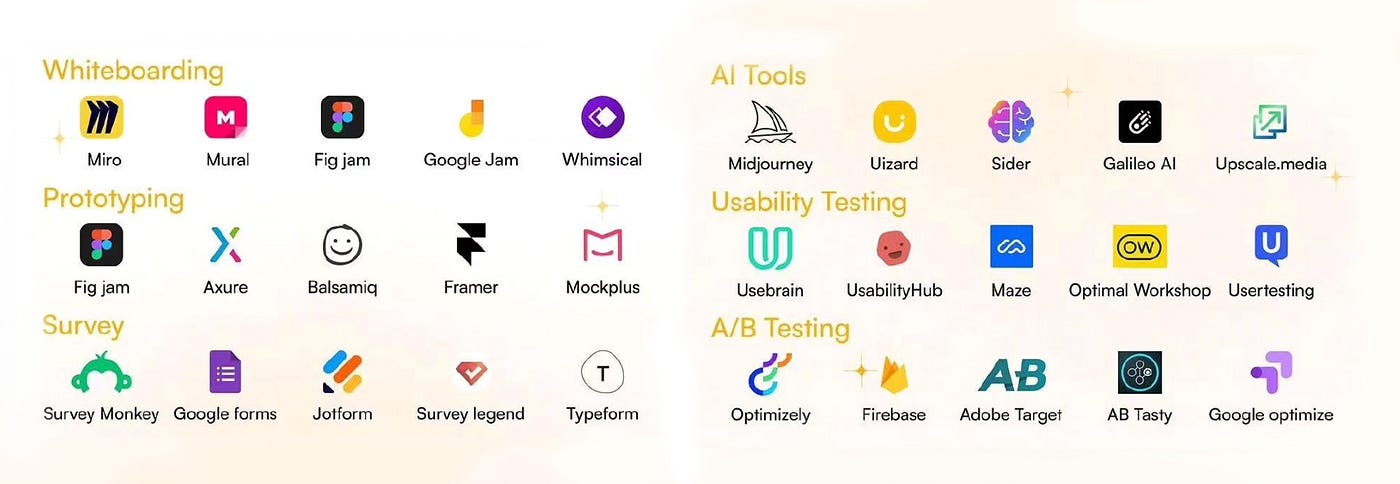
Here are some popular A/B testing tools that you can consider:
| Tool | Key Features | Price |
|---|---|---|
| Google Optimize | Free, integrates with Google Analytics, easy to use | Free |
| Optimizely | Advanced targeting, robust analytics, visual editor | Starts at $50/month |
| VWO (Visual Website Optimizer) | Heatmaps, session recordings, A/B and multivariate testing | Starts at $99/month |
| Adobe Target | Personalization, automation, advanced segmentation | Custom pricing |
Each tool has its strengths. Choose one that fits your needs and budget.
Features Of User-friendly Tools
Choosing the right A/B testing tool can make a big difference. User-friendly tools simplify the testing process. They help users focus on results. Let’s explore some key features that make these tools easy to use.
Ease Of Use
Ease of use is a top priority for user-friendly A/B testing tools. A simple and clear interface helps users set up tests quickly. Drag-and-drop functionality often makes the process smoother. Users can create and manage tests without technical skills. Clear, step-by-step instructions guide users through the process.
| Feature | Benefit |
|---|---|
| Drag-and-drop | Quick test setup |
| Clear instructions | Guides users easily |
Integration Capabilities
Integration capabilities are essential for any A/B testing tool. Seamless integration with existing systems saves time. Connecting with popular platforms, like Google Analytics, provides comprehensive data. These tools often support various CMS and e-commerce platforms.
- Connects with Google Analytics
- Supports various CMS
- Compatible with e-commerce platforms
Integration capabilities enhance the tool’s functionality. Users can analyze results within their preferred analytics platform. This feature ensures a smooth workflow and accurate data interpretation.
Setting Up An A/b Test
Setting up an A/B test is essential for improving your website’s performance. It allows you to test different versions of your web pages. You can then see which one performs better. This guide will help you set up an A/B test step-by-step.
Defining Goals
First, you need to define clear goals for your A/B test. What do you want to achieve? Here are some common goals:
- Increase click-through rates
- Boost conversion rates
- Improve user engagement
Make sure your goals are specific and measurable. This will help you analyze the results effectively.
Creating Variants
Next, you need to create different variants of your web page. A variant is a different version of your page. Here’s how to do it:
- Identify elements to test: Choose elements like headlines, images, or buttons.
- Create alternative versions: Make small changes to these elements.
- Label the variants: Use labels like “Version A” and “Version B.”
Keep the changes simple. This makes it easier to identify what works best.
| Element | Version A | Version B |
|---|---|---|
| Headline | Buy Now! | Shop Today! |
| Button Color | Red | Green |
Use the table to keep track of different versions. This helps in comparing results later.
Analyzing A/b Test Results
Once your A/B test is complete, analyzing the results is crucial. This step helps you understand what changes can improve user experience. By looking at the data, you can make informed decisions. This ensures that your website or app performs better.
Key Metrics To Track
Tracking the right metrics is vital. Here are some key metrics to keep an eye on:
- Conversion Rate: The percentage of visitors who complete a desired action.
- Click-Through Rate (CTR): The ratio of users who click on a specific link to the number of total users.
- Bounce Rate: The percentage of visitors who leave after viewing only one page.
- Average Time on Page: How long visitors stay on a page.
- Revenue Per Visitor: The average revenue generated per visitor.
Interpreting Data
Understanding your data helps you make the right decisions. Here are some tips:
- Check if the results are statistically significant. This means the changes are not due to chance.
- Compare the performance of the two variants. Look at the key metrics you tracked.
- Identify patterns and trends. See what changes led to improvements or declines.
- Consider external factors. Events or changes outside the test can affect the results.
- Document your findings. Keep a record of what worked and what didn’t.
Using these steps, you can gain valuable insights. These insights will help you optimize your website or app.
Credit: www.optimizely.com
Case Studies Of Successful A/b Tests
Understanding the impact of A/B testing through real-life examples can help businesses make informed decisions. Here are some case studies of successful A/B tests that demonstrate how different industries have leveraged A/B testing tools to optimize their user experience and increase conversions.
E-commerce Success
An e-commerce company aimed to boost its product sales. They decided to test two different versions of their product page.
| Element | Version A | Version B |
|---|---|---|
| Product Description | Short and concise | Detailed with bullet points |
| Call-to-Action Button | “Buy Now” | “Add to Cart” |
| Customer Reviews | Shown at the bottom | Shown near the top |
After running the test for two weeks, the company found that Version B outperformed Version A with a 15% increase in sales. Customers preferred the detailed product descriptions and the placement of customer reviews.
Saas Platform Success
A SaaS platform wanted to improve its user sign-up rate. They tested two different sign-up forms.
- Version A: A long form with multiple fields
- Version B: A short form with minimal fields
They also tested the color of the sign-up button.
- Button Color A: Blue
- Button Color B: Green
After a month of testing, the results showed that the short form with the green button had a 25% higher sign-up rate. This simplified process encouraged more users to complete the sign-up.
These case studies highlight the importance of experimenting with different elements. User-friendly A/B testing tools can provide valuable insights to drive business growth.
Common Pitfalls In A/b Testing
A/B testing is a great way to improve user experience. Yet, many fall into common pitfalls. These mistakes can skew results and waste resources. Understanding these pitfalls helps you avoid them and get accurate results.
Avoiding Bias
Bias is a major issue in A/B testing. It can occur in many ways:
- Selection Bias: Only a certain type of user sees the test.
- Time Bias: Running the test at a specific time affects results.
- Confirmation Bias: Expecting a certain outcome skews interpretation.
To avoid bias, ensure random assignment of users to groups. Use tools that automate this process. Run tests over a representative period. This ensures diverse user interaction.
Ensuring Statistical Significance
Statistical significance is crucial for valid results. Without it, results may be due to chance:
- Define Significance Level: Set a clear threshold, like 95% confidence.
- Sample Size: Ensure enough participants in each group.
- Duration: Run the test long enough to gather sufficient data.
Many tools offer calculators for sample size and duration. Use them. Avoid ending tests early, even if results look promising.
| Common Pitfall | Solution |
|---|---|
| Bias | Random assignment, representative period |
| Statistical Significance | Clear threshold, adequate sample size |
Understanding and avoiding these pitfalls is key. It ensures your A/B tests provide reliable insights.
Credit: www.datadab.com
Future Trends In A/b Testing
The future of A/B testing is promising. New technologies are making testing more efficient and insightful. Let’s explore some of the exciting trends in A/B testing.
Ai And Machine Learning
Artificial Intelligence (AI) and Machine Learning (ML) are transforming A/B testing. These technologies can analyze vast amounts of data quickly. They identify patterns and trends that human analysts might miss.
AI and ML can automate the testing process. This saves time and reduces human error. They can also predict which variations will perform better. This helps in making informed decisions faster.
For example, AI can create dynamic content based on user behavior. This can lead to more personalized experiences for users.
Personalization
Personalization is another significant trend in A/B testing. Users expect customized experiences. A/B testing tools now offer more ways to personalize content.
These tools can segment users based on various criteria. These include demographics, behavior, and preferences. Personalized content can improve engagement and conversion rates.
For instance, an e-commerce site can show different product recommendations to different users. This increases the chances of a purchase.
Personalization also enhances user satisfaction. Users feel more valued when the content is relevant to them.
These trends are shaping the future of A/B testing. AI and personalization are making testing more effective and user-friendly.
Conclusion And Next Steps
As you wrap up your A/B testing, it’s crucial to take the right steps. These steps will ensure you get the most out of your data and improve your strategies.
Implementing Insights
After running your A/B tests, it’s time to implement the insights. Use the data to make informed decisions. Update your website or app based on the winning variations. This step is key to improving user experience.
- Analyze the results carefully.
- Identify the winning variations.
- Apply changes to your platform.
Make sure to document the changes. This helps in tracking performance over time. Keep a record of what worked and what didn’t. This will guide your future tests.
Continuous Improvement
A/B testing is an ongoing process. It’s not a one-time task. Regular testing helps in adapting to user behavior changes. This ensures your platform stays relevant.
- Schedule regular tests.
- Keep an eye on trends.
- Adapt to new insights.
Always be ready to test new ideas. User preferences evolve, and so should your strategies. Continuous improvement keeps your platform user-friendly and efficient.
| Step | Action |
|---|---|
| 1 | Analyze results |
| 2 | Implement changes |
| 3 | Document updates |
| 4 | Schedule new tests |
| 5 | Adapt strategies |
Following these steps will help you get the most out of your A/B testing. Stay proactive and keep improving.
Credit: medium.com
Frequently Asked Questions
What Is A/b Testing?
A/B testing compares two versions of a webpage to see which performs better. It’s used to optimize user experience and increase conversions.
Why Use User-friendly A/b Testing Tools?
User-friendly A/B testing tools simplify the testing process. They make it easy for non-technical users to set up and analyze tests.
How Do A/b Testing Tools Work?
A/B testing tools divide users into groups and show different versions of a webpage. They track performance metrics to determine the better version.
What Are The Benefits Of A/b Testing?
A/B testing improves user experience and increases conversion rates. It provides data-driven insights to make informed decisions.
Conclusion
Choosing the right A/B testing tool is vital. It ensures better user experience. Simple interfaces make testing easier for everyone. Look for tools with clear reports. Understand your results quickly. This helps improve your website’s performance. Remember, testing is an ongoing process.
Keep experimenting and learning. This way, you can make informed decisions. Your users will benefit from a better experience. The right tool can make all the difference. Happy testing!