

Are you tired of blurry, low-resolution images ruining your projects? Img.Upscaler could be the solution you need.
This AI-powered tool promises to enhance and upscale your images effortlessly. In this review, we’ll explore the Img.Upscaler Lifetime Deal and see if it’s worth your investment. Img.Upscaler uses advanced AI technology to improve image quality, making it perfect for both personal and commercial use. Whether you’re a graphic designer, photographer, or web designer, this tool offers an easy way to upgrade your visuals. With features like batch processing and built-in photo editing, Img.Upscaler aims to save you time and deliver high-quality results. Let’s dive into the details and see what makes this tool stand out. Check out Img.Upscaler here.
Credit: dealmirror.com
Introduction To Img.upscaler
Are you tired of low-resolution images that lack clarity? Meet Img.Upscaler, an AI-powered tool designed to enhance and enlarge your images effortlessly. This tool is perfect for anyone needing high-quality images quickly and easily.
What Is Img.upscaler?
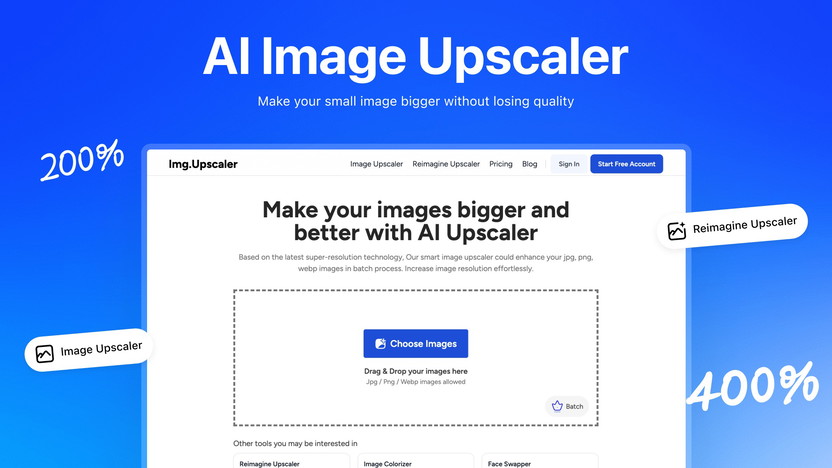
Img.Upscaler is an innovative image enhancement tool that uses advanced AI technology. It can upscale images by 200% or 400%, adding details and patterns to improve quality. Whether for personal or commercial use, this tool makes your images look professional.
Purpose And Use Cases
Img.Upscaler serves multiple purposes, making it versatile and valuable. Here are some key use cases:
- Graphic Designers: Enhance images for projects without compromising quality.
- Photographers: Improve and enlarge photos for prints and portfolios.
- Web Designers: Create high-resolution images for websites and digital media.
Additionally, the tool supports batch processing, allowing you to upscale up to 8 images simultaneously. This feature saves time and increases efficiency.
| Main Features | Benefits |
|---|---|
| AI-Powered Upscaling | Enhances image resolution by 200% or 400% |
| Batch Processing | Upscale multiple images at once |
| Built-in Photo Editor | Crop, resize, rotate, adjust brightness and contrast |
| Reimagination AI | Creates enhanced versions of images |
| No Watermarks | Final images are watermark-free |
Img.Upscaler is a cost-effective solution with a one-time payment of $69, giving you lifetime access. This tool offers high-quality results, making it ideal for anyone needing superior image resolution and quality.
Key Features Of Img.upscaler
Img.Upscaler offers a range of features that make image enhancement effortless and efficient. Its AI-powered technology, batch processing capability, user-friendly interface, high-resolution output, and cross-platform compatibility make it a versatile tool for various users.
Ai-powered Image Upscaling
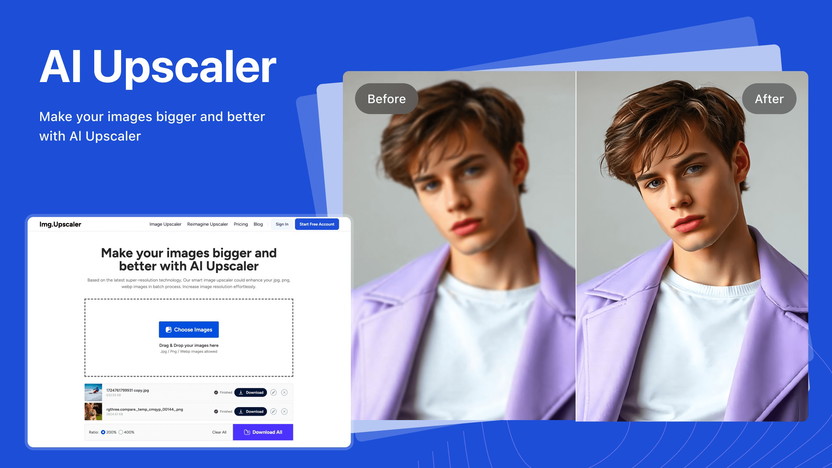
One of the standout features of Img.Upscaler is its AI-Powered Upscaling. This feature enhances image resolution by 200% or 400%, adding details and patterns to low-resolution images. This makes your images look sharp and clear without any manual adjustments.
Batch Processing Capability
With batch processing, you can upscale up to eight images at the same time. This saves you time and effort, especially when dealing with large quantities of images. Whether you are a graphic designer or a photographer, this feature increases your productivity significantly.
User-friendly Interface
The user-friendly interface of Img.Upscaler ensures that you can navigate and use the tool with ease. The simple click-based interface requires no learning curve, making it accessible even for beginners. This means you can start enhancing your images right away.
High Resolution Output
Img.Upscaler guarantees high-quality output for all your images. The final images are free of watermarks and maintain high resolution, making them suitable for various uses. Whether you are working with anime, animals, or portraits, the quality remains top-notch.
Cross-platform Compatibility
Img.Upscaler is compatible across multiple platforms, making it a versatile tool for users on different devices. Whether you are using a PC, Mac, or mobile device, you can access and use Img.Upscaler without any issues. This flexibility makes it a convenient option for many users.
| Feature | Description |
|---|---|
| AI-Powered Upscaling | Enhances image resolution by 200% or 400% using advanced AI technology. |
| Batch Processing | Upscale up to 8 images simultaneously, saving time and effort. |
| User-Friendly Interface | Simple click-based interface with no learning curve required. |
| High Resolution Output | Final output images are of high quality and free of watermarks. |
| Cross-Platform Compatibility | Accessible on PC, Mac, and mobile devices for versatile use. |
Pricing And Affordability
Img.Upscaler offers a cost-effective solution for enhancing and upscaling images. It is designed to meet the needs of graphic designers, photographers, and web designers. Let’s dive into the pricing details and see how it compares to subscription plans.
Lifetime Deal Overview
The Lifetime Deal for Img.Upscaler is priced at a one-time payment of $69. This is a significant discount from the original price of $699, offering a 90% savings. This deal provides unlimited access to the tool’s features without any recurring costs. Users also benefit from a 60-day money-back guarantee if they are not satisfied with the product.
Comparison With Subscription Plans
Comparing the one-time payment of $69 to common subscription models highlights its affordability. Most image enhancement tools, like Adobe Photoshop and Canva, offer monthly or annual subscriptions. These often range from $10 to $50 per month. Over time, subscription costs can add up, making Img.Upscaler’s lifetime deal a more cost-effective choice.
| Feature | Img.Upscaler | Subscription Plans |
|---|---|---|
| Cost | $69 one-time | $10-$50 per month |
| Access | Lifetime | Monthly/Annual |
| Refund Policy | 60-day money-back guarantee | Varies |
Value For Money Analysis
Img.Upscaler’s value for money is evident in its AI-powered upscaling and batch processing capabilities. Users can upscale up to 8 images simultaneously, saving time and enhancing productivity. The built-in photo editor includes tools for cropping, resizing, rotating, and adjusting brightness and contrast. This makes it a versatile tool for personal and commercial use.
Unlike many other tools, Img.Upscaler provides high-quality output without watermarks, making it suitable for professional projects. Given the features and the one-time cost, Img.Upscaler offers excellent value for money, especially compared to ongoing subscription fees.
- Ease of Use: Simple interface with no learning curve.
- Cost-Effective: One-time purchase with lifetime access.
- Time-Saving: Batch processing and AI technology increase efficiency.
- Versatile: Ideal for various types of users and images.
- High-Quality Results: Maintains high resolution and quality.
Pros And Cons Of Img.upscaler
Img.Upscaler is an AI-powered tool designed to improve image quality. It offers various features for personal and commercial use. Below, we explore its advantages and areas for improvement.
Advantages Of Using Img.upscaler
- AI-Powered Upscaling: Enhances image resolution by 200% or 400%.
- Batch Processing: Upscale up to 8 images simultaneously, saving time.
- Built-in Photo Editor: Tools for cropping, resizing, rotating, adjusting brightness and contrast, and applying filters.
- High-Quality Output: Suitable for anime, animals, and portraits without watermarks.
- Ease of Use: Simple click-based interface with no learning curve.
- Cost-Effective: One-time purchase with lifetime access for $69.
- Time-Saving: Batch processing and AI technology increase efficiency.
Areas For Improvement
- Integrations: Currently integrates only with Google Analytics. More integrations could enhance usability.
- Resource Type: Limited to PDFs. Offering more resource types could be beneficial.
- Certification: No certifications available. Adding certifications could increase credibility.
- Non-Stackable Deal: This deal cannot be combined with other offers, limiting flexibility.
Overall, Img.Upscaler offers a valuable set of features for image enhancement. While there are areas for improvement, its advantages make it a strong option for graphic designers, photographers, and web designers.
Recommendations For Ideal Users
The Img.Upscaler is a powerful tool designed to enhance and upscale images effortlessly. Its advanced AI technology makes it perfect for both personal and commercial use. Let’s look at who can benefit the most from this lifetime deal.
Best Use Cases
Img.Upscaler is versatile and caters to various use cases. Here are some of the best scenarios where this tool shines:
- Graphic Designers: Enhance and upscale images to create stunning visuals for projects.
- Photographers: Improve the quality of low-resolution photos, making them print-ready.
- Web Designers: Optimize images for websites, ensuring they look crisp and professional.
- Anime Enthusiasts: Upscale anime pictures, preserving details and enhancing quality.
- Marketing Professionals: Use high-quality images for marketing campaigns and social media posts.
Who Will Benefit The Most?
Img.Upscaler is ideal for various professionals and hobbyists. Here are the groups that will benefit the most:
| Category | Benefit |
|---|---|
| Graphic Designers | High-quality image enhancement for creative projects. |
| Photographers | Improve photo quality, making them suitable for printing. |
| Web Designers | Optimized images for websites, enhancing user experience. |
| Anime Enthusiasts | Upscale anime images while preserving intricate details. |
| Marketing Professionals | High-resolution images for effective marketing materials. |
In summary, Img.Upscaler caters to a wide range of users, offering high-quality results and efficiency through its AI-powered technology.
Credit: appsumo.com
Credit: appsumo.com
Frequently Asked Questions
What Is Img.upscaler?
Img. Upscaler is a tool that enhances image resolution using AI technology. It improves image quality without losing details.
How Does Img.upscaler Work?
Img. Upscaler uses advanced AI algorithms to upscale images. It analyzes and enhances image details, providing better resolution and clarity.
Is Img.upscaler Easy To Use?
Yes, Img. Upscaler is user-friendly. Simply upload your image and the tool will upscale it automatically.
What Are The Benefits Of Img.upscaler?
Img. Upscaler improves image quality, making them clearer and more detailed. It’s perfect for professional and personal use.
Conclusion
Choosing Img.Upscaler is a smart decision for image enhancement needs. Its AI technology ensures high-quality results. The tool’s ease of use and batch processing save time. The lifetime deal at a one-time payment of $69 is cost-effective. Plus, the 60-day money-back guarantee makes it risk-free. Ideal for designers, photographers, and web developers. Try Img.Upscaler today for high-resolution images. Grab your lifetime deal now!