

Microthemer Lifetime Deal Review Microthemer is a powerful WordPress CSS editor plugin. It allows you to customize your site’s design with ease.
If you’re a site builder looking for a versatile tool, Microthemer might be the answer. With its point-and-click editing and visual interface, you can style any WordPress content professionally. From beginners to advanced users, this plugin offers a seamless experience. It integrates with popular page builders like Elementor and Divi, making it highly compatible. Imagine having over 150 styling options at your fingertips. Microthemer provides animations, transitions, flexbox, CSS shapes, and more. Plus, it supports responsive design, ensuring your site looks great on all devices. Ready to explore more? Dive into our detailed review to see if Microthemer fits your needs. Check out the Microthemer Lifetime Deal here.
Introduction To Microthemer
Microthemer is a powerful WordPress plugin designed to give users complete control over their site’s styling. It caters to users of all skill levels, providing a seamless and intuitive interface for both beginners and advanced designers. This tool ensures your WordPress site looks exactly how you envision it, making design adjustments a breeze.
What Is Microthemer?
Microthemer is a CSS editor plugin for WordPress. It allows site builders to style any WordPress content with ease. Users can make design changes using a point-and-click visual interface. This eliminates the need for deep coding knowledge, although it also supports CSS, Sass, and JS for advanced users.
Purpose And Target Audience
The primary purpose of Microthemer is to provide a user-friendly tool for customizing WordPress site styling. It is suitable for:
- Beginners who want to style their sites without coding.
- Advanced designers looking for a robust tool with visual and code editing capabilities.
- Web developers needing to create pixel-perfect, responsive designs.
| Main Features | Description |
|---|---|
| 150+ Styling Options | Includes animations, transitions, transforms, filters, flexbox, CSS shapes, and CSS grid. |
| Responsive Design | Customize breakpoints and preview on different screen sizes. |
| Visual and Code Editor | Switch between a visual interface and CSS, Sass, JS code editing. |
| Integrations | Works with popular page builders like Elementor, Beaver Builder, and Divi. |
| Drag-and-Drop CSS Grid | Create layouts easily with drag-and-drop functionality. |
| Event-Based Animation | Set animations based on events such as inView or onClick. |
| Customizable Toolbars | Adjust toolbars and color schemes to suit your preferences. |
| HTML and CSS Inspection | Inspect and edit HTML and CSS for precise control. |
| History Restore and Draft Mode | Restore previous versions and work in draft mode. |
| Lightweight and Discreet | Uninstall without losing your styling changes. |
| Custom CSS, Sass, and JS Support | Enhance your design workflow with custom code support. |
Microthemer aims to provide full design control to its users. With its user-friendly interface and comprehensive compatibility with WordPress themes and plugins, it ensures professional results every time. Whether you are building your first site or managing multiple client projects, Microthemer offers the tools you need for stunning, responsive designs.

Credit: thepromotes.com
Key Features Of Microthemer
Microthemer is a versatile WordPress CSS editor plugin, perfect for web designers of all levels. Its various features make it easy to style any WordPress content with flexibility and precision. Here, we’ll explore the key features that make Microthemer a popular choice among site builders.
Intuitive Visual Editor
The Intuitive Visual Editor in Microthemer allows users to style their WordPress content using a point-and-click interface. It supports over 150 styling options, including animations, transitions, and CSS grid layouts. Beginners can learn CSS quickly, while advanced users can enjoy the ease of visual editing.
Responsive Design Capabilities
Microthemer offers robust Responsive Design Capabilities. Users can create custom breakpoints and preview designs on different screen sizes. This ensures your site looks great on desktops, tablets, and mobile devices.
Live Preview And Instant Updates
With Live Preview and Instant Updates, you can see changes in real-time. This feature eliminates the need for constant page refreshes, speeding up the design process and allowing for immediate feedback on your styling adjustments.
Advanced Css And Javascript Editing
Microthemer supports Advanced CSS and JavaScript Editing. You can switch between visual and code editing modes, offering the flexibility to write custom CSS, Sass, and JavaScript. This feature is perfect for those who prefer hands-on coding for more precise control.
Pre-built Design Packs
Microthemer includes Pre-built Design Packs that provide ready-made styles and layouts. These packs help users get started quickly and ensure professional results. You can customize these packs to match your unique design requirements.
| Feature | Details |
|---|---|
| Visual and Code Editor | Switch between point-and-click editing and code editing |
| Integrations | Works with popular page builders like Elementor and Divi |
| Event-Based Animation | Set animations based on events like inView or onClick |
| Customizable Toolbars | Adjust toolbars and color schemes to your liking |
| History Restore | Restore previous versions and work in draft mode |
Microthemer’s comprehensive features make it an excellent choice for anyone looking to customize their WordPress site’s styling with ease and precision.
Pricing And Affordability
Microthemer offers a cost-effective solution for customizing your WordPress site. Whether you’re a novice or a pro, the lifetime deal ensures you get the most value for your money. Let’s break down the pricing plans and see how Microthemer stacks up against other tools in the market.
Lifetime Deal Breakdown
Microthemer provides three distinct plans, each designed to cater to different needs:
| Plan | Price | Sites | Features |
|---|---|---|---|
| Plan 1 | $59 (originally $125) | 1 Site | All features, 150+ CSS styling options, visual and code editing |
| Plan 2 | $118 (originally $250) | 3 Sites | All features, 150+ CSS styling options, visual and code editing |
| Plan 3 | $177 (originally $499) | Unlimited Sites | All features, 150+ CSS styling options, visual and code editing |
Each plan includes lifetime access, future updates, and a 60-day money-back guarantee. You can redeem codes within 60 days of purchase and stack up to 3 codes for additional benefits.
Comparison With Other Tools
When compared to other WordPress CSS editors, Microthemer stands out due to its comprehensive features and affordability. Here’s a quick comparison:
- Elementor Pro: $49/year for 1 site, lacks lifetime access.
- Beaver Builder: $99/year for Standard plan, no lifetime deal.
- Divi Builder: $89/year or $249 for lifetime access, more expensive than Microthemer’s plans.
Microthemer offers similar or better features at a lower one-time cost, making it a more economical choice.
Value For Money
Microthemer provides excellent value for money with its rich feature set and lifetime access. Here’s why:
- 150+ Styling Options: Empower your design with animations, transitions, and CSS grids.
- Responsive Design: Ensure your site looks great on any device.
- Visual and Code Editor: Seamlessly switch between visual and code editing.
- Integration with Popular Builders: Works with Elementor, Beaver Builder, Divi, and more.
- Event-Based Animation: Add dynamic animations based on user interactions.
With its user-friendly interface and powerful tools, Microthemer is an excellent investment for anyone looking to enhance their WordPress site design.

Credit: thepromotes.com
Pros And Cons Of Microthemer
Microthemer is a versatile WordPress CSS editor plugin. It allows users of all skill levels to style any WordPress content. This section explores the advantages and potential drawbacks of using Microthemer.
Advantages Based On Real-world Usage
| Feature | Benefit |
|---|---|
| 150+ Styling Options | Provides a wide range of design possibilities including animations, transitions, and CSS grid. |
| Responsive Design | Allows custom breakpoints to ensure your site looks great on all screen sizes. |
| Visual and Code Editor | Switch between visual editing and code editing to suit your workflow. |
| Integrations | Works seamlessly with popular page builders like Elementor and Beaver Builder. |
| Drag-and-Drop CSS Grid | Create complex layouts easily with a simple drag-and-drop interface. |
| Event-Based Animation | Set animations based on user interactions such as clicks or scrolling. |
| Customizable Toolbars and Layouts | Personalize the interface to match your working style. |
| Lightweight and Discreet | Uninstall without losing your styling changes, keeping your site clean. |
Potential Drawbacks And Limitations
- Learning Curve: Beginners may find the wide range of options overwhelming.
- Cost: While offering a lifetime deal, the initial cost might be high for some users.
- Limited to WordPress: Only usable within the WordPress ecosystem.
- Advanced Features: Some advanced features might require knowledge of CSS, Sass, or JS.
Despite these potential limitations, Microthemer provides a powerful toolset for customizing WordPress sites. The flexibility and range of features make it a valuable asset for both beginners and experienced developers.
Ideal Users And Scenarios
Microthemer is a powerful CSS editor plugin for WordPress, designed to cater to site builders of all skill levels. This tool provides a comprehensive range of features that make it suitable for a variety of users and scenarios. In this section, we will explore who can benefit the most from Microthemer and provide some practical use cases and examples.
Who Can Benefit The Most?
Microthemer is ideal for several types of users:
- Web Designers: Professionals who need to create pixel-perfect designs.
- Developers: Those who prefer coding but also want visual editing options.
- Beginners: Novices who are learning HTML and CSS through an intuitive interface.
- Freelancers: Individuals managing multiple client sites with different styling needs.
Use Cases And Examples
Here are some scenarios where Microthemer can be particularly beneficial:
- Responsive Design: Customize breakpoints to ensure your site looks great on all devices. For example, a fashion blog that needs to be visually appealing on mobile and desktop.
- Event-Based Animations: Add animations triggered by specific events. For instance, a portfolio site where elements animate on scroll to showcase projects dynamically.
- Deep Integration with Page Builders: Seamlessly integrate with popular page builders like Elementor and Divi. For example, a real estate website that uses Elementor for layout but needs additional CSS tweaks.
- Customizable Toolbars and Layouts: Adjust the interface to match your workflow. For example, a SaaS company that has specific branding guidelines and needs a customized editing environment.
Microthemer’s flexibility and powerful features make it a valuable tool for anyone looking to enhance their WordPress site’s design and functionality.
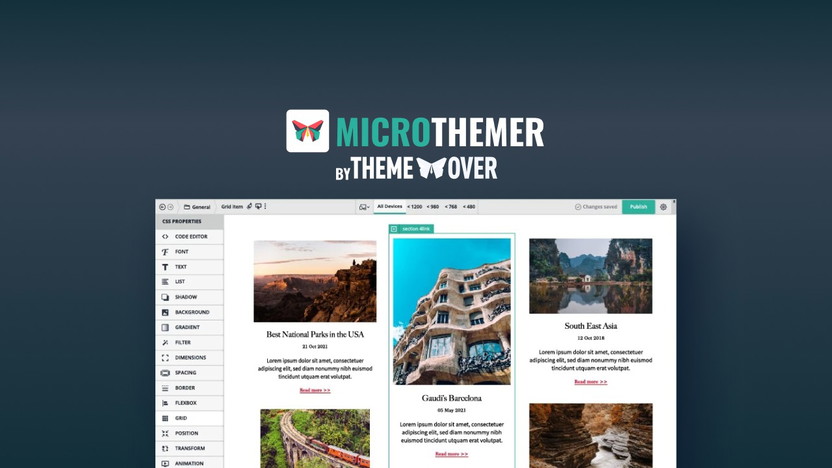
Credit: appsumo.com
Frequently Asked Questions
What Is Microthemer?
Microthemer is a visual CSS editor for WordPress. It allows you to design your site visually. You don’t need to write code.
How Does Microthemer Work?
Microthemer provides an intuitive interface. You can style your website by clicking and editing elements. It generates clean CSS code automatically.
Is Microthemer Suitable For Beginners?
Yes, Microthemer is beginner-friendly. Its visual interface is easy to use. You can see changes in real-time.
Can I Use Microthemer With Any Theme?
Yes, Microthemer works with any WordPress theme. It allows you to style any element on your site. Compatibility is not an issue.
Conclusion
Microthemer stands out as a versatile tool for WordPress site styling. Its user-friendly interface and robust features cater to both beginners and advanced users. With 150+ styling options and responsive design features, it makes customizing your site a breeze. Plus, the lifetime access and money-back guarantee ensure peace of mind. Ready to give Microthemer a try? Check out the Microthemer Lifetime Deal now for a smarter way to style your WordPress site.