

Are you looking for a tool to streamline your product development process? PathPro might be the answer.
This software combines feedback collection, project management, and user engagement on one platform. PathPro is designed to help teams build products users actually want. It offers features like feedback collection, feature voting, and task management. With PathPro, you can create dedicated channels for feedback, build public or private roadmaps, and manage tasks efficiently. It also provides customer analytics to track user behavior and engagement. For those looking to enhance their product development and user interaction, PathPro offers a comprehensive solution. Learn more about PathPro and its lifetime deal here.

Credit: www.youtube.com
Introduction To Pathpro
PathPro is an innovative software tool designed to simplify feedback collection and project management. It helps teams build products that users truly need. This unique platform combines several essential features, ensuring smooth communication between users and developers.
Overview Of Pathpro
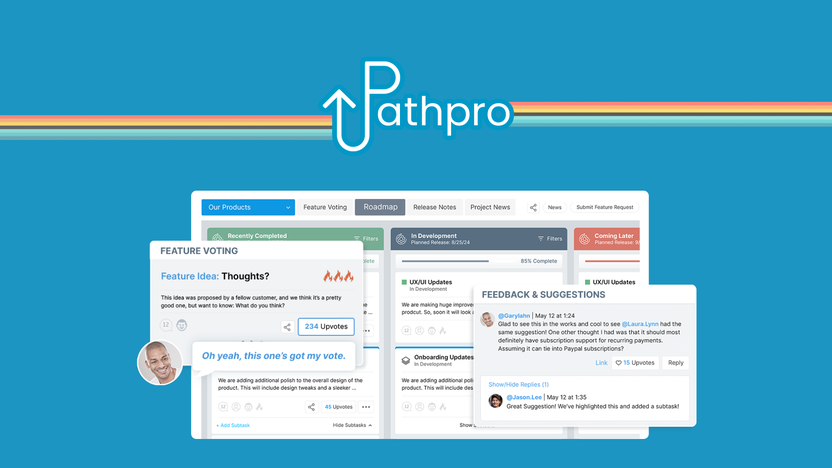
PathPro offers a centralized channel for customer feedback. It allows users to vote on features, integrates feedback into development pipelines, and provides a comprehensive task management system. It also includes:
- Feedback Collection: Create dedicated channels and add feedback widgets to your site.
- Feature Voting: Users can vote on features to prioritize development.
- Roadmaps: Build and toggle public/private roadmaps, assign tasks, set statuses, and create sub-tasks.
- Release Notes: Publish interactive release notes and send email notifications for updates.
- Community Engagement: Users can upvote, comment, and collect data on customer behavior.
- White Labeling: Customize the platform with your branding.
- CNAME: Publish to a custom domain.
- Task Management: Manage tasks and to-do lists, feature and idea submissions.
- Customer Analytics: Track user contributions and behavior.
Purpose Of Pathpro In User Feedback Collection
PathPro centralizes customer feedback collection and management. It validates product features through user voting. The tool keeps users informed with detailed roadmaps and release notes, enhancing community engagement. It also streamlines task management and project development.
Using PathPro, teams can ensure they build products that users actually want. The platform’s feedback collection feature allows teams to gather valuable insights directly from users. Feature voting helps prioritize development tasks based on user demand. The roadmaps feature keeps everyone informed about upcoming developments and updates.
Additionally, release notes ensure users stay updated with the latest changes and improvements. Community engagement tools like upvoting and commenting foster a sense of involvement and collaboration among users. Overall, PathPro’s comprehensive suite of features supports the entire feedback and development lifecycle.
Key Features Of Pathpro
PathPro offers a comprehensive solution for collecting user feedback and managing tasks. This platform is designed to streamline project management and product development with a range of powerful features.
User Feedback Collection
PathPro allows you to create dedicated channels for feedback collection. You can easily add feedback widgets to your site. This makes it simple for users to share their thoughts and suggestions. Feedback is centralized, making it easier to manage and act upon.
Task Creation And Management
Manage tasks and to-do lists efficiently with PathPro. You can assign tasks, set statuses, and create sub-tasks. This helps in organizing work and ensuring nothing falls through the cracks. The platform supports feature and idea submissions, making it easy to prioritize development.
Customizable Feedback Forms
PathPro offers customizable feedback forms. You can tailor these forms to fit your specific needs. This ensures you collect the most relevant information from your users. The forms are easy to set up and use, enhancing the feedback collection process.
Integration With Other Tools
PathPro integrates seamlessly with other tools. This includes popular project management and communication platforms. Integration helps in creating a smooth workflow, allowing you to keep all your tools in sync.
Analytics And Reporting
PathPro provides robust analytics and reporting features. You can track user contributions and behavior. This data helps in understanding user needs better and improving your product. Detailed reports can be generated to gain insights into feedback and task management.
| License Tier | Price | Projects | Community Members | Team Members | Features |
|---|---|---|---|---|---|
| License Tier 1 | $49 (discounted from $348) | 2 | 200 | 4 | Includes all main features |
| License Tier 2 | $149 (discounted from $588) | 5 | Unlimited | Unlimited | Includes all main features |
| License Tier 3 | $349 (discounted from $4,308) | 25 | Unlimited | Unlimited | Includes all main features |
Pricing And Affordability Breakdown
PathPro offers a comprehensive tool for collecting user feedback, building product roadmaps, and managing tasks. This section explores the pricing structure of PathPro, comparing it with competitors, and analyzing its value for money.
Lifetime Deal Pricing
PathPro provides three distinct lifetime deal tiers, each tailored to different user needs:
| License Tier | Price | Projects | Community Members | Team Members |
|---|---|---|---|---|
| License Tier 1 | $49 (discounted from $348) | 2 | 200 | 4 |
| License Tier 2 | $149 (discounted from $588) | 5 | Unlimited | Unlimited |
| License Tier 3 | $349 (discounted from $4,308) | 25 | Unlimited | Unlimited |
Cost Comparison With Competitors
PathPro stands out in the market, particularly when compared to alternatives like Canny, ClickUp, and Trello:
- Canny: Subscription-based plans starting from $50 per month for basic features.
- ClickUp: Plans range from $5 to $29 per user per month.
- Trello: Free plan available, with premium plans starting at $10 per user per month.
PathPro’s lifetime deal pricing is significantly more affordable. It offers a one-time payment, eliminating recurring costs.
Value For Money Analysis
The value proposition of PathPro is compelling due to its robust feature set:
- Feedback Collection: Dedicated channels and feedback widgets.
- Feature Voting: Users prioritize features through voting.
- Roadmaps: Build and manage detailed roadmaps.
- Release Notes: Publish interactive notes and send email updates.
- Community Engagement: Upvotes, comments, and customer behavior data.
- White Labeling: Customize with your branding.
- Task Management: Manage tasks, to-do lists, and submissions.
- Customer Analytics: Track user contributions and behavior.
For a one-time payment, users gain lifetime access to all these features. PathPro’s combination of affordability and functionality makes it a valuable investment.
Pros And Cons Of Pathpro
PathPro is a comprehensive tool that combines feedback collection and project management. It helps teams build products that users truly want. Understanding its pros and cons can help you decide if it fits your needs.
Advantages Of Using Pathpro
PathPro offers several advantages that make it an attractive option for teams:
- Centralized Feedback Collection: Create dedicated channels and add feedback widgets to your site. This ensures all user feedback is stored in one place.
- Feature Voting: Users can vote on features. This helps prioritize development based on user demand.
- Roadmaps: Build and toggle public/private roadmaps, assign tasks, set statuses, and create sub-tasks. Keeps users informed and aligned.
- Release Notes: Publish interactive release notes and send email notifications for updates. Keeps users updated on new features and improvements.
- Community Engagement: Users can upvote, comment, and contribute to discussions. This fosters a sense of community and increases user engagement.
- White Labeling: Customize the platform with your branding. This enhances brand consistency.
- CNAME: Publish to a custom domain. This provides a professional look.
- Task Management: Manage tasks and to-do lists efficiently. Simplifies project development and task tracking.
- Customer Analytics: Track user contributions and behavior. This helps understand user needs better.
Potential Drawbacks And Limitations
While PathPro has many strengths, it also has some limitations:
- Limited Projects on Lower Tiers: License Tier 1 only allows for 2 projects. This may be restrictive for larger teams.
- Community Member Limits: License Tier 1 limits community members to 200. This may not be sufficient for larger user bases.
- Cost: Higher license tiers can be expensive. License Tier 3 costs $349, which may be a significant investment for small teams.
- Learning Curve: New users may face a learning curve. The extensive features may require time to master.
By considering these pros and cons, you can determine if PathPro is the right tool for your team.
Specific Recommendations For Ideal Users
PathPro is a versatile tool designed to centralize feedback collection, task management, and product development. This section will highlight the best scenarios for using PathPro and identify who will benefit the most from this tool.
Best Scenarios For Using Pathpro
PathPro shines in various use cases. Here are some of the best scenarios:
- Product Development: Teams looking to build products that meet user needs.
- Feature Prioritization: Companies needing to prioritize features based on user votes.
- Community Engagement: Platforms wanting to increase user interaction through voting and comments.
- Task Management: Organizations aiming to streamline their task management and project development processes.
- Release Updates: Businesses needing to keep users informed with detailed roadmaps and interactive release notes.
Who Will Benefit The Most From Pathpro
PathPro is tailored for specific user groups. These include:
- Product Designers: Who need to gather and integrate user feedback efficiently.
- Product Managers: Seeking to validate product features through user voting.
- Project Managers: Aiming to streamline task management and project development.
- Small to Medium Enterprises (SMEs): Companies needing a cost-effective solution for feedback collection and task management.
- Startups: New businesses looking to build products that users actually want.
PathPro’s robust features make it a valuable tool for any team that values user feedback and effective project management.

Credit: bestlifetimo.com
Credit: appsumo.com
Frequently Asked Questions
What Is Pathpro Lifetime Deal?
Pathpro Lifetime Deal offers a one-time purchase to access Pathpro forever. It allows businesses to collect user feedback and create tasks efficiently.
How Does Pathpro Collect User Feedback?
Pathpro collects user feedback through customizable forms and surveys. It integrates seamlessly into your website or app, ensuring user responses are captured effectively.
Can Pathpro Create Tasks From Feedback?
Yes, Pathpro can create tasks directly from user feedback. This feature helps streamline workflows and prioritize important feedback effortlessly.
Is Pathpro Suitable For Small Businesses?
Absolutely, Pathpro is ideal for small businesses. It offers an affordable way to gather user insights and manage tasks without needing extensive resources.
Conclusion
PathPro offers a comprehensive solution for feedback collection and task management. This tool combines multiple essential features to simplify your workflow. Engage your users effectively while keeping your projects organized. With PathPro, you can build products that truly meet user needs. Interested? Check it out here.
