

A/B testing for mobile apps helps you compare two versions. It shows which one performs better.
In the competitive world of mobile apps, making informed decisions is crucial. A/B testing allows developers to test different app variations, see what users prefer, and optimize accordingly. This method improves user experience and boosts app performance. Through controlled experiments, you can identify what works best for your audience.
Understanding user behavior and preferences can lead to higher engagement and satisfaction. Ready to learn how A/B testing can elevate your mobile app? Let’s dive into the basics and benefits of this essential tool for app development.
Introduction To A/b Testing
In the fast-paced world of mobile apps, making informed decisions is crucial. A/B testing is a key method for optimizing user experience. This method helps you understand what works best for your audience. Let’s dive into the basics of A/B testing and its importance in mobile apps.
What Is A/b Testing?
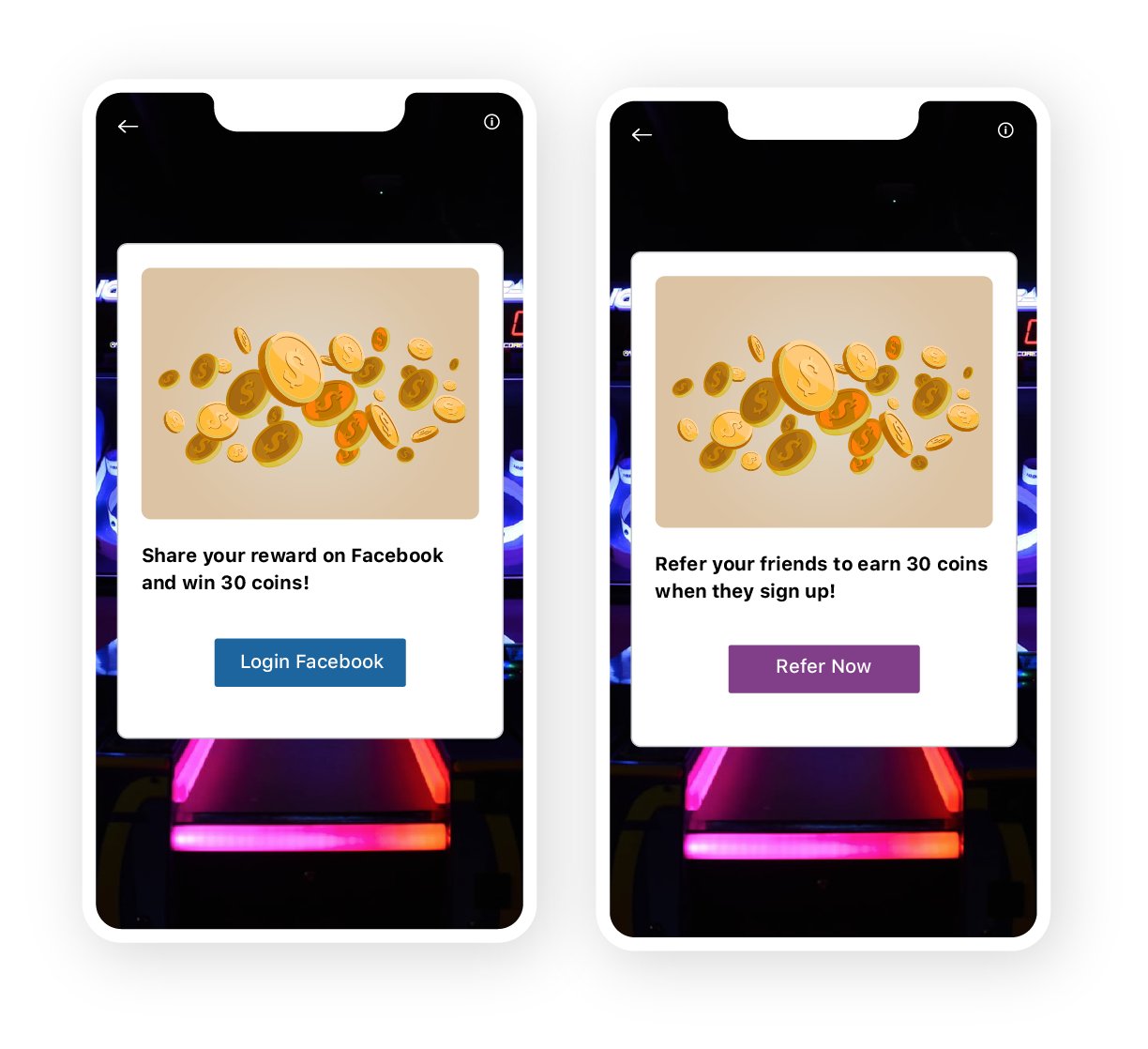
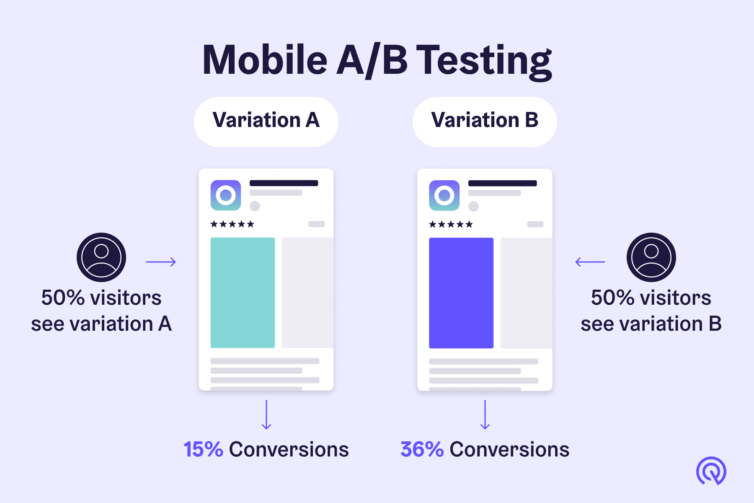
A/B testing is a method of comparing two versions of an app feature. This helps to determine which one performs better. The process involves creating two versions, A and B, and showing them to different user groups. The performance of each version is then measured.
Consider an example. You want to test two different button colors in your app. Version A has a red button. Version B has a blue button. Users interact with both versions. You then measure which button gets more clicks.
A/B testing can be applied to many aspects of a mobile app. These include layout, content, colors, and more. It provides clear data on what users prefer.
Importance In Mobile Apps
Why is A/B testing important for mobile apps? Here are some key reasons:
- Improves user experience: Testing helps you understand user preferences. This leads to a more enjoyable app experience.
- Increases engagement: Optimized features keep users engaged. This can lead to higher retention rates.
- Boosts conversions: Better user experience often results in more conversions. This could mean more in-app purchases or sign-ups.
Here’s a quick table to summarize the benefits:
| Benefit | Description |
|---|---|
| Improves User Experience | Helps identify user preferences |
| Increases Engagement | Optimized features keep users engaged |
| Boosts Conversions | Leads to more in-app purchases or sign-ups |
In essence, A/B testing is a powerful tool. It helps you make data-driven decisions. This leads to a better app experience and increased user satisfaction.
Setting Up A/b Tests
Setting up A/B tests for mobile apps is a critical step in optimizing user experience and achieving your business goals. This process involves selecting the right elements to test, defining clear objectives, and tracking the right metrics. Here’s a guide on how to effectively set up A/B tests.
Choosing Elements To Test
Choosing the right elements to test is the first step. Focus on key areas that impact user engagement and conversion rates. Here are some common elements to consider:
- App Layout: Test different layouts to see which one users prefer.
- Call-to-Action Buttons: Experiment with button text, color, and placement.
- Onboarding Process: Try different onboarding flows to see which one retains users.
- Navigation: Test different navigation styles to improve user experience.
Defining Objectives And Metrics
Before running your A/B test, define clear objectives. What do you want to achieve with this test? Common objectives include:
- Increasing user engagement
- Boosting conversion rates
- Improving user retention
Once you have your objectives, identify the metrics to measure success. Here are some metrics to consider:
- Click-through Rate (CTR): Measures the number of clicks on a specific element.
- Conversion Rate: Tracks how many users complete a desired action.
- Retention Rate: Measures how many users return to your app over time.
To ensure accuracy, use a table to track your metrics:
| Metric | Description | Objective |
|---|---|---|
| Click-through Rate | Number of clicks on a specific element | Increase user engagement |
| Conversion Rate | Users completing a desired action | Boost conversion rates |
| Retention Rate | Users returning to the app | Improve user retention |
By defining clear objectives and metrics, you can track the success of your A/B tests effectively.
Creating Test Variations
A/B testing for mobile apps is a powerful way to understand user preferences. Creating test variations is a crucial step in this process. It involves developing different versions of app features or interfaces to see what works best. This section covers the key aspects of creating effective test variations.
Designing Different Versions
Designing different versions is the foundation of A/B testing. Start by identifying the element to test. This could be a button color, a layout, or a feature.
To create effective variations:
- Keep changes simple. Focus on one element at a time.
- Ensure the variations are significantly different.
- Use a clear naming convention for different versions.
Implementing Changes
Once the variations are designed, implement the changes in your app. This can be done through your app’s backend or a dedicated A/B testing platform.
To ensure smooth implementation:
- Test the changes in a controlled environment first.
- Deploy the variations to a small user group initially.
- Monitor the performance and user feedback closely.
By following these steps, you can create effective test variations. This helps in making data-driven decisions for your mobile app. Remember, the goal is to improve user experience and app performance.
Target Audience Segmentation
Effective target audience segmentation is crucial for successful A/B testing in mobile apps. By dividing users into distinct groups, you can create more personalized tests. This leads to better insights and improved user experience. Let’s explore how to identify user segments and personalize tests for these segments.
Identifying User Segments
Begin by analyzing user data. Look for patterns in behavior, demographics, and preferences. Common segments include:
- Age groups
- Geographic locations
- Device types
- Usage frequency
Use analytics tools to gather this data. Segment users based on these criteria.
Personalizing Tests For Segments
Once you have identified segments, create personalized tests. Customize your app’s features for each segment. For example:
- Show different layouts to different age groups.
- Offer localized content for various geographic locations.
- Optimize performance for different device types.
- Provide tailored experiences for frequent and infrequent users.
Personalizing tests helps you understand what works best for each group. This leads to better user engagement and satisfaction.
| Segment | Personalization Example |
|---|---|
| Age Groups | Different UI designs |
| Geographic Locations | Localized content |
| Device Types | Performance optimization |
| Usage Frequency | Tailored experiences |
In summary, segmenting your target audience and personalizing tests for each segment is key. It helps you deliver a better user experience and achieve more accurate results from A/B testing.
Running A/b Tests
Running A/B tests helps you understand what works best for your mobile app. It involves comparing two versions of your app to see which performs better. This method provides valuable insights to improve user experience and app performance.
Test Duration
The duration of your test is crucial. Too short, and you might not gather enough data. Too long, and external factors might affect your results. A good rule is to run your test for at least one full user cycle.
Consider the following factors when determining test duration:
- User activity: How often users interact with your app.
- Traffic volume: Number of users participating in the test.
- Event frequency: How often the tested feature is used.
A table can help you decide the optimal test duration based on these factors:
| Factor | Short Duration | Long Duration |
|---|---|---|
| User Activity | Low | High |
| Traffic Volume | Low | High |
| Event Frequency | Low | High |
Ensuring Fair Testing Conditions
Fair testing conditions ensure unbiased results. Follow these steps to maintain fairness:
- Randomize user assignment: Split users randomly into groups A and B.
- Equal sample size: Ensure both groups are similar in size.
- Consistent environment: Keep external factors constant during the test.
Also, consider these points for fair testing:
- Exclude holidays: Avoid running tests during holidays or special events.
- Monitor external changes: Keep track of changes in the app store or market.
- Check technical issues: Ensure there are no bugs affecting the test.
By following these guidelines, you can run effective A/B tests. This will help you make data-driven decisions for your mobile app.
Analyzing Test Results
Analyzing test results is a crucial step in A/B testing for mobile apps. It’s where you understand what works and what doesn’t. This section covers how to interpret data and check for statistical significance.
Interpreting Data
Start by gathering all the data from your test. Look at metrics like click-through rates, conversion rates, and user engagement. These numbers show how users respond to different versions of your app.
- Click-through rates: Measure how many users click on links or buttons.
- Conversion rates: Track how many users complete a desired action, like making a purchase.
- User engagement: Look at how users interact with your app over time.
Compare these metrics between the control group and the test group. This helps identify which version performs better. Use visual aids like graphs and charts for better understanding.
Make sure to look at both positive and negative changes. Sometimes, a higher click-through rate might lead to lower conversion rates.
Statistical Significance
Statistical significance tells if the results are due to the changes made or just by chance. This ensures that your findings are reliable.
Use a statistical significance calculator to check your results. Input your data and see if the p-value is less than 0.05. If it is, your results are significant.
| Metric | Control Group | Test Group | P-Value |
|---|---|---|---|
| Click-through Rate | 5% | 7% | 0.03 |
| Conversion Rate | 2% | 3% | 0.02 |
If the p-value is higher than 0.05, the results are not significant. In that case, you might need to run more tests.
Always aim for a high sample size. A larger sample size gives more accurate results.
Implementing Winning Variations
Once you have identified the winning variation from your A/B testing, it’s time to implement these changes in your mobile app. This stage is crucial as it ensures that the improvements you observed during testing are effectively translated into the live environment. Proper implementation can significantly impact user experience and overall app performance.
Deploying Changes
Deploying changes involves integrating the successful elements from your tests into the app. Start by creating a clear deployment plan. Outline each step required to make the changes live. Use the following steps to ensure a smooth deployment:
- Review the winning variation and confirm its elements.
- Coordinate with your development team to integrate the changes.
- Test the updated app in a staging environment to spot any issues.
- Deploy the changes to a small percentage of users first to monitor impact.
- Roll out the update to all users if no issues arise.
Monitoring Post-implementation
After deploying the changes, continuous monitoring is key. This ensures the updates perform as expected and do not introduce new problems. Key steps for monitoring include:
- Track user engagement and key metrics using analytics tools.
- Collect user feedback through in-app surveys or reviews.
- Compare new data with previous data to assess performance.
- Identify any issues or unexpected behaviors promptly.
- Iterate on the changes if needed to improve user experience.
Use the following table to summarize the monitoring process:
| Step | Description |
|---|---|
| Track | Use analytics tools to monitor key metrics. |
| Collect | Gather user feedback through surveys or reviews. |
| Compare | Assess new data against previous data. |
| Identify | Spot issues or unexpected behaviors. |
| Iterate | Make necessary adjustments to improve. |
By effectively deploying and monitoring winning variations, you ensure your mobile app stays optimized and user-friendly.
Credit: medium.com
Case Studies
Case studies provide real-world insights into A/B Testing for Mobile Apps. They showcase successful tests and the lessons learned from them. By exploring these, you can better understand the value of A/B testing and how it can be applied to your own mobile app.
Successful A/b Tests
Let’s look at some successful A/B tests in the mobile app industry.
| Company | Test | Outcome |
|---|---|---|
| Spotify | Button Color Change | Increased conversions by 10% |
| Airbnb | Search Functionality | Improved user engagement by 15% |
| Uber | Onboarding Process | Reduced drop-off rates by 20% |
These examples highlight how small changes can lead to significant improvements.
Lessons Learned
From the case studies, we can draw several lessons learned:
- Test One Variable at a Time: Focus on a single change to see its impact.
- Set Clear Goals: Define what success looks like before starting the test.
- Use a Large Enough Sample Size: Ensure your sample size is big enough to draw accurate conclusions.
- Monitor Results Consistently: Keep an eye on your metrics to catch trends early.
- Iterate Based on Data: Use the data from your tests to make informed decisions.
These lessons can help improve your approach to A/B testing. They ensure you get the most accurate and useful results.
Best Practices
A/B testing helps improve your mobile app by comparing two versions. Learn these best practices to make your tests effective and avoid common mistakes. Implementing the right strategies can lead to better user experiences and higher engagement.
Common Mistakes To Avoid
- Testing too many variables at once: Focus on one variable to get clear results.
- Ignoring statistical significance: Ensure your sample size is large enough for reliable data.
- Not segmenting users: Different user groups may react differently to changes.
- Stopping tests too early: Give tests enough time to gather meaningful data.
- Overlooking qualitative feedback: User feedback provides context to quantitative data.
Tips For Effective Testing
- Define clear goals: Know what you want to achieve, like higher click rates or better retention.
- Use reliable tools: Choose tools that track and analyze data accurately.
- Create a hypothesis: Predict the outcome of your changes based on user behavior.
- Analyze results thoroughly: Look at both positive and negative outcomes to understand the impact.
- Implement changes based on findings: Apply successful changes and continue testing for ongoing improvement.
By following these best practices, your A/B tests will be more effective. This leads to better decisions and an improved mobile app experience for your users.
Credit: vwo.com
Credit: innovuratech.com
Frequently Asked Questions
What Is A/b Testing For Mobile Apps?
A/B testing for mobile apps is a method to compare two versions of an app. It helps identify which version performs better. It involves splitting users into groups and analyzing results.
Why Is A/b Testing Important For Mobile Apps?
A/B testing is crucial for optimizing user experience. It helps improve app performance and engagement. It identifies the best features and functionalities. This leads to increased user retention and satisfaction.
How Do You Conduct A/b Testing On Mobile Apps?
To conduct A/B testing, create two app versions. Split users into groups and monitor their interactions. Analyze the data to determine which version performs better. Make data-driven decisions based on the results.
What Metrics Should You Track In A/b Testing?
Key metrics include user engagement, retention rates, and conversion rates. Other important metrics are click-through rates and in-app purchases. Track these to measure the effectiveness of changes.
Conclusion
A/B testing for mobile apps is essential for improving user experience. It helps identify what works best. Testing different elements provides valuable insights. These insights lead to data-driven decisions. Remember to test one variable at a time. Use clear metrics to measure success.
Keep tests simple and focused. Regular testing ensures continuous improvement. Your app will become more user-friendly. Enhanced user satisfaction leads to higher retention rates. Start A/B testing today and see the benefits. Your users will thank you.