

In the world of digital marketing, A/B testing is a crucial tool. It helps businesses make data-driven decisions to enhance user experience and conversion rates.
Choosing the right A/B testing software can be overwhelming, given the numerous options available. Some tools offer basic features, while others provide advanced functionalities. Comparing different A/B testing software helps you find the best fit for your needs. This blog post will guide you through the process of comparing A/B testing software.
By understanding their features, pros, and cons, you can make an informed decision. Let’s dive in and explore the key aspects to consider when choosing the best A/B testing software for your business.
Introduction To A/b Testing
A/B testing is a method used to compare two versions of a webpage or app. The goal is to determine which version performs better. By showing different versions to different users, we gather data to make informed decisions. This process helps in improving user experience and increasing conversions.
Purpose And Benefits
The purpose of A/B testing is to test changes to your webpage or app. This helps in identifying what works best for your audience.
Here are some benefits of A/B testing:
- Increases conversion rates by identifying the best-performing version.
- Reduces risks by testing changes before full implementation.
- Improves user experience by understanding user preferences.
- Provides data-driven insights for decision-making.
Key Terms And Concepts
| Term | Definition |
|---|---|
| Control | The original version of the webpage or app. |
| Variant | The modified version being tested against the control. |
| Conversion Rate | The percentage of users who complete the desired action. |
| Sample Size | The number of users included in the test. |
| Statistical Significance | Indicates that the results are not due to chance. |
Criteria For Selecting A/b Testing Software
Selecting the right A/B testing software can significantly impact your marketing strategies. Each tool comes with unique features and capabilities. It’s essential to know what to look for. Here are some key criteria for selecting A/B testing software.
Ease Of Use
The software should be easy to navigate. A user-friendly interface saves time and reduces errors. Look for tools with a simple setup process and clear instructions.
Some tools offer drag-and-drop functionality. This feature makes designing tests straightforward. Ensure the software provides helpful tutorials and customer support.
Integration Capabilities
Integration with other tools is crucial. Your A/B testing software should work seamlessly with your existing systems. This includes CMS, CRM, and analytics tools.
Check for compatibility with popular platforms. Some software offers APIs for custom integrations. Ensure it supports data syncing for accurate results.
Pricing Models
Consider your budget when choosing A/B testing software. Pricing models vary widely. Some tools offer a free trial or a freemium version.
Look at what each pricing tier includes. Some plans may limit the number of tests or users. Compare the cost against the features offered.
Here’s a quick table to illustrate common pricing models:
| Pricing Model | Features |
|---|---|
| Free | Basic features, limited tests |
| Monthly Subscription | Advanced features, more users |
| Pay-per-test | Only pay for what you use |
Choosing the right software involves balancing ease of use, integration capabilities, and pricing. Evaluate these criteria to find the best fit for your needs.
Top A/b Testing Tools Overview
A/B testing is crucial for optimizing your website. It helps you understand what works best for your audience. With many tools available, choosing the right one can be tough. Here, we provide an overview of the top A/B testing tools.
Popular Choices
| Tool | Features | Pricing |
|---|---|---|
| Optimizely |
|
Starts at $50/month |
| Google Optimize |
|
Free and Paid plans |
| VWO (Visual Website Optimizer) |
|
Starts at $99/month |
Emerging Tools
New tools are entering the market. They offer fresh features and competitive pricing.
- Convert: Focuses on privacy and security. Ideal for GDPR compliance.
- AB Tasty: Offers AI-driven insights. User-friendly interface.
- Kameleoon: Provides advanced segmentation. Real-time data analysis.
These emerging tools are gaining popularity. They offer unique features and cater to specific needs.
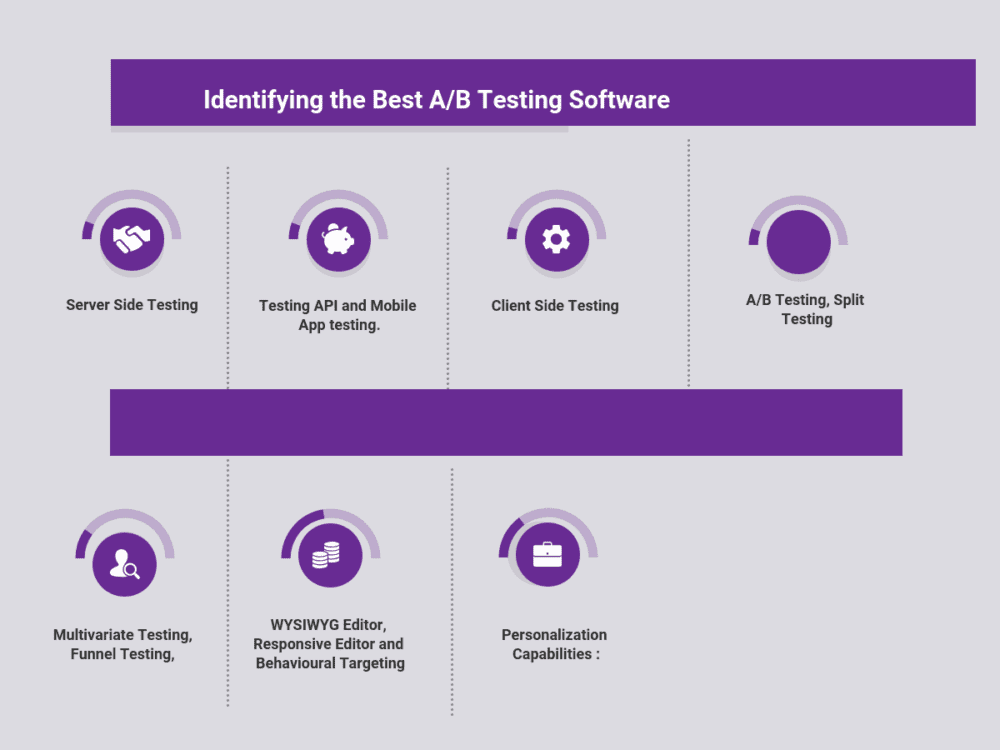
Credit: www.predictiveanalyticstoday.com
Tool 1: Optimizely
Optimizely is a popular A/B testing software. It helps businesses improve their websites through testing. It is known for its user-friendly interface and robust features.
Features
- Visual Editor: Easily create and edit tests without coding.
- Targeting: Personalize tests for specific audience segments.
- Multi-page Testing: Test changes across multiple pages.
- Statistical Significance: Reliable data to make informed decisions.
- Integrations: Compatible with popular analytics and marketing tools.
Pros And Cons
| Pros | Cons |
|---|---|
|
|
Best Use Cases
- Website Redesigns: Test new design elements to improve user experience.
- Marketing Campaigns: Optimize landing pages for better conversions.
- Product Launches: Validate new features before full rollout.
- Content Optimization: Test different headlines, images, and calls to action.
Tool 2: Vwo (visual Website Optimizer)
VWO, or Visual Website Optimizer, is a popular A/B testing tool. It helps businesses optimize their websites through detailed testing and analysis. VWO offers a range of features that make it a powerful choice for marketers and developers alike.
Features
- Visual Editor: Easily create variations without coding knowledge.
- Heatmaps: Understand user behavior with visual data.
- Multivariate Testing: Test multiple variations simultaneously.
- Segmentation: Target specific user groups for personalized tests.
- Advanced Reporting: Get detailed insights into test performance.
- Integration: Seamlessly integrates with other analytics tools.
Pros And Cons
| Pros | Cons |
|---|---|
| Easy to use with a visual editor. | Can be expensive for small businesses. |
| Provides detailed heatmaps and user insights. | Requires time to learn all features. |
| Supports advanced testing options. | Customer support can be slow. |
| Integrates with many other tools. | Complex setup for advanced tests. |
Best Use Cases
- Landing Page Optimization: Improve conversion rates by testing different page elements.
- Product Page Enhancements: Test product descriptions, images, and CTAs for better engagement.
- User Experience Testing: Identify and fix user experience issues with heatmaps and session recordings.
- Personalized Marketing: Deliver personalized content to specific audience segments.
Tool 3: Google Optimize
Google Optimize is a powerful and easy-to-use A/B testing tool. It helps businesses improve their website performance. With Google Optimize, you can run experiments to see what works best for your audience. This tool integrates well with Google Analytics, providing detailed insights to help you make informed decisions.
Features
Google Optimize offers a range of features to enhance your testing experience:
- Multivariate testing – Test multiple elements on a page at once.
- Personalization – Create personalized experiences for different user segments.
- Visual editor – Easy-to-use interface for making changes without coding.
- Integration with Google Analytics – Seamless data sharing for deeper insights.
- Targeting options – Target specific user groups based on behavior, location, and device.
Pros And Cons
| Pros | Cons |
|---|---|
|
|
Best Use Cases
Google Optimize is ideal for:
- Small to medium businesses – Those looking for a budget-friendly A/B testing tool.
- Marketing teams – Wanting to optimize web pages and increase conversion rates.
- Website developers – Needing to test changes before a full rollout.
- E-commerce sites – Aiming to improve user experience and sales.
Tool 4: Adobe Target
Tool 4: Adobe Target is a powerful A/B testing software. It helps businesses optimize their customer experiences. Adobe Target offers robust features and deep integration with other Adobe products. This makes it a preferred choice for many marketers.
Features
- Personalization: Adobe Target provides personalized content for each user.
- Multivariate Testing: Test multiple variables at once to find the best combination.
- Machine Learning: Leverage AI to predict and deliver the best experiences.
- Integration: Seamless integration with Adobe Analytics and other Adobe tools.
- Automated Workflow: Simplify testing processes with automated workflows.
Pros And Cons
| Pros | Cons |
|---|---|
| Powerful personalization capabilities | Complex interface for beginners |
| AI-driven insights | High cost for small businesses |
| Deep integration with Adobe products | Steep learning curve |
Best Use Cases
- Large Enterprises: Ideal for companies with extensive digital marketing needs.
- Data-Driven Decision Making: Perfect for businesses that rely on data to guide strategies.
- Personalized User Experiences: Great for brands that want to offer tailored content.
- Multichannel Marketing: Suitable for brands operating across multiple channels.

Credit: conversion-rate-experts.com
Tool 5: Unbounce
Unbounce is a popular tool for A/B testing. It helps businesses improve their landing pages. Known for its user-friendly interface, Unbounce makes testing different versions of web pages easy. This tool is perfect for marketers wanting to optimize their conversion rates.
Features
Unbounce offers several features that make it a top choice for A/B testing:
- Drag-and-drop builder: Easily create and modify landing pages without coding.
- Smart Traffic: Uses AI to automatically direct visitors to the best-converting page.
- Templates: Over 100 pre-designed templates to choose from.
- Pop-ups and sticky bars: Increase conversions with customizable pop-ups and sticky bars.
- Integrations: Connects with popular tools like Mailchimp, Salesforce, and HubSpot.
Pros And Cons
| Pros | Cons |
|---|---|
|
|
Best Use Cases
Unbounce is best suited for specific scenarios:
- Launching new campaigns: Test different landing page versions to find the most effective one.
- Increasing conversions: Use Smart Traffic to automatically boost conversion rates.
- Lead generation: Implement pop-ups and sticky bars to capture more leads.
- Small to medium businesses: An affordable solution for businesses looking to optimize their landing pages.
Comparative Analysis
Choosing the right A/B testing software can be challenging. Many options are available with varied features and pricing. This section will help you compare different A/B testing tools to make an informed decision. We will look at features, pricing, and user experience.
Feature Comparison
Different A/B testing software come with various features. Here is a table to compare the key features:
| Feature | Tool A | Tool B | Tool C |
|---|---|---|---|
| Visual Editor | Yes | No | Yes |
| Segmentation | Yes | Yes | No |
| Reporting | Advanced | Basic | Advanced |
| Integrations | Many | Few | Many |
Pricing Comparison
Pricing is a critical factor when selecting A/B testing software. Here is a comparison of pricing plans:
- Tool A: Starts at $50/month
- Tool B: Starts at $30/month
- Tool C: Starts at $45/month
Some tools offer free trials or limited free versions. Check the details on their websites.
User Experience
User experience is vital for effective A/B testing. Here is what users say:
- Tool A: Easy to use, with a smooth interface.
- Tool B: Basic interface, some learning curve.
- Tool C: Intuitive and user-friendly.
Reading user reviews can provide additional insights into the software’s usability.
Choosing The Right Tool For Your Needs
Picking the best A/B testing software can feel overwhelming. There are many options, each with unique features. This section will help you find the right tool for your specific needs.
Business Size And Type
Consider your business size. Small businesses may need simple tools. Large enterprises require advanced features. What is your business type? E-commerce sites might need different features than SaaS companies. Choose a tool that fits your business model.
| Business Size | Recommended Features |
|---|---|
| Small | Basic analytics, easy setup, affordable pricing |
| Medium | Customizable reports, integration options, user-friendly interface |
| Large | Advanced targeting, multivariate testing, dedicated support |
Specific Requirements
List your specific needs. Do you need detailed analytics? Or a tool with easy integration? Identify must-have features before choosing. This saves time and ensures the tool meets your needs.
- Detailed reports
- Easy setup
- Customizable options
- Seamless integration with existing systems
Future Scalability
Think about future growth. Will the tool scale with your business? Choose a tool that can grow with you. This prevents the need for a new tool later. Look for flexible pricing plans and scalable features.
- Check if the tool offers scalable plans
- Ensure it can handle increased traffic
- Look for features that can be added as needed
Choosing the right A/B testing software involves careful consideration. Match the tool to your business size, type, and future needs. This ensures effective and efficient testing.
Conclusion And Recommendations
Choosing the right A/B testing software is crucial. It helps improve conversion rates and user experience. This section provides final thoughts and next steps for making an informed decision.
Final Thoughts
After comparing various A/B testing tools, it’s clear that each has unique features. Some tools offer advanced analytics, while others focus on ease of use. Price and scalability are also important factors. Consider your business needs and goals when selecting a tool.
For small businesses, user-friendly interfaces and cost-effectiveness are key. Larger enterprises might prioritize robust analytics and integration capabilities. Always look for tools that offer comprehensive reporting. This helps you make data-driven decisions.
Suggested Next Steps
Here are some steps to help you decide:
- Identify your testing goals. What do you hope to achieve?
- Evaluate your budget. How much can you afford to spend?
- Shortlist tools that meet your criteria. Consider user reviews and ratings.
- Take advantage of free trials. Test the tools before committing.
- Consult your team. Get feedback from those who will use the software.
Here’s a simple table to compare some popular A/B testing tools:
| Tool | Key Features | Pricing |
|---|---|---|
| Tool A | Advanced Analytics, User-friendly Interface | $$ |
| Tool B | Comprehensive Reporting, Integration Capabilities | $$$ |
| Tool C | Cost-effective, Basic Features | $ |
Remember to keep your goals and budget in mind. This will guide you to the best choice for your needs. Happy testing!
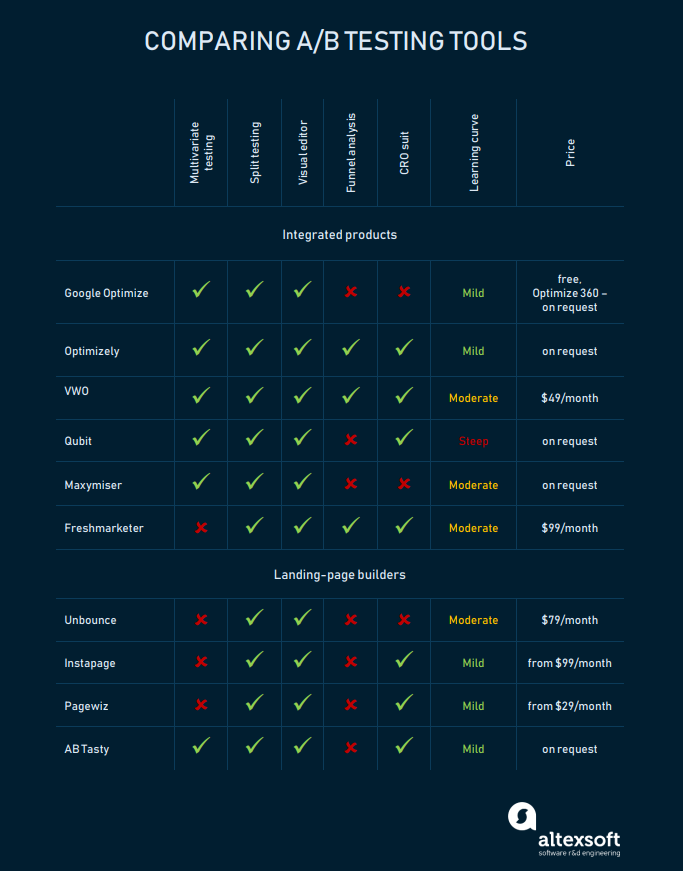
Credit: www.altexsoft.com
Frequently Asked Questions
What Is A/b Testing Software?
A/B testing software helps compare two versions of a web page or app. It identifies which version performs better. This improves conversion rates and user experience.
Why Use A/b Testing Software?
Using A/B testing software helps optimize your website or app. It provides data-driven insights to improve user engagement and conversions.
How Does A/b Testing Software Work?
A/B testing software splits your audience into two groups. Each group sees a different version. The software then measures which version performs better.
What Features Should A/b Testing Software Have?
A/B testing software should offer user-friendly interfaces, robust analytics, and integration capabilities. It should support multivariate testing and provide real-time data.
Conclusion
Choosing the right A/B testing software can boost your website’s performance. Each tool offers unique features and benefits. Prioritize your business needs and budget. Start small, then scale up as you see results. Testing helps you understand what works best for your audience.
Make data-driven decisions to improve user experience. Remember, consistent testing leads to continuous improvement. So, explore different options and find the best fit. Happy testing!