

Creating natural-sounding voiceovers can be challenging and time-consuming. Lazybird offers a solution with its AI-powered text-to-speech tool.
This tool can convert text into lifelike voiceovers in seconds. In this blog post, we will review the Lazybird Lifetime Deal. Lazybird is designed for content creators, course developers, and YouTubers. It features over 200 voices and supports more than 100 languages. With its customizable settings, you can adjust pitch, speed, and tone to match your content’s mood. Lazybird also allows you to export audio in various formats and includes access to thousands of stock images, videos, and audio files. If you’re looking to streamline your voiceover process and enhance your content, keep reading to learn more about Lazybird’s features and benefits. You can check out the deal here.
Introduction To Lazybird
Creating professional voiceovers can be challenging. Lazybird simplifies this with its AI-powered platform. This tool converts text into lifelike voiceovers in seconds. It is designed for content creators, course creators, and YouTubers.
What Is Lazybird?
Lazybird is an AI-powered text-to-speech tool. It converts text into high-quality, natural-sounding voiceovers. Users can choose from over 200 voices in more than 100 languages. Lazybird offers a versatile solution for creating engaging audio content.
The Purpose Of Lazybird
Lazybird aims to make voiceover creation quick and efficient. It helps users generate professional voiceovers without needing a recording studio. Content creators can tailor voiceovers to match their content’s tone and mood.
| Feature | Description |
|---|---|
| Voice Variety | Access over 200 AI voices with different accents and tones. |
| Language Support | Create voiceovers in more than 100 languages. |
| Customization | Adjust pitch, pauses, speed, and tone. |
| Export Options | Export audio in multiple formats like MP3, WAV, or OGG. |
| Stock Files | Access thousands of stock images, videos, and audio files. |
| API Integration | Supports API and Rest API for seamless integration. |
Benefits of Using Lazybird:
- Create content in various languages to reach a broader audience.
- Tailor voiceovers to match the exact mood and pacing required.
- Generate professional voiceovers quickly, saving time and resources.
- Export unlimited media files to scale content creation effortlessly.
- Add background music and adjust voice tones to make content more engaging.
Lazybird offers two pricing tiers:
- License Tier 1: $39 (originally $50)
- 200,000 characters per month
- High-quality AI voiceover
- Support for video, audio, and images
- Access to 200+ voices in 100+ languages
- Upload .txt and .docx scripts
- Access to thousands of stock images and videos
- License Tier 2: $99 (originally $100)
- 1,000,000 characters per month
- Includes all features of License Tier 1 with higher character limits
Lazybird offers a 60-day money-back guarantee. Users can try the tool for 60 days and get a full refund if not satisfied. The purchase provides lifetime access to Lazybird, including all future Premium Plan updates.
For more information, visit the Lazybird website.

Credit: appsumo.com
Key Features Of Lazybird
Lazybird offers natural-sounding AI voiceovers with an easy-to-use interface. Enjoy various voice options and fast processing times. Ideal for creating engaging audio content effortlessly.
Lazybird is a powerful AI-driven text-to-speech tool that turns text into high-quality, lifelike voiceovers in seconds. With its array of features, it caters to content creators, course creators, and YouTubers who seek natural-sounding voiceovers quickly and efficiently. Let’s dive into the key features that make Lazybird stand out.Ai-powered Natural-sounding Voiceovers
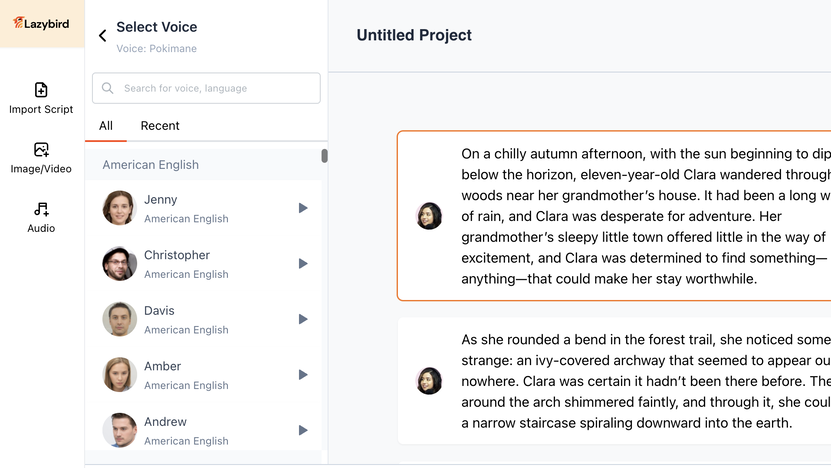
Lazybird uses advanced AI technology to generate natural-sounding voiceovers. The platform ensures that the voiceovers are not only high-quality but also lifelike, making them suitable for various types of content. Whether for videos, podcasts, or online courses, Lazybird’s AI ensures the voiceovers sound authentic and engaging.Wide Range Of Voice Options
With Lazybird, you can access over 200 AI voices. These voices come with different accents and tones, allowing you to choose the perfect voice for your project. The platform supports more than 100 languages, giving you the flexibility to create content for a global audience. Here’s a quick overview of the voice options:| Feature | Description |
|---|---|
| Voice Variety | Over 200 AI voices with various accents and tones |
| Language Support | Supports more than 100 languages |
Customization And Flexibility
Lazybird offers extensive customization options to tailor your voiceovers. You can adjust the pitch, pauses, speed, and tone of the voiceovers. This level of customization helps you match the exact mood and pacing required for your content. Additionally, you can export audio in multiple formats like MP3, WAV, or OGG, ensuring compatibility with various platforms.- Adjust pitch, pauses, speed, and tone
- Export audio in MP3, WAV, or OGG formats
User-friendly Interface
The user-friendly interface of Lazybird makes it easy for anyone to create professional voiceovers. The platform is designed to be intuitive, allowing users to navigate and use the features effortlessly. Even those with minimal technical skills can produce high-quality voiceovers within minutes.- Easy navigation
- Intuitive design
- Minimal technical skills required
Pricing And Affordability
Lazybird offers an appealing pricing structure, making it accessible to a wide range of users. The lifetime deal ensures a one-time payment, granting you access to its robust features and updates. Let’s delve into the specifics of the pricing and evaluate its value.
Lifetime Deal Breakdown
Lazybird provides two license tiers, each designed to cater to different needs. Here’s a breakdown of the available options:
| License Tier | Price | Characters per Month | Key Features |
|---|---|---|---|
| License Tier 1 | $39 (originally $50) | 200,000 |
|
| License Tier 2 | $99 (originally $100) | 1,000,000 |
|
Value For Money Analysis
The value for money that Lazybird offers is exceptional. At just $39, users receive lifetime access to a powerful AI tool that can generate natural-sounding voiceovers in seconds. The extensive voice variety and language support make it a versatile choice for various content creation needs.
For users requiring more extensive use, the $99 tier provides 1,000,000 characters per month, allowing for larger-scale projects. This tier also includes all the features of the first tier, ensuring you get the most out of your investment.
Both plans come with a 60-day money-back guarantee, offering peace of mind. If the tool doesn’t meet your expectations, you can request a full refund within this period.
In summary, Lazybird’s pricing structure is not only affordable but also packed with features that provide great value for money. Whether you’re a small content creator or a large-scale producer, there’s a plan that fits your needs.
Credit: appsumo.com
Pros And Cons Of Lazybird
Lazybird is an advanced AI-powered text-to-speech tool. It offers a variety of features that appeal to content creators, marketers, and freelancers. While it boasts many advantages, it also has some limitations. Let’s dive into the pros and cons of Lazybird.
Advantages Based On Real-world Usage
- Voice Variety: Lazybird provides access to over 200 AI voices with different accents and tones.
- Language Support: Create voiceovers in more than 100 languages, which is ideal for a global audience.
- Customization: Adjust pitch, pauses, speed, and tone to match the exact mood and pacing required.
- Export Options: Export audio in multiple formats like MP3, WAV, or OGG.
- Stock Files: Access thousands of stock images, videos, and audio files to enhance your content.
- API Integration: Supports API and Rest API for seamless integration with other tools.
Drawbacks And Limitations
- Character Limits: The basic license tier limits you to 200,000 characters per month, which might be restrictive for heavy users.
- Activation Requirement: You must activate the license within 60 days of purchase, which can be inconvenient for some users.
- Initial Cost: While the pricing is competitive, the upfront cost might be a barrier for some users.
Despite these drawbacks, Lazybird remains a powerful tool for creating natural-sounding voiceovers quickly and efficiently. Its wide range of features and customization options make it a valuable asset for content creators looking to enhance their projects.
Recommendations For Ideal Users
Ideal for content creators, Lazybird is perfect for those seeking natural-sounding AI voiceovers. Simple and easy to use, it enhances productivity.
Lazybird is an AI-powered tool that transforms text into lifelike voiceovers. It’s a perfect solution for individuals and businesses that need high-quality voiceovers without the hassle of hiring voice actors. But who stands to benefit the most from this incredible platform? Let’s explore.Best Use Cases
Lazybird offers a multitude of use cases, making it versatile and practical for many fields. Here are some of the best ways to utilize this tool:- Content Creators: Generate professional voiceovers for YouTube videos, podcasts, and online courses.
- Marketers: Create engaging ads, product demos, and social media content to captivate audiences.
- Educators: Develop interactive e-learning materials and audiobooks for students.
- Businesses: Produce high-quality voiceovers for presentations, explainer videos, and customer support materials.
Who Will Benefit The Most?
Lazybird is particularly beneficial for several user groups, thanks to its extensive features and ease of use:| User Group | Benefits |
|---|---|
| Freelancers | Quickly produce voiceovers for client projects, saving time and increasing productivity. |
| Small Businesses | Create professional voiceovers without the need for expensive recording equipment. |
| Large Corporations | Scale content creation with unlimited media exports and API integration. |
| Non-English Speakers | Utilize over 100 languages to create content for a global audience. |
Credit: lifetimo.com
Frequently Asked Questions
What Is Lazybird?
Lazybird is a software that creates natural-sounding AI voiceovers. It’s ideal for videos, podcasts, and audiobooks.
How Does Lazybird Work?
Lazybird uses advanced AI technology to generate lifelike voiceovers. You input text, and it converts it into speech.
Is Lazybird Easy To Use?
Yes, Lazybird is user-friendly. Even beginners can create professional voiceovers with minimal effort.
What Are The Main Features Of Lazybird?
Lazybird offers multiple voice options, customizable settings, and high-quality output. It supports various languages and accents.
Conclusion
Lazybird offers an efficient solution for creating natural AI voiceovers. With over 200 voices and 100+ languages, it suits content creators and YouTubers. Customization options allow adjusting pitch, speed, and tone. Export audio in various formats like MP3 or WAV. Access stock images, videos, and audio files. The lifetime deal is a great value with a 60-day money-back guarantee. Discover more about Lazybird here for high-quality voiceover needs. Start creating professional voiceovers quickly and easily with Lazybird today!