

When it comes to creating engaging video content, the right tools make all the difference. ScreenToVideo offers an all-in-one solution for recording, editing, and sharing videos.
If you are a content creator, educator, or small business owner, you will find this tool especially useful. In this blog post, we will review the ScreenToVideo Lifetime Deal. We’ll cover its features, benefits, and why it stands out in the crowded market of screen recording and video editing tools. With ScreenToVideo, you can capture your screen, add audio and webcam footage, use whiteboard tools, and export videos in various formats. Read on to learn how this tool can elevate your video content creation process. Click here to check out the deal.

Credit: www.youtube.com
Introduction To Screentovideo
Welcome to our Screentovideo Lifetime Deal Review. In this section, we will introduce you to this powerful screen recorder and video editor. Screentovideo combines intuitive design with versatile features, making it ideal for content creators, course creators, and small businesses. Let’s dive deeper into what makes Screentovideo a must-have tool.
What Is Screentovideo?
ScreenToVideo is an easy-to-use screen recorder and video editor. It allows you to record, edit, and share videos efficiently. The interface is intuitive, making it accessible to both beginners and professionals. With Screentovideo, you can capture your screen, record audio, and integrate webcam footage effortlessly.
Purpose And Utility Of Screentovideo
The main purpose of Screentovideo is to provide a comprehensive solution for video creation. Here are some of its key utilities:
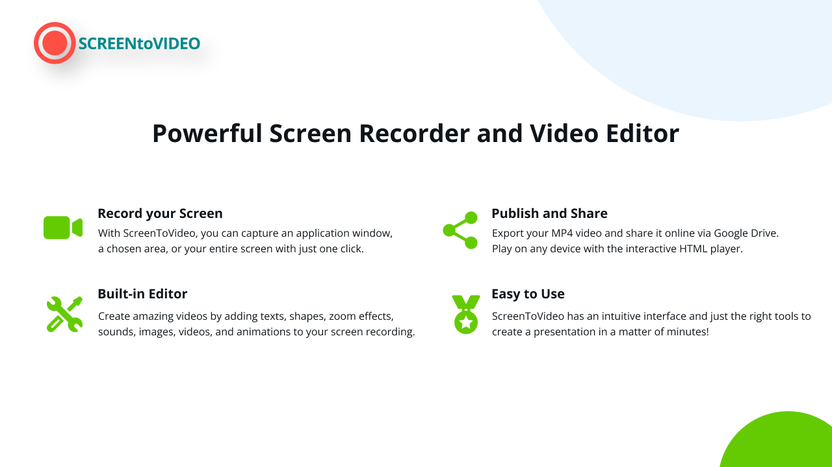
- Screen Recording: Capture a specific window, a chosen area, or the entire screen.
- Audio & Webcam Integration: Record voice, system sounds, and webcam with virtual backgrounds.
- Whiteboard & Sketching Tools: Turn your screen into a whiteboard and use flexible sketching tools.
- Animated GIFs: Create animated GIFs quickly and easily.
- Video Editing: Use various components like text areas, video effects, and Google Text-To-Speech integration.
- Closed Captions & Audio Normalization: Available without any configuration.
- Export Options: Export videos in MP4, WMV, GIF, or MP3 formats using hardware-accelerated encoders.
- Google Drive Integration: Upload and share videos directly from Google Drive.
The versatility of Screentovideo makes it suitable for creating tutorials, presentations, and interactive content. It is designed to adapt to remote work and online content creation, ensuring you can produce high-quality videos efficiently.
Key Features Of Screentovideo
ScreenToVideo offers a range of powerful features. These features make recording, editing, and sharing videos easy and efficient. Whether you’re a content creator, course creator, or small business owner, ScreenToVideo has something for everyone.
Easy-to-use Interface
ScreenToVideo boasts an intuitive interface that is user-friendly. Even beginners can navigate it with ease. The layout is clean and well-organized, ensuring that all tools are within reach. No need for extensive tutorials; everything is straightforward.
Advanced Editing Tools
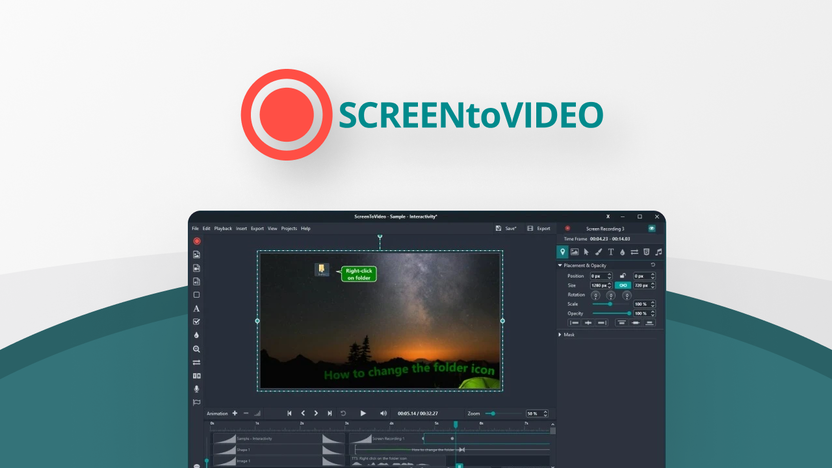
The video editor in ScreenToVideo comes packed with a variety of components. You can add text areas, video effects, and even Google Text-To-Speech integrations. Whiteboard and sketching tools allow you to draw directly on the screen. This makes it ideal for creating interactive tutorials.
Seamless Export Options
Exporting your finished video is quick and painless. ScreenToVideo supports multiple formats such as MP4, WMV, GIF, and MP3. The software uses hardware-accelerated encoders for faster export times. You can also share your videos directly from Google Drive.
Integration With Other Software
ScreenToVideo seamlessly integrates with other software. The Google Drive integration allows for easy uploading and sharing. This feature is particularly useful for those who need to distribute their videos quickly and efficiently.
The advanced editing tools, seamless export options, and integration capabilities make ScreenToVideo a comprehensive solution for all your video recording and editing needs. Its user-friendly interface ensures that you can focus on creating high-quality content without getting bogged down by complicated software.
Pricing And Affordability
When considering a screen recorder and video editor, pricing is often a major factor. ScreenToVideo offers a compelling Lifetime Deal, making it an attractive choice for many users. Let’s delve into the specifics.
Lifetime Deal Overview
ScreenToVideo currently offers a Lifetime Deal for a one-time purchase of $59. This is a significant reduction from its original price of $119, representing a 50% discount. The deal includes:
- Full-featured recorder and editor
- Lifetime access
- Free lifetime upgrades
- Support
Additionally, the deal comes with a 60-day money-back guarantee. This allows you to try the product risk-free for two months. If it doesn’t meet your needs, you can request a refund. Note that the redemption code must be used within 60 days of purchase, and the deal is non-stackable with other offers.
Cost-effectiveness Compared To Competitors
When compared to other screen recording and video editing tools on the market, ScreenToVideo’s Lifetime Deal offers excellent value. Here’s a quick comparison:
| Feature | ScreenToVideo | Competitor A | Competitor B |
|---|---|---|---|
| Price | $59 (Lifetime) | $100/year | $80/year |
| Lifetime Access | Yes | No | No |
| Free Upgrades | Yes | No | No |
| Money-Back Guarantee | 60 days | 30 days | 30 days |
As seen in the table, ScreenToVideo offers a one-time payment with lifetime access and free upgrades. Competitors often charge annual fees without offering lifetime access or free upgrades. This makes ScreenToVideo a more cost-effective option for long-term use.
Credit: appsumo.com
Pros Of Screentovideo
Screentovideo is a versatile tool for recording, editing, and sharing videos. It offers several benefits that make it a top choice for content creators, course creators, and small businesses. Below, we explore some of its key advantages.
User-friendly Experience
One of the standout features of Screentovideo is its intuitive interface. The design is simple, making it easy for users to navigate and use. Even beginners can quickly learn to record and edit videos without needing extensive tutorials.
The software includes whiteboard and sketching tools, allowing users to draw directly on their screen. This feature is especially useful for creating educational content or detailed presentations.
Comprehensive Editing Capabilities
Screentovideo offers a range of video editing tools. Users can add text areas, apply video effects, and integrate Google Text-To-Speech. This ensures your videos are both professional and engaging.
The editor also supports animated GIFs and includes built-in closed captions and audio normalization. These features enhance the accessibility and quality of your videos without requiring additional software or plugins.
High-quality Export Formats
Exporting videos is quick and versatile with Screentovideo. The software supports multiple formats including MP4, WMV, GIF, and MP3. This flexibility ensures your videos can be used across various platforms and devices.
Additionally, Screentovideo leverages hardware-accelerated encoders for fast export times. This means you spend less time waiting and more time creating content.
The software also integrates with Google Drive. Users can upload and share their videos directly from the platform, streamlining the sharing process.
Cons Of Screentovideo
While ScreenToVideo offers many advantages, there are some drawbacks. Understanding these cons can help you decide if it meets your needs.
Limitations In Free Version
The free version of ScreenToVideo comes with several limitations. These restrictions can affect the overall user experience.
- Watermarks: Videos exported in the free version include watermarks.
- Limited Export Formats: Only a few formats are available for export.
- Feature Access: Some advanced features are not accessible in the free version.
These limitations can be a deterrent for users seeking more robust functionality without a purchase.
Potential Learning Curve For Advanced Features
Although the interface is intuitive, some advanced features may require time to learn. This can be a challenge for new users.
| Feature | Learning Difficulty |
|---|---|
| Audio Normalization | Moderate |
| Google Text-To-Speech | High |
| Whiteboard Tools | Moderate |
Users may need to invest time in tutorials or support to fully leverage these features. This can be inconvenient for those seeking immediate results.
Ideal Users And Scenarios
The ScreenToVideo Lifetime Deal offers a robust solution for recording and editing videos. It’s perfect for various user groups and scenarios, simplifying video creation with its intuitive features. Let’s explore who can benefit the most from ScreenToVideo and the ideal scenarios for its use.
Best For Educators And Trainers
ScreenToVideo is an excellent tool for educators and trainers. Its screen recording capabilities allow teachers to create detailed tutorials. The whiteboard and sketching tools help explain complex concepts visually. Educators can record their voice and system sounds, enhancing the learning experience.
With features like closed captions and audio normalization, creating accessible content is easy. Exporting videos in various formats, including MP4 and WMV, ensures compatibility with different platforms.
Perfect For Content Creators And Youtubers
Content creators and YouTubers will find ScreenToVideo highly beneficial. The ability to record the entire screen or a specific window is crucial for creating engaging content. Integrating audio and webcam with virtual backgrounds adds a professional touch.
The video editor offers various components like text areas and video effects, allowing creators to produce high-quality videos. Additionally, the option to create animated GIFs provides versatility in content creation.
With Google Drive integration, uploading and sharing videos becomes seamless. The lifetime deal with free upgrades makes it a cost-effective solution for long-term use.
Useful For Business Presentations And Tutorials
Businesses can utilize ScreenToVideo for creating professional presentations and tutorials. The software supports recording voice and system sounds, making it ideal for detailed demonstrations.
Annotations and interactive tutorials can be quickly published, enhancing remote work and online training sessions. Export options in multiple formats ensure that videos are compatible with various platforms and devices.
ScreenToVideo’s user-friendly interface and efficient editing tools make it easy to produce high-quality business content. The lifetime deal offers significant savings, providing a valuable resource for any business.
Credit: appsumo.com
Frequently Asked Questions
What Is Screentovideo Lifetime Deal?
Screentovideo Lifetime Deal offers a one-time payment for lifetime access. It allows users to edit and export screen recordings easily.
How Does Screentovideo Work?
Screentovideo captures your screen activities. It provides editing tools to enhance recordings and export them in various formats.
Is Screentovideo User-friendly?
Yes, Screentovideo is user-friendly. It offers an intuitive interface suitable for beginners and professionals alike.
What Features Does Screentovideo Offer?
Screentovideo offers screen recording, video editing, annotations, and multiple export options. It supports high-quality video output.
Conclusion
ScreenToVideo is a practical tool for content creators and small businesses. It provides easy recording, editing, and sharing of videos. Its user-friendly interface makes video creation simple and efficient. With features like audio integration, video effects, and quick export options, it suits various needs. The lifetime deal at $59 offers excellent value. Try ScreenToVideo now and enhance your video production effortlessly. For more details, check out the ScreenToVideo Lifetime Deal.