

Video thumbnails are small but powerful. They can make or break viewer engagement.
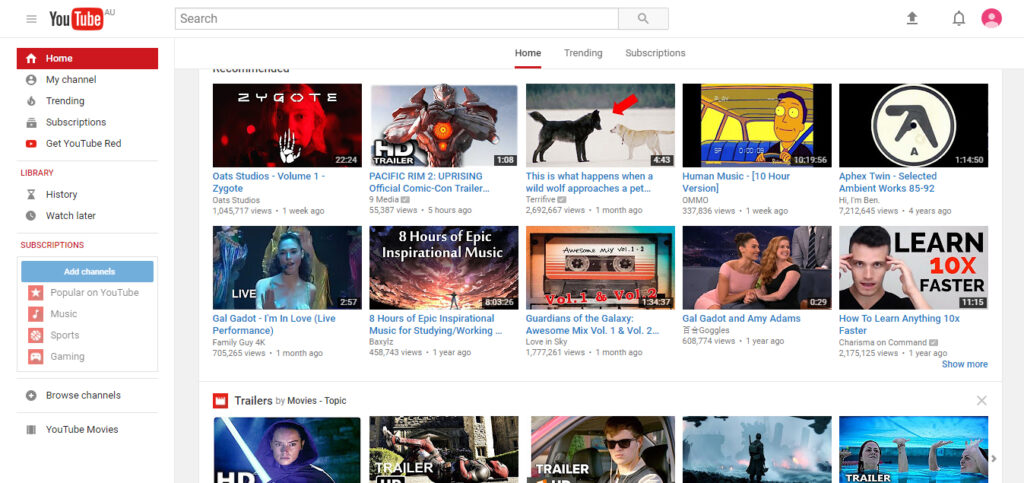
A video thumbnail is the first thing potential viewers see when browsing content. It’s like a book cover, giving a sneak peek of what’s inside. A captivating thumbnail can grab attention and entice viewers to click. Without a good thumbnail, even the best videos might be overlooked.
Understanding the importance of video thumbnails and how to create effective ones can significantly impact your video’s success. In this blog post, we will explore why thumbnails matter and share tips on making them stand out. Get ready to learn how to make your videos more appealing with the right thumbnails!
Credit: www.wowmakers.com
Importance Of Video Thumbnails
Video thumbnails play a crucial role in attracting viewers. They act as the first point of contact between your content and potential viewers. An effective thumbnail can significantly impact your video’s performance. Let’s explore the importance of video thumbnails in detail.
First Impressions Matter
Your video thumbnail is the first thing people see. A visually appealing thumbnail can grab attention quickly. It helps in creating curiosity and interest. If your thumbnail looks professional, viewers are more likely to click on your video.
Think of it as a book cover. A good cover entices people to read the book. Similarly, an engaging thumbnail encourages viewers to watch your video. A poorly designed thumbnail may cause potential viewers to scroll past your content.
Role In Click-through Rates
Click-through rate (CTR) measures how often people click on your video after seeing the thumbnail. A higher CTR indicates that your thumbnail is effective. Thumbnails with bright colors, clear text, and relevant images perform better.
For instance, a thumbnail with a smiling face or an action shot can increase CTR. You should avoid using misleading thumbnails. This can lead to a high bounce rate and negatively affect your channel’s reputation.
Consider these tips for creating effective thumbnails:
- Use high-quality images
- Include relevant text
- Maintain brand consistency
- Test different designs
Remember, a well-designed thumbnail is essential for attracting viewers and improving your video’s performance.
Designing Eye-catching Thumbnails
Creating an attractive thumbnail can greatly boost video engagement. A well-designed thumbnail grabs attention and compels users to click. Here, we discuss key elements that contribute to an eye-catching thumbnail.
Color Psychology
Colors play a crucial role in thumbnail design. They evoke emotions and catch the viewer’s eye. Understanding basic color psychology can help you choose the right colors.
- Red: Indicates urgency, excitement, and passion. Perfect for action-packed videos.
- Blue: Conveys trust and calmness. Ideal for educational or informative content.
- Yellow: Represents happiness and energy. Good for fun and lively videos.
- Green: Associated with nature and health. Best for outdoor or wellness topics.
Contrasting colors also help your thumbnail stand out. Use complementary colors to make text and images pop.
Effective Use Of Text
Text on thumbnails should be clear and concise. It should give a quick idea of the video content.
- Bold Fonts: Use bold, easy-to-read fonts. Ensure text is legible even on small screens.
- Short Phrases: Keep it brief. Use 3-5 words to convey the video’s main idea.
- Positioning: Place text where it doesn’t cover important visuals. Usually, the top or bottom corners work best.
- Color Contrast: Use colors that contrast with the background. This makes the text stand out.
Utilizing these techniques will make your thumbnails more appealing and effective. Remember, a good thumbnail can significantly increase your video’s click-through rate.
Best Practices For Thumbnails
Creating the perfect video thumbnail can significantly improve your video’s engagement. Thumbnails are the first thing viewers see, so making them attractive is crucial. Here are some best practices to consider when designing your video thumbnails.
Consistent Branding
Maintaining consistent branding helps in building your channel’s identity. Use the same fonts, colors, and styles in your thumbnails. This makes your videos easily recognizable. Consistency can also make your channel look more professional.
Consider creating a template for your thumbnails. This ensures that all your thumbnails have a uniform look. A consistent design can also make your content appear more organized.
High-quality Images
Always use high-quality images for your thumbnails. Blurry or pixelated images can deter viewers from clicking. High-resolution images look more appealing and professional.
Make sure the image is relevant to the video content. A misleading thumbnail can lead to viewer disappointment and lower engagement. Use images that are clear and well-lit. This will make the thumbnail more visually appealing.
| Aspect | Importance |
|---|---|
| Resolution | High-quality images are crucial for professional appearance. |
| Relevance | Thumbnails should match the video’s content. |
| Lighting | Well-lit images attract more viewers. |
Analyzing Successful Thumbnails
Creating effective video thumbnails is an art. A great thumbnail can increase click-through rates. It can also boost your video’s visibility. Let’s analyze what makes a thumbnail successful.
Case Studies
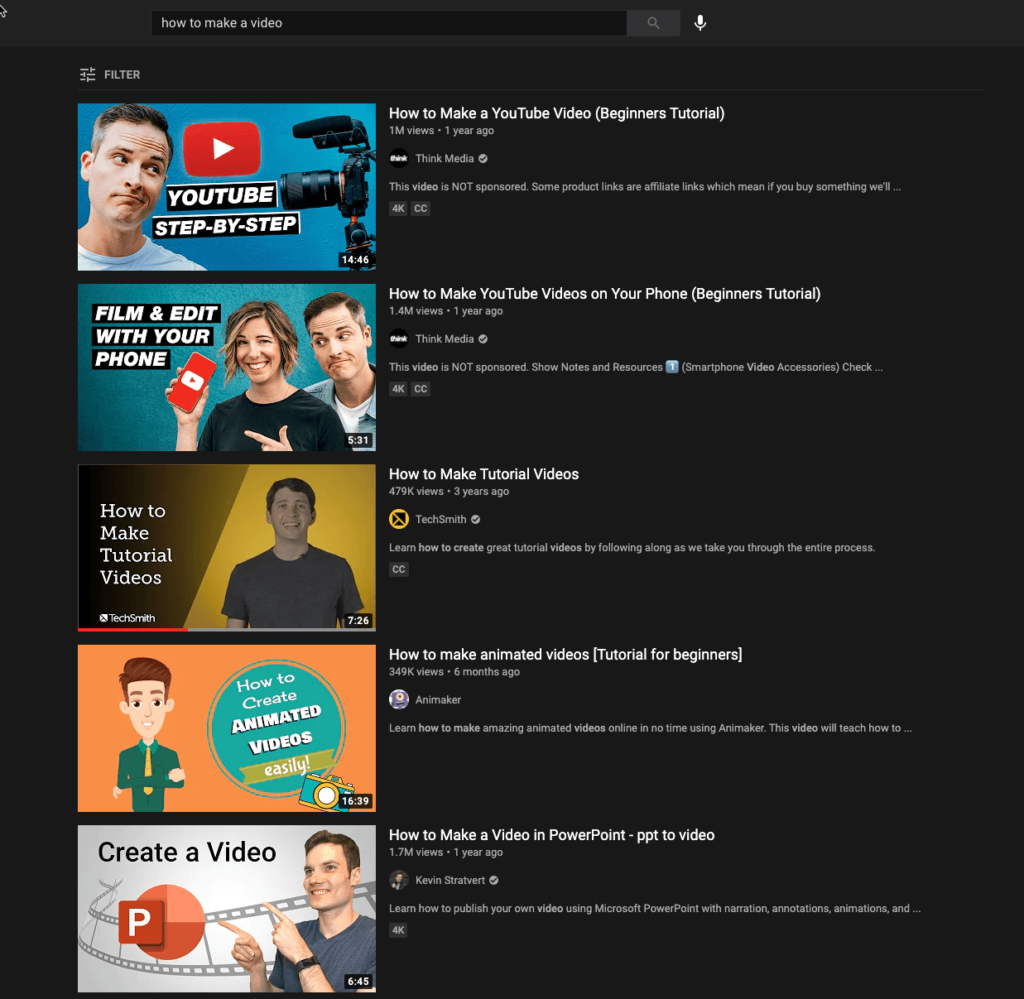
To understand successful thumbnails, look at popular YouTube channels. For example, consider MrBeast. His thumbnails are bright and engaging. They often feature close-ups of faces. This creates a sense of urgency and excitement.
Another example is TED Talks. Their thumbnails are simple yet effective. They use clear text and professional images. This makes their content look trustworthy.
Common Elements
Successful thumbnails share common elements. These elements make them stand out. Here are some key features:
- Bright Colors: Bright colors catch the eye. They make the thumbnail pop.
- Clear Text: Use bold, readable text. This helps viewers understand the video’s topic.
- High-Quality Images: Sharp, high-resolution images look professional. They attract more clicks.
- Facial Expressions: Faces showing emotion grab attention. They create a connection with the viewer.
- Consistent Style: A consistent style builds your brand. It makes your videos easily recognizable.
In summary, analyzing thumbnails from successful channels helps. Identify common elements and apply them. This can improve your own video thumbnails significantly.
Tools For Creating Thumbnails
Creating eye-catching video thumbnails is essential for attracting viewers. With the right tools, you can make thumbnails that stand out. This section covers some useful tools for creating thumbnails.
Online Editors
Online editors offer convenience and ease of use. They are perfect for beginners and professionals alike. Here are some popular online editors:
- Canva: Canva is user-friendly and offers a wide range of templates. You can easily customize thumbnails with text, images, and graphics. It also has a free version with many features.
- Adobe Spark: Adobe Spark is another great online tool. It has pre-designed templates and allows you to add your own photos and text. The interface is simple to navigate.
- Fotor: Fotor provides various editing tools and templates. It is ideal for those who want to create professional-looking thumbnails quickly. Fotor also offers a free version with many options.
Graphic Design Software
Graphic design software provides advanced features for creating detailed thumbnails. These tools are suitable for those with more experience in design. Let’s look at some top graphic design software:
- Adobe Photoshop: Photoshop is a powerful tool for creating custom thumbnails. It offers a range of features such as layers, filters, and effects. It is ideal for detailed and high-quality designs.
- GIMP: GIMP is an open-source alternative to Photoshop. It offers many similar features and is free to use. It is a great choice for those who need powerful editing tools without the cost.
- CorelDRAW: CorelDRAW is known for its vector graphics capabilities. It is perfect for creating scalable thumbnails. The software offers various tools for precise and creative designs.
Choosing the right tool depends on your needs and experience level. Online editors are best for quick and easy designs. Graphic design software offers more control and advanced features.
Credit: www.techsmith.com
A/b Testing Thumbnails
A/B testing thumbnails can help you find the best thumbnail for your videos. This process involves creating two different thumbnails and comparing their performance. By doing this, you can see which thumbnail attracts more viewers. This method is simple yet effective in boosting your video’s reach and engagement.
Setting Up Tests
To start, create two distinct thumbnails. Ensure they are visually different. Upload both thumbnails to your video platform. Use an A/B testing tool to randomly show each thumbnail to different viewers. Track performance over a set period.
Here’s a step-by-step guide:
- Create two unique thumbnails.
- Upload thumbnails using the A/B testing tool.
- Set the duration for the test.
- Monitor the performance metrics.
Key metrics to track include:
- Click-through rate (CTR)
- View count
- Watch time
Interpreting Results
After the test period, analyze the data. Compare the performance of both thumbnails. Focus on the CTR and view count. These metrics indicate viewer interest.
Use a table to organize your data:
| Metric | Thumbnail A | Thumbnail B |
|---|---|---|
| Click-through rate (CTR) | 5% | 7% |
| View count | 1,000 | 1,500 |
| Watch time | 2 minutes | 3 minutes |
If Thumbnail B has higher metrics, choose it as the primary thumbnail. Make sure to repeat this process regularly. Trends and viewer preferences can change over time.
Common Mistakes To Avoid
Creating effective video thumbnails is crucial for attracting viewers. But many make common mistakes that can hurt engagement. Let’s dive into the most frequent errors and how to avoid them.
Overloading With Information
A thumbnail cluttered with text and images can overwhelm viewers. Simplicity is key. Thumbnails should convey the essence of the video with minimal elements.
Consider these points:
- Use bold, large text for essential information.
- Limit text to three to five words.
- Include a clear image that represents the video.
Here is a comparison table to help understand better:
| Overloaded Thumbnails | Effective Thumbnails |
|---|---|
| Too much text | Minimal text |
| Multiple images | Single, clear image |
| Complex design | Simple design |
Misleading Thumbnails
Misleading thumbnails can damage trust with your audience. Always ensure thumbnails accurately reflect the video content.
Tips to avoid misleading thumbnails:
- Use an image from the actual video.
- Match the thumbnail text with the video title.
- Avoid clickbait tactics that disappoint viewers.
Misleading thumbnails may bring clicks but will lead to negative feedback and decreased trust.
Remember, the goal is to attract and retain viewers with honest, engaging thumbnails.
Future Trends In Thumbnails
The future of video thumbnails is evolving rapidly. As video content continues to dominate online platforms, the way thumbnails are designed and used is changing. These changes aim to increase engagement and improve viewer experience. The following trends highlight the direction in which video thumbnails are headed.
Animated Thumbnails
Animated thumbnails are gaining popularity. They provide a preview of the video in motion. This makes them more engaging than static images. Viewers get a sneak peek of the content, which can increase click-through rates.
Platforms like YouTube have started to adopt this trend. Animated thumbnails can include short clips or GIFs. The movement catches the viewer’s eye, making them more likely to click. This trend is especially effective for dynamic content, such as vlogs and action-packed videos.
| Feature | Benefit |
|---|---|
| Engaging Preview | Increases click-through rates |
| Eye-catching | Grabs viewer attention |
| Dynamic Content | Highlights exciting parts of the video |
Personalized Thumbnails
Personalized thumbnails are another emerging trend. These thumbnails are tailored to individual viewers based on their preferences and past behavior. This customization can be achieved using AI and machine learning.
For example, a user who frequently watches cooking videos might see thumbnails featuring food. Meanwhile, someone interested in tech may see thumbnails with gadgets. This personal touch makes the content more appealing to different audiences.
- Tailored content for each viewer
- Increases relevance and interest
- Utilizes AI for better customization
Personalized thumbnails can significantly improve user engagement. Viewers are more likely to click on content that seems relevant to their interests. This trend is expected to grow as technology advances, making video platforms even more user-friendly.
Credit: biteable.com
Frequently Asked Questions
What Are Video Thumbnails?
Video thumbnails are preview images that represent video content. They help viewers understand the video’s subject before clicking.
How To Create Effective Video Thumbnails?
Use high-quality images, clear text, and vibrant colors. Make sure the thumbnail is relevant to the video content.
Why Are Video Thumbnails Important?
Thumbnails attract viewers and increase click-through rates. They provide a visual preview of the video content.
What Size Should Video Thumbnails Be?
The recommended size for video thumbnails is 1280 x 720 pixels. Ensure the image is clear and not pixelated.
Conclusion
Crafting effective video thumbnails boosts viewer engagement. They attract attention quickly. Strong visuals and clear text are key. Thumbnails should represent your content accurately. This builds trust with your audience. Consistency in style also helps. It makes your videos easily recognizable.
Experiment with different designs. See what resonates best with your viewers. Keep refining your approach. Your thumbnails play a crucial role in your video’s success. Invest time in creating compelling ones. It will pay off with higher click-through rates and more views.