

Website performance is crucial for success. A fast, responsive site keeps users happy.
In today’s digital age, every second counts. Users expect quick load times and smooth navigation. Slow websites frustrate visitors and can drive them away. Improving website performance can boost user experience and increase engagement. It’s essential for retaining visitors and enhancing site efficiency.
In this post, we’ll explore 15 practical ways to improve your website’s performance. These tips will help you create a seamless experience for your users. Stay tuned for actionable strategies that can make a big difference in your site’s speed and responsiveness. Your website’s success starts with performance. Let’s dive in!

Credit: www.orbitmedia.com
Importance Of Website Performance
Website performance is crucial for any successful online presence. A fast website ensures users stay engaged. Slow websites lead to frustration and high bounce rates. Improving website performance should be a top priority for all businesses.
User Experience
A fast website provides a better user experience. Users expect pages to load quickly. If it takes too long, they will leave. This can result in lost customers and revenue.
- Fast loading times keep users engaged.
- Improved website speed reduces bounce rates.
- Users are more likely to revisit a fast website.
User satisfaction increases with better performance. Positive experiences lead to higher customer retention. Happy users are more likely to recommend your site.
Seo Benefits
Website performance affects SEO rankings. Search engines like Google prioritize fast websites. A slow website can hurt your search engine rankings.
| Fast Website | Slow Website |
|---|---|
| Higher search rankings | Lower search rankings |
| Better user engagement | Poor user engagement |
| Higher conversion rates | Lower conversion rates |
Search engines use page speed as a ranking factor. Fast websites have an advantage over slower ones. Improving your website speed can boost your SEO efforts.
Assessing Current Performance
Before making improvements, evaluate your website’s current performance. This step is crucial. It helps identify areas needing attention. Knowing where you stand is the first step toward progress.
Performance Tools
Several tools are available to assess website performance. These tools provide insights into speed, responsiveness, and overall user experience. Here are a few popular options:
- Google PageSpeed Insights: Analyzes page speed and provides improvement suggestions.
- GTmetrix: Offers detailed reports on website performance, including load time, page size, and more.
- Pingdom Tools: Measures the load time and provides performance grades.
- WebPageTest: Allows you to test your website’s performance from different locations.
Key Metrics
Understanding key metrics helps in assessing performance. Focus on the following metrics:
- Load Time: The time it takes for a page to fully load. Aim for less than 3 seconds.
- First Contentful Paint (FCP): Time taken to display the first piece of content. Faster FCP improves user experience.
- Time to Interactive (TTI): Measures how long before the page becomes fully interactive.
- Speed Index: Shows how quickly content is visually displayed during page load.
- Total Blocking Time (TBT): The sum of all time periods where the main thread was blocked.
| Metric | Description | Optimal Value |
|---|---|---|
| Load Time | Time for a page to fully load | < 3 seconds |
| FCP | First piece of content displayed | < 1.8 seconds |
| TTI | Time until the page is interactive | < 5 seconds |
| Speed Index | How quickly content is displayed | < 3.4 seconds |
| TBT | Time periods where main thread was blocked | < 300 ms |
Use these metrics to track performance. Regularly monitor them to ensure your website stays optimized.
Optimizing Images
Optimizing images is crucial for improving website performance. Images often take up a lot of bandwidth. This slows down page load times. By optimizing images, you can enhance the user experience. Visitors prefer fast-loading sites. Search engines also reward faster websites. Let’s dive into some effective methods for optimizing images.
Image Compression
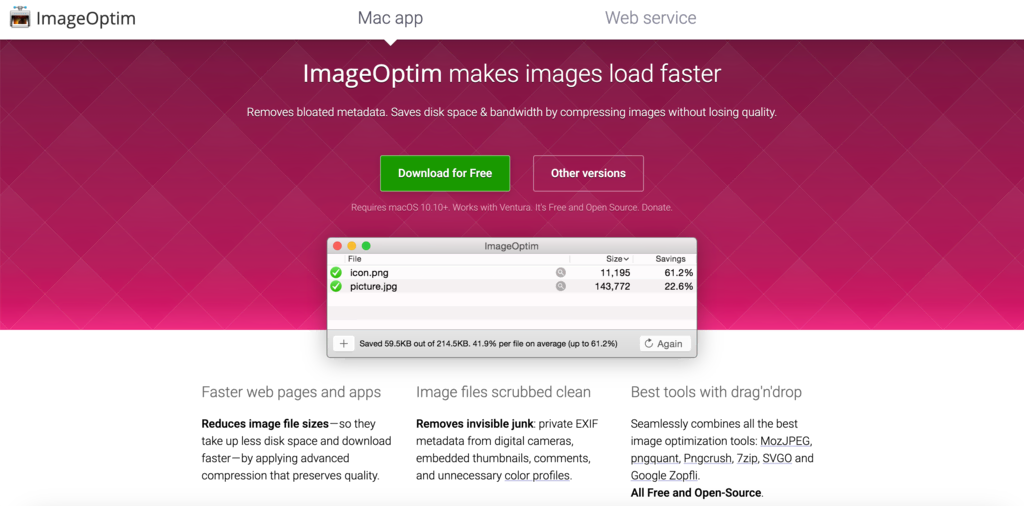
Image compression reduces the file size of your images. Smaller files load faster. There are many tools available for this. Tools like TinyPNG and JPEG-Optimizer are popular choices. They compress images without losing much quality.
Here is a quick guide to compressing images:
- Upload your image to a compression tool.
- Choose the compression level. Balance quality and size.
- Download the compressed image.
Proper Formats
Choosing the right image format is key. Different formats serve different purposes. Here are some common formats:
| Format | Best Use |
|---|---|
| JPEG | Photographs and complex images. |
| PNG | Images with transparency. |
| GIF | Animations and simple graphics. |
| WebP | High-quality images with smaller sizes. |
WebP is a modern format. It offers excellent quality and small sizes. Not all browsers support WebP yet. Ensure fallback options are available.
By focusing on image compression and proper formats, you can significantly improve your website’s performance. This leads to happier visitors and better search engine rankings.
Minimizing Http Requests
Minimizing HTTP requests is crucial for improving website performance. Each request made by the browser to load files like images, scripts, and stylesheets adds time to your page load. Fewer HTTP requests mean faster loading times, leading to a better user experience. Here are some effective strategies to reduce HTTP requests.
Combining Files
Combining multiple CSS or JavaScript files into one can reduce the number of HTTP requests. Instead of loading several files individually, a single file is loaded, cutting down on the time needed to make multiple requests.
For example, if you have three CSS files:
/ File 1: styles.css /
body {
    background-color: #fff;
}

/ File 2: layout.css /
.container {
    width: 80%;
    margin: 0 auto;
}

/ File 3: typography.css /
h1, h2, h3 {
    font-family: Arial, sans-serif;
}
Combine them into one file:
/ Combined file: main.css /
body {
    background-color: #fff;
}
.container {
    width: 80%;
    margin: 0 auto;
}
h1, h2, h3 {
    font-family: Arial, sans-serif;
}
This single file will reduce the number of HTTP requests from three to one.
Using Css Sprites
CSS sprites combine multiple images into one single image file. By using CSS to display only parts of the image, you can reduce the number of image requests.
For example, instead of loading three separate icons:
- icon1.png
- icon2.png
- icon3.png
Combine them into one sprite image:

Use CSS to display each icon:
/ CSS /
.icon1 {
    width: 32px;
    height: 32px;
    background: url('sprite.png') 0 0;
}

.icon2 {
    width: 32px;
    height: 32px;
    background: url('sprite.png') -32px 0;
}

.icon3 {
    width: 32px;
    height: 32px;
    background: url('sprite.png') -64px 0;
}
This method reduces three image requests to one, enhancing loading speed.
Leveraging Browser Caching
Leveraging browser caching is a vital technique to improve website performance. It ensures that browsers store certain files on users’ devices for a specified period. When users revisit your website, their browsers can load these stored files, speeding up the page load time.
Cache-control Headers
Setting Cache-Control headers is crucial for browser caching. These headers tell the browser how long to cache a file.
Here is an example of a Cache-Control header:
Cache-Control: max-age=31536000This header sets the cache duration to one year (in seconds). Using Cache-Control headers effectively can significantly reduce server load and improve user experience.
Expiration Dates
Expiration dates define when cached content should be considered stale. Setting expiration dates ensures that users always have the most recent version of your website.
Here is an example of setting an expiration date:
Expires: Wed, 21 Oct 2023 07:28:00 GMTBy setting an appropriate expiration date, you ensure that content updates are reflected without delay.
In summary, leveraging browser caching through Cache-Control headers and expiration dates can greatly enhance website performance. It reduces load times, improves user experience, and decreases server load.

Credit: www.tealhq.com
Implementing Content Delivery Networks
One of the key strategies to improve website performance is implementing Content Delivery Networks (CDNs). CDNs enhance the delivery of your website’s content by distributing it across various servers worldwide. This ensures faster loading times and a more reliable user experience. Let’s dive into the benefits and how to choose the right CDN for your website.
Cdn Benefits
Utilizing a CDN offers numerous advantages:
- Faster Load Times: CDNs reduce latency by serving content from servers closer to the user.
- Improved Reliability: If one server fails, another takes over, ensuring uptime.
- Reduced Bandwidth Costs: CDNs cache content, reducing the load on your origin server.
- Better Security: CDNs provide enhanced protection against DDoS attacks.
- Global Reach: CDNs have servers worldwide, ensuring a consistent experience for all users.
Choosing A Cdn
Selecting the right CDN involves considering several factors:
- Performance: Test the CDN’s speed and reliability.
- Coverage: Ensure the CDN has servers in key regions for your audience.
- Security Features: Look for CDNs offering DDoS protection and SSL support.
- Cost: Compare pricing models to find one that fits your budget.
- Support: Choose a CDN with excellent customer support and documentation.
Here’s a quick comparison of popular CDNs:
| CDN Provider | Key Features | Pricing |
|---|---|---|
| Cloudflare | Global coverage, DDoS protection, SSL support | Free and paid plans |
| Amazon CloudFront | High performance, integration with AWS | Pay-as-you-go |
| Akamai | Extensive network, advanced security | Custom pricing |
Implementing a CDN can significantly improve your website’s performance. It offers faster load times, better security, and reduced costs. Make sure to choose a CDN that aligns with your needs and budget.
Reducing Server Response Time
Reducing server response time is vital for website performance. Faster response times improve user experience and SEO rankings. To achieve this, focus on optimizing database queries and server configuration.
Optimizing Database Queries
Database queries can slow down server response times. Optimize them for better performance.
- Indexing: Use indexes to speed up data retrieval.
- Query Optimization: Write efficient queries to minimize load.
- Remove Redundant Data: Eliminate duplicate entries in the database.
- Use Stored Procedures: They are precompiled and run faster.
Consider the following example of an optimized query:
SELECT name, email FROM users WHERE age > 30;
Efficient Server Configuration
Proper server configuration can reduce response times significantly.
| Configuration | Benefit |
|---|---|
| Server Caching | Reduces data retrieval time |
| Load Balancing | Distributes traffic evenly |
| Upgrade Hardware | Handles more requests efficiently |
Here are some steps to configure your server efficiently:
- Enable server-side caching.
- Optimize PHP and database settings.
- Use a Content Delivery Network (CDN).
- Regularly update server software.
Follow these guidelines to reduce server response time and improve website performance.
Enabling Compression
Enabling compression is a key strategy to improve website performance. It reduces the size of your files, making your website load faster. Faster load times result in a better user experience and improved SEO rankings. Two popular compression methods are Gzip and Brotli.
Gzip Compression
Gzip compression is a widely used method to compress files. It is supported by most web servers and browsers. This method reduces the size of HTML, CSS, and JavaScript files. Smaller files mean faster downloads for your users.
To enable Gzip compression, add the following code to your server configuration:
  AddOutputFilterByType DEFLATE text/html
  AddOutputFilterByType DEFLATE text/css
  AddOutputFilterByType DEFLATE application/javascript
Check if Gzip is enabled using online tools like GzipWTF or Check Gzip Compression.
Brotli Compression
Brotli compression is a newer method developed by Google. It provides better compression rates than Gzip, especially for text files. Brotli is supported by modern browsers and web servers.
To enable Brotli compression, add the following code to your server configuration:
  AddOutputFilterByType BROTLI_COMPRESS text/html
  AddOutputFilterByType BROTLI_COMPRESS text/css
  AddOutputFilterByType BROTLI_COMPRESS application/javascript
Like Gzip, you can verify Brotli compression using online tools.
Both Gzip and Brotli can significantly improve your website’s performance. Choose the one that best fits your needs and server capabilities.
Utilizing Lazy Loading
Improving website performance is crucial. One effective technique is lazy loading. Lazy loading optimizes how content loads. Instead of loading everything at once, it loads elements as needed. This reduces initial load times and enhances user experience.
Images
Using lazy loading for images can significantly boost performance. Images often take up a lot of bandwidth. By lazy loading, images load only when they enter the viewport. This approach saves bandwidth and speeds up initial page load.
- Reduces initial load time.
- Saves bandwidth.
- Improves user experience.
To implement lazy loading for images, you can use the loading attribute in HTML. Example:

This simple change can have a big impact on your site’s performance.
Videos
Lazy loading isn’t just for images. Videos can benefit too. Videos are often larger than images. Loading all video content at once can slow down your site. Lazy loading videos means they load only when needed.
For lazy loading videos, you can use the loading attribute or JavaScript libraries. Example using HTML:
This method ensures videos load only when users are ready to watch them.
Implementing lazy loading for both images and videos can drastically improve your website’s performance. It makes your site faster and more efficient.
Minifying Css, Javascript, And Html
Improving website performance is crucial for better user experience and SEO rankings. One effective way is by minifying CSS, JavaScript, and HTML. Minification reduces file sizes, making your website load faster. This process removes unnecessary characters such as spaces, comments, and line breaks without affecting the functionality.
Tools For Minification
Various tools can help you minify your website’s code. Here are some popular options:
- Minify: A PHP5 app that helps minify CSS and JavaScript files.
- UglifyJS: A well-known JavaScript minification tool.
- CSSNano: A tool to minify CSS files efficiently.
- HTMLMinifier: A powerful tool for minifying HTML files.
These tools can be used manually or integrated into your build process.
Impact On Performance
Minifying CSS, JavaScript, and HTML can significantly improve your website’s performance. Here are some key benefits:
| Benefit | Description |
|---|---|
| Faster Load Times | Minified files reduce the size, leading to quicker load times. |
| Better SEO | Search engines rank faster websites higher. |
| Improved User Experience | Users enjoy a smoother experience with faster websites. |
Minification helps in lowering bandwidth usage and reducing server load. This process ultimately leads to better user satisfaction and higher conversion rates.
Implementing Amp
Improving website performance is crucial for enhancing user experience and boosting search engine rankings. One effective way to achieve this is by implementing AMP (Accelerated Mobile Pages). This section will guide you through the essentials of AMP, its advantages, and how it can significantly improve your website’s performance.
What Is Amp?
AMP stands for Accelerated Mobile Pages. It is an open-source framework developed by Google. The goal is to make web pages load faster on mobile devices. AMP achieves this by using a stripped-down version of HTML. This ensures that the pages are lightweight and load quickly.
AMP consists of three components:
- AMP HTML: A subset of HTML with some restrictions.
- AMP JS: A JavaScript library ensuring fast rendering.
- AMP Cache: A content delivery network to cache AMP pages.
Advantages Of Amp
AMP offers several benefits that can improve your website’s performance and user experience. Here are some key advantages:
- Faster Load Times: AMP pages load quickly on mobile devices. This keeps users engaged and reduces bounce rates.
- Improved SEO: Google prioritizes AMP pages in search results. This can improve your website’s visibility and ranking.
- Enhanced User Experience: Faster load times result in a better user experience. Users are more likely to stay on your site and interact with your content.
- Reduced Server Load: AMP pages are cached by Google. This reduces the load on your server, making it more efficient.
Consider implementing AMP to enhance your website’s performance. It can provide a better experience for your mobile users. This, in turn, can lead to higher engagement and improved search engine rankings.
Credit: www.hostinger.com
Mobile Optimization
Mobile optimization is essential for improving website performance. It ensures your site loads quickly and looks great on smartphones and tablets. This means your visitors have a smooth experience, leading to higher engagement and conversions. Let’s explore key aspects of mobile optimization.
Responsive Design
Responsive design ensures your website adapts to different screen sizes. This is crucial for providing a seamless user experience across all devices. A responsive website adjusts images, text, and layout automatically. This makes it easy to read and navigate on any device.
Here are some key points for responsive design:
- Use flexible grids and layouts.
- Implement media queries in your CSS.
- Ensure images are scalable.
- Test on various devices and screen sizes.
Accelerated Mobile Pages
Accelerated Mobile Pages (AMP) is a technology that speeds up webpage loading on mobile devices. AMP pages are stripped-down versions of regular web pages. They load almost instantly, providing a better user experience.
Benefits of implementing AMP:
- Faster loading times.
- Improved mobile user experience.
- Higher search engine rankings.
- Reduced bounce rates.
To implement AMP, follow these steps:
- Create an AMP HTML version of your page.
- Use the AMP library and components.
- Validate your AMP page using the AMP Validator tool.
- Submit your AMP page to Google Search Console.
In conclusion, focusing on mobile optimization by using responsive design and AMP ensures your website performs well on mobile devices. This leads to higher user satisfaction and better search engine rankings.
Frequently Asked Questions
How Can I Improve Website Performance?
Improving website performance involves optimizing images, minifying CSS and JavaScript, and leveraging browser caching. Implementing a Content Delivery Network (CDN) and reducing server response time can also help. Regularly monitoring performance metrics is essential.
What Is The Importance Of Website Speed?
Website speed is crucial for user experience and SEO. Faster websites keep visitors engaged and improve search engine rankings. Slow websites lead to higher bounce rates and lower conversion rates.
How Do Cdns Enhance Website Performance?
CDNs distribute your website content across multiple servers worldwide. This reduces latency and improves load times. They also help handle high traffic loads efficiently, ensuring consistent performance.
Why Should I Optimize Images?
Optimizing images reduces their file size without compromising quality. This leads to faster load times and improved website performance. Use formats like JPEG or WebP and tools like compression plugins.
Conclusion
Improving website performance is essential. It enhances user experience and boosts SEO. Fast-loading pages keep visitors engaged and reduce bounce rates. Optimize images and reduce server requests. Minimize code and leverage browser caching. Regularly monitor performance using tools like Google PageSpeed Insights.
A swift, efficient website attracts more visitors and converts better. Keep refining your site for peak performance. This leads to sustained growth and success online. Implement these strategies today and see the difference. Happy optimizing!