

Website performance metrics are crucial for understanding your site’s success. They help identify areas for improvement and enhance user experience.
Every website owner desires a fast, efficient site. But how do you measure this? Website performance metrics provide the answer. These metrics offer insights into how well your site performs. They cover speed, user engagement, and more. By tracking these metrics, you can spot issues early.
This helps improve your website’s speed and user satisfaction. In this post, we’ll explore the importance of website performance metrics. We’ll discuss key metrics you should monitor. Understanding these will help you maintain a top-performing website. Ready to dive in? Let’s get started!
Importance Of Website Performance
In today’s digital age, the performance of your website is crucial. A fast and responsive website enhances user engagement. It also helps in retaining visitors and improving conversion rates. Understanding website performance metrics is key to optimizing your site for better results.
Impact On User Experience
Website performance directly affects user experience. A slow-loading website can frustrate visitors. They are likely to leave if the page doesn’t load within a few seconds. According to studies, 47% of users expect a web page to load in 2 seconds or less.
A fast website creates a positive impression. It encourages users to stay longer and explore more. Here are some key points to consider:
- Loading Speed: Quick load times keep users engaged.
- Navigation: Smooth navigation improves user satisfaction.
- Responsiveness: Mobile-friendly sites cater to a wider audience.
Seo And Search Rankings
Website performance also impacts your SEO and search rankings. Search engines like Google prioritize fast-loading websites. A slow site can result in lower rankings. This affects your visibility and traffic.
Google’s algorithm considers page speed as a ranking factor. Here are some ways performance affects SEO:
- Page Speed: Faster pages rank higher on search engines.
- Mobile Optimization: Mobile-friendly sites perform better in search results.
- Bounce Rate: High bounce rates can lower your rankings.
Improving website performance can lead to better SEO results. It ensures your site is accessible and user-friendly. This can drive more organic traffic to your site.

Credit: agencyanalytics.com
Key Performance Metrics
Understanding key performance metrics is crucial for optimizing your website. These metrics help you measure the user experience and identify areas for improvement. Let’s dive into some of the most important metrics you should track.
Page Load Time
Page Load Time is the time it takes for a web page to fully load. This metric is vital for user satisfaction. Slow page load times can lead to higher bounce rates. Users expect pages to load quickly. Aim for a page load time under three seconds.
Time To First Byte (ttfb)
Time to First Byte (TTFB) measures the time it takes for the browser to receive the first byte of data from the server. A lower TTFB means a faster website. It indicates that the server is responding quickly. Strive for a TTFB of under 200 milliseconds.
First Contentful Paint (fcp)
First Contentful Paint (FCP) is the time it takes for the first piece of content to appear on the screen. This could be text, an image, or a canvas. FCP helps you understand how quickly users see something useful. A good FCP is under 1.8 seconds.
Largest Contentful Paint (lcp)
Largest Contentful Paint (LCP) measures the time it takes for the largest piece of content to load. This could be an image or a large block of text. A fast LCP improves user satisfaction. Aim for an LCP of under 2.5 seconds.
Cumulative Layout Shift (cls)
Cumulative Layout Shift (CLS) tracks the visual stability of a web page. It measures unexpected layout shifts that occur during loading. A low CLS score indicates a stable page. This is important for a good user experience. Keep your CLS score below 0.1.
| Metric | Ideal Time/Score |
|---|---|
| Page Load Time | Under 3 seconds |
| TTFB | Under 200 milliseconds |
| FCP | Under 1.8 seconds |
| LCP | Under 2.5 seconds |
| CLS | Below 0.1 |
Tools For Measuring Performance
Understanding website performance is crucial for enhancing user experience. Various tools help measure and analyze website performance. This section explores three popular tools: Google PageSpeed Insights, GTmetrix, and WebPageTest.
Google Pagespeed Insights
Google PageSpeed Insights is a free tool that evaluates your website’s performance. It provides insights for both desktop and mobile versions. The tool highlights key performance metrics like:
- First Contentful Paint (FCP)
- Speed Index
- Largest Contentful Paint (LCP)
- Time to Interactive (TTI)
- Total Blocking Time (TBT)
- Cumulative Layout Shift (CLS)
Google PageSpeed Insights also offers suggestions for improving page load times. These recommendations can help you optimize your site effectively.
Gtmetrix
GTmetrix provides a detailed report on your website’s performance. It analyzes your site and offers actionable insights. GTmetrix uses Lighthouse and other tools for analysis. Key features include:
| Feature | Description |
|---|---|
| Performance Scores | Shows overall performance with grades |
| Waterfall Charts | Visual representation of page load times |
| Video Playback | Shows how your site loads |
| Historical Data | Track performance over time |
GTmetrix is a valuable tool for developers and website owners. It helps identify performance bottlenecks.
Webpagetest
WebPageTest is another powerful tool for measuring website performance. It offers detailed insights and recommendations. WebPageTest allows testing from various locations and browsers. Key metrics include:
- Time to First Byte (TTFB)
- Start Render
- First Interactive
- Fully Loaded Time
WebPageTest also offers advanced testing features. These include multi-step transactions, video capture, and content blocking. This tool is comprehensive and user-friendly.
Optimizing Images
Images play a crucial role in enhancing the visual appeal of your website. But, large image files can slow down your site’s load time. Optimizing images is essential for improving website performance. It ensures fast load times, better user experience, and higher search engine rankings. Let’s explore some effective techniques for optimizing images.
Image Compression Techniques
Image compression reduces the file size without sacrificing quality. Here are some popular techniques:
- Lossless Compression: Reduces file size without losing any data. Tools like PNGGauntlet and ImageOptim are great options.
- Lossy Compression: Reduces file size by removing some data. This can slightly affect quality. Use tools like JPEGmini and TinyPNG.
By choosing the right compression technique, you can significantly reduce load times. This improves the overall user experience.
Choosing The Right File Format
Selecting the right file format is crucial for image optimization. Different formats serve different purposes. Here are some common file formats:
| File Format | Best Use |
|---|---|
| JPEG | Photos and complex images. Best for lossy compression. |
| PNG | Graphics with transparent backgrounds. Ideal for lossless compression. |
| GIF | Simple animations and small graphics. Limited to 256 colors. |
| WebP | Modern format offering better compression. Supported by most browsers. |
Choosing the right format ensures images load quickly and maintain quality. This improves both user experience and SEO.
Enhancing Server Response Time
Improving server response time is crucial for a fast website. A quicker server response means that your web pages load faster. This helps keep users engaged and can improve your search engine rankings. Below are some effective methods to enhance server response time.
Using Content Delivery Networks (cdns)
A Content Delivery Network (CDN) is a system of distributed servers. These servers deliver web content based on the user’s geographic location. CDNs improve site speed by reducing the distance data travels. This leads to faster load times.
Using a CDN offers several benefits:
- Reduces latency by serving content from a nearby server.
- Decreases the load on your origin server.
- Provides faster delivery of static content like images, CSS, and JavaScript.
Popular CDNs include Cloudflare, Akamai, and Amazon CloudFront. These services offer various plans to fit different needs and budgets.
Server-side Optimization Techniques
Optimizing the server itself can also enhance response time. Below are some effective server-side techniques:
- Upgrade Server Hardware: Ensure your server has enough resources like CPU, RAM, and storage.
- Use a Faster Web Server: Consider switching to a high-performance web server like Nginx or LiteSpeed.
- Database Optimization: Regularly clean and optimize your database to improve query performance.
- Enable Caching: Use server-side caching to store frequently accessed data. This reduces the need to generate content dynamically.
Below is a table summarizing these optimization techniques:
| Technique | Benefit |
|---|---|
| Upgrade Server Hardware | Increases overall server capacity |
| Use a Faster Web Server | Improves request handling speed |
| Database Optimization | Enhances query execution time |
| Enable Caching | Reduces server load and latency |
By combining CDNs with server-side optimization, you can achieve significant improvements in server response time. This will lead to a faster, more efficient website.
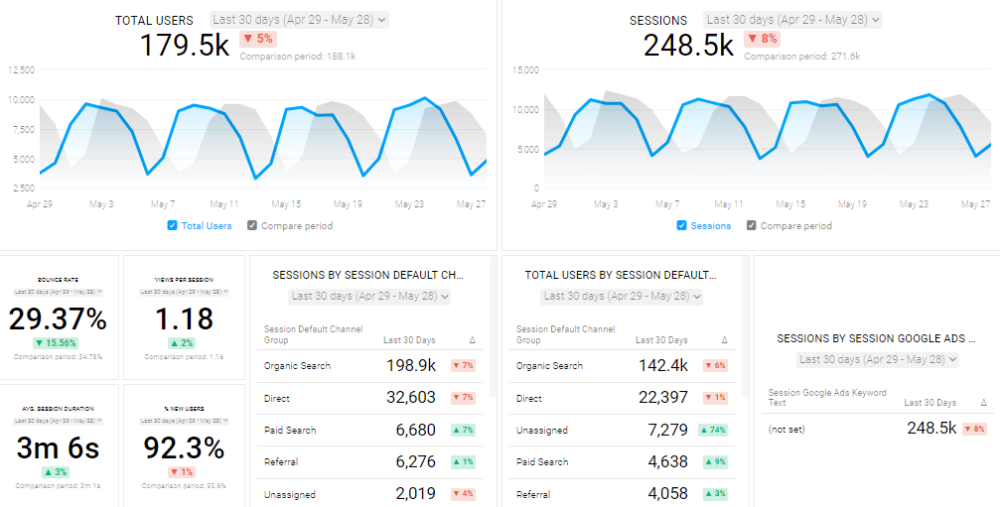
Credit: databox.com
Minimizing Javascript And Css
Minimizing JavaScript and CSS can greatly improve your website’s performance. This involves reducing the size and load time of your scripts and styles. Smaller files load faster, making your site more responsive. There are several methods to minimize JavaScript and CSS, including minification, compression, and asynchronous loading. Let’s explore these methods in detail.
Minification And Compression
Minification is the process of removing unnecessary characters from your code. This includes spaces, comments, and line breaks. Minification reduces the file size without affecting its functionality.
For example, consider the following CSS code:
body {
    background-color: #fff;
    margin: 0;
    padding: 0;
}
After minification, it becomes:
body{background-color:#fff;margin:0;padding:0;}
Compression is another technique to reduce file size. Tools like Gzip can compress your JavaScript and CSS files. This makes them smaller and faster to download. Both minification and compression are essential for optimizing web performance.
Asynchronous Loading
Asynchronous loading allows JavaScript files to load separately from the rest of the page. This means the HTML can render while JavaScript is still downloading. This speeds up the initial load time of your page.
You can implement asynchronous loading by adding the async attribute to your script tags:
Alternatively, you can use the defer attribute:
The async attribute loads the script as soon as possible. The defer attribute loads the script after the HTML is fully parsed. Both methods can improve load times and enhance user experience.
By focusing on these methods, you can significantly improve your website’s performance. Minification and compression reduce file sizes. Asynchronous loading speeds up initial page load. Together, these techniques create a faster, more efficient website.
Leveraging Browser Caching
Website performance is critical for user experience and search engine ranking. One powerful technique to enhance your site’s performance is leveraging browser caching. Browser caching stores static files on a user’s device, reducing load times for repeat visits. This section will guide you through setting expiration dates and caching strategies.
Setting Expiration Dates
Setting expiration dates tells the browser how long to store files. This prevents re-downloading on each visit. You can define expiration dates for different file types. Here’s a simple example:
  ExpiresActive On
  ExpiresByType text/html "access plus 1 month"
  ExpiresByType image/gif "access plus 1 year"
  ExpiresByType image/jpeg "access plus 1 year"
  ExpiresByType image/png "access plus 1 year"
  ExpiresByType text/css "access plus 1 month"
  ExpiresByType application/javascript "access plus 1 month"
In this code, HTML files expire after 1 month, images after 1 year, and CSS/JS files after 1 month. Adjust the times based on your needs.
Caching Strategies
Effective caching strategies improve site performance. Here are a few common ones:
- Public Caching: Store assets available to all users. Ideal for static resources like images and stylesheets.
- Private Caching: Store user-specific data. Useful for personalized content.
- No-Cache: Prevents caching. Use for content that changes frequently.
- Conditional Requests: Use
If-Modified-Sinceheaders to check if the resource has changed. Saves bandwidth and improves load times.
Choosing the right strategy depends on your site’s content and user needs. Here’s a table summarizing these strategies:
| Strategy | Description | Use Case |
|---|---|---|
| Public Caching | Stores assets for all users. | Static resources like images. |
| Private Caching | Stores user-specific data. | Personalized content. |
| No-Cache | Prevents caching. | Frequently changing content. |
| Conditional Requests | Uses headers to check changes. | Content with occasional updates. |
Implementing these strategies ensures your website delivers a faster, smoother experience for users.
Monitoring And Continuous Improvement
Website performance is not a one-time task. It requires ongoing monitoring and continuous improvement. This ensures your site remains fast, responsive, and user-friendly. By regularly assessing performance metrics, you can identify areas for improvement and make necessary adjustments. This proactive approach helps maintain a positive user experience and keeps your website competitive.
Regular Performance Audits
Conducting regular performance audits is crucial for maintaining website health. These audits help identify bottlenecks that slow down your site. They also reveal opportunities to enhance speed and efficiency.
Here are some key steps for a performance audit:
- Check page load times
- Analyze server response times
- Review browser caching settings
- Test mobile performance
- Evaluate third-party scripts
Use tools like Google PageSpeed Insights, GTmetrix, and Pingdom. These tools provide detailed reports and actionable insights.
Adapting To New Technologies
The web constantly evolves. Adapting to new technologies keeps your site modern and efficient. Regularly update your website to leverage new features and improvements.
Consider the following technologies:
- HTTP/2: Improves speed by allowing multiple requests in a single connection.
- AMP (Accelerated Mobile Pages): Enhances mobile page load speeds.
- Progressive Web Apps (PWA): Combines the best of web and mobile apps.
- CDNs (Content Delivery Networks): Distributes content across multiple servers for faster access.
Stay informed about the latest trends and updates. This ensures your website remains competitive and performs optimally.
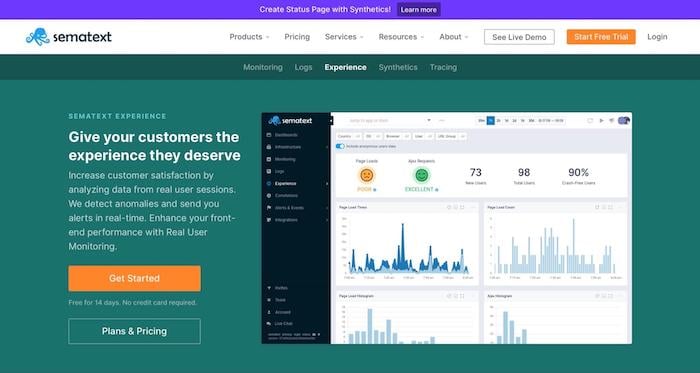
Credit: neilpatel.com
Frequently Asked Questions
What Are Website Performance Metrics?
Website performance metrics measure the speed, responsiveness, and usability of a website. These metrics help assess user experience and identify areas for improvement.
Why Is Website Performance Important?
Website performance is crucial for user satisfaction and SEO. Faster websites provide better user experiences, leading to higher engagement and conversions.
How Do I Measure Website Speed?
Measure website speed using tools like Google PageSpeed Insights, GTmetrix, or Pingdom. These tools analyze various performance aspects and provide actionable insights.
What Is A Good Page Load Time?
A good page load time is under 2 seconds. Faster load times enhance user experience and reduce bounce rates, leading to higher engagement.
Conclusion
Measuring website performance metrics is crucial for online success. Track key metrics like load time, bounce rate, and user engagement. Regularly check your website’s health. Use tools to monitor and improve these metrics. A well-performing website attracts and retains users.
Better performance leads to higher satisfaction and conversions. Stay proactive in analyzing and enhancing your website. This will ensure a smooth, efficient user experience.