

Optimization is key in achieving efficiency and success. Yet, many overlook its importance.
Lack of optimization can lead to wasted time, resources, and opportunities. It affects businesses, websites, and even personal productivity. Think of a car running on low fuel—it won’t go far. The same goes for any system or process that isn’t optimized.
It struggles to perform well. This blog will explore the common areas where optimization is often ignored. We will also discuss its impact and how to address it. Whether you run a business, manage a website, or simply want to improve your daily routines, understanding optimization is crucial. Let’s dive into why optimizing matters and how to get started.
Introduction To Website Optimization
Website optimization is crucial. It improves user experience and boosts search engine rankings. Many websites face issues due to lack of optimization. This can lead to slow load times and poor user engagement.
Optimizing a website involves various strategies. These include enhancing speed, ensuring mobile-friendliness, and improving overall user experience. Let’s explore the importance of optimization and common mistakes to avoid.
Importance Of Optimization
Optimization is vital for several reasons. It directly impacts user satisfaction and search engine rankings.
- Improved User Experience: A fast, responsive site keeps users engaged.
- Higher Search Rankings: Search engines prioritize optimized sites, boosting visibility.
- Increased Conversion Rates: Smooth navigation and quick load times lead to more conversions.
- Reduced Bounce Rates: Users stay longer on well-optimized sites.
These factors highlight the importance of maintaining an optimized website.
Common Optimization Mistakes
Many websites suffer from common optimization mistakes. Avoiding these errors can significantly enhance site performance.
- Ignoring Mobile Optimization: Mobile traffic is significant. Ensure your site is mobile-friendly.
- Large Image Sizes: Compress images to speed up load times.
- Overuse of Plugins: Too many plugins can slow down a site. Use only essential plugins.
- Not Utilizing Caching: Caching improves load times. Implement it to enhance performance.
- Poor Code Quality: Clean, efficient code is crucial. Avoid bloated, messy code.
Avoiding these mistakes helps maintain a fast, user-friendly website.
Impact On User Experience
Lack of Optimization can significantly impact user experience. Users expect fast, smooth, and intuitive interactions with websites. When these expectations are not met, it can lead to frustration and decreased user engagement. Below, we will explore two key areas where poor optimization affects user experience: Slow Loading Times and Navigation Issues.
Slow Loading Times
Slow loading times are a major issue for user experience. Users expect pages to load quickly, ideally within a few seconds. If a page takes too long, users may leave and not return. This increases the bounce rate and can negatively affect your website’s search engine ranking.
Several factors contribute to slow loading times:
- Large image files
- Too many HTTP requests
- Poor server performance
- Unoptimized code
By addressing these issues, you can improve loading times, ensuring users stay engaged and satisfied.
Navigation Issues
Navigation issues can also hurt user experience. Users need to find information easily. If they struggle to navigate your site, they may leave and find a competitor’s site that is easier to use.
Common navigation issues include:
- Complex menus
- Poorly labeled links
- Broken links
- Lack of a search function
Fixing these issues can make your site more user-friendly. Users will appreciate the improved navigation and will likely spend more time on your site.
Seo Consequences
Failure to optimize your website can lead to serious SEO consequences. These consequences impact your site’s visibility, traffic, and overall success. This section will explore the two major consequences: lower search engine rankings and decreased organic traffic.
Lower Search Engine Rankings
A lack of optimization negatively affects your site’s search engine rankings. Search engines like Google prioritize well-optimized websites. They look for elements like keywords, meta tags, and fast loading speeds. Without these elements, your site will rank lower.
Lower rankings mean fewer people will see your site. This leads to fewer clicks and less engagement. Your site might even end up on the second or third page of search results. Most users never look past the first page. So, it’s crucial to optimize your site to improve its rankings.
Decreased Organic Traffic
Lower rankings also result in decreased organic traffic. Organic traffic refers to visitors who find your site through search engines. If your site ranks low, fewer visitors will find it. This can lead to a significant drop in traffic.
Here are some factors that contribute to decreased organic traffic:
- Poor keyword usage
- Slow loading speeds
- Missing meta descriptions
- Low-quality content
By addressing these issues, you can improve your site’s optimization. This will help increase organic traffic and bring more visitors to your site.
Conversion Rate Decline
Conversion Rate Decline is a critical issue for any business. It means fewer visitors are completing desired actions, like making a purchase or signing up for a newsletter. This decline can be caused by many factors. Let’s explore some of the main reasons.
Higher Bounce Rates
A high bounce rate is a red flag. It indicates users are leaving your site quickly. A poor user experience often causes this. Slow loading times, confusing navigation, or irrelevant content can drive users away. Ensuring your site is user-friendly can help reduce bounce rates.
Reduced Sales And Leads
Optimization issues can lead to fewer sales and leads. If your site isn’t easy to use, visitors won’t convert. This can include complicated checkout processes, unclear calls to action, or lack of trust signals. Simplifying the user journey can help improve conversion rates.
| Issue | Impact on Conversion Rate |
|---|---|
| High Bounce Rate | Users leave quickly, decreasing conversion chances |
| Poor User Experience | Visitors get frustrated and abandon the site |
| Complex Checkout Process | Users may give up before completing a purchase |
- Ensure your site loads quickly
- Make navigation simple and clear
- Use clear and strong calls to action
- Display trust signals like reviews and security badges
Mobile Optimization Challenges
In the digital age, mobile optimization is crucial. Many websites face significant mobile optimization challenges. These issues can hinder user experience and lower search engine rankings. Let’s explore some common challenges.
Responsive Design Problems
Responsive design ensures a website works on all devices. But, creating a responsive design can be tricky. Here are some common problems:
- Inconsistent Layouts: Elements may not align correctly on different screens.
- Slow Load Times: Heavy images and scripts can slow down mobile pages.
- Navigation Issues: Menus and buttons may be hard to click on smaller screens.
These design problems can frustrate users. They might leave your site if it’s hard to use on their phone.
Mobile User Expectations
Mobile users have different expectations compared to desktop users. They want quick and easy access to information. Here are some key expectations:
- Fast Load Times: Mobile users expect pages to load quickly, within seconds.
- Easy Navigation: Simple menus and clear buttons are crucial.
- Readable Text: Text should be large enough to read without zooming.
- Touch-Friendly Elements: Links and buttons should be easy to tap.
Meeting these expectations is essential. A poor mobile experience can drive users away.

Credit: www.reddit.com
Technical Debt Accumulation
Technical debt refers to the costs developers incur when they prioritize quick fixes over long-term solutions. These costs accumulate over time, leading to issues that can cripple a system. When technical debt mounts, it can slow down processes and make future updates difficult.
Outdated Code
Outdated code is one of the main contributors to technical debt. Developers often use quick patches that solve immediate issues but leave the codebase fragmented.
Older code may not be compatible with new technologies. This incompatibility can cause the system to fail or perform poorly. Regular updates are crucial to prevent these issues.
Maintenance Costs
The maintenance costs of a system with high technical debt are significant. Developers spend more time fixing issues than improving features. This imbalance can lead to higher operational costs.
A system with outdated code requires more resources for maintenance. These resources could be better used for innovation and growth. Investing in proper code updates can save money in the long run.
| Issue | Impact |
|---|---|
| Outdated Code | System Performance Issues |
| High Maintenance Costs | Increased Operational Expenses |
Reducing technical debt is vital for the long-term health of a system. Regular code updates and effective maintenance practices are key to managing technical debt effectively.
Security Vulnerabilities
Lack of optimization often leads to various security vulnerabilities in your system. These vulnerabilities expose your website to numerous threats. It’s crucial to understand the risks and take steps to secure your data and protect your users.
Increased Risk Of Hacks
Unoptimized websites are easy targets for hackers. Hackers exploit security flaws to gain access. They can steal data, disrupt services, and cause financial loss. Regular updates and patches reduce these risks.
An unoptimized website lacks the latest security features. Hackers use advanced techniques to bypass outdated defenses. Protecting your website with the latest security measures is essential.
Data Protection Issues
Data protection is critical for any business. Unoptimized sites often lack robust security protocols. This makes them vulnerable to data breaches. Sensitive information like customer details can be exposed.
Implementing encryption helps in safeguarding data. Regular security audits identify potential weaknesses. Ensuring data protection builds trust with your users.
Here’s a simple table to illustrate the impact of data breaches:
| Impact | Description |
|---|---|
| Financial Loss | Loss of money due to stolen data |
| Reputation Damage | Loss of trust from users |
| Legal Consequences | Penalties for data protection violations |
To avoid these issues, secure your site. Regular updates, encryption, and security audits are key.
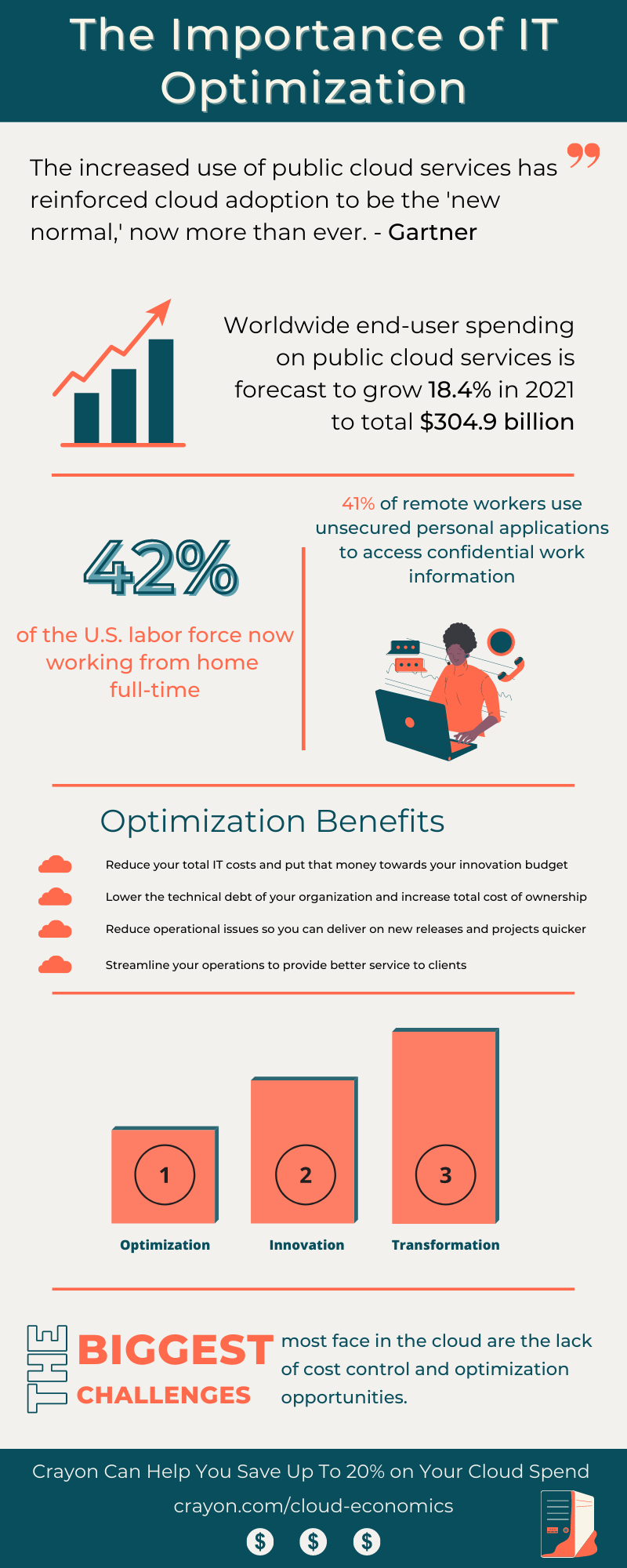
Credit: www.crayon.com
Steps To Improve Optimization
Optimizing your website is essential for better performance and visibility. There are various steps you can take to improve optimization. By focusing on these steps, you can enhance user experience and search engine rankings.
Regular Audits
Conducting regular audits is crucial for identifying issues. Check for broken links, missing images, and slow load times. Regular audits help in pinpointing areas that need improvement.
Use the following checklist for audits:
- Check website speed
- Inspect mobile responsiveness
- Review meta tags and descriptions
- Analyze user behavior
- Identify broken links
Utilizing Tools And Resources
Leverage various tools and resources to enhance optimization. These tools can provide insights and automated solutions.
Here are some useful tools:
| Tool | Purpose |
|---|---|
| Google Analytics | Track website traffic and user behavior |
| SEMrush | Analyze SEO and keyword performance |
| GTmetrix | Measure website speed |
| Yoast SEO | Optimize on-page SEO |
By using these tools, you can gain valuable insights and make data-driven decisions. This, in turn, will improve your website’s optimization.

Credit: www.reddit.com
Frequently Asked Questions
What Is Lack Of Optimization?
Lack of optimization refers to not maximizing efficiency or performance. This can impact website speed, user experience, and search engine rankings.
How Does Lack Of Optimization Affect Seo?
Lack of optimization can lower your search engine rankings. Slow load times and poor user experience reduce organic traffic and conversions.
What Are Common Signs Of Poor Optimization?
Common signs include slow website speed, high bounce rates, and low search engine rankings. These issues impact user experience and engagement.
How Can You Improve Website Optimization?
Improve website optimization by compressing images, minifying code, and using a content delivery network (CDN). Regularly update and audit your website.
Conclusion
Addressing lack of optimization is crucial for success. It affects site performance, user experience, and search rankings. Small changes can make a big difference. Regular audits and updates keep your site optimized. Stay proactive. Don’t wait for issues to arise.
Optimization is an ongoing process. Keep learning and improving. Your efforts will pay off in the long run. Remember, an optimized site benefits both users and search engines.