

Website optimization is crucial for online success. It improves user experience and boosts search rankings.
In today’s digital world, a well-optimized website is essential. It can attract more visitors and convert them into loyal customers. Optimizing your website involves various techniques. These techniques enhance speed, usability, and search engine visibility. From image compression to SEO practices, every detail matters.
A faster website keeps users engaged and reduces bounce rates. Better usability ensures visitors find what they need quickly. Effective SEO strategies help your site rank higher on search engines. This means more organic traffic and potential business growth. In this blog post, we will explore key website optimization techniques. These methods will help you improve your website’s performance and achieve better results. Let’s dive in and make your website the best it can be!

Credit: www.reliablesoft.net
Importance Of Website Optimization
Optimizing your website is crucial. It ensures your site performs well and meets the needs of your users. A well-optimized website can improve user experience and boost your search engine rankings.
User Experience
User experience is a key factor in website optimization. A fast-loading website keeps visitors engaged and reduces bounce rates. Slow websites frustrate users, leading them to leave your site quickly.
Another aspect is easy navigation. A clear and intuitive navigation menu helps users find what they need quickly. This improves their overall experience.
Responsive design is also vital. Your website should work well on all devices, including smartphones and tablets. A responsive website adjusts its layout based on the screen size, ensuring a smooth experience for all users.
Seo Benefits
Website optimization is not just about user experience. It also has significant SEO benefits. Search engines like Google consider site speed as a ranking factor. Faster websites rank higher in search results.
Optimized websites often have better on-page SEO. This includes elements like meta tags, headings, and content structure. These elements help search engines understand your content better.
Furthermore, optimized images and media improve load times and SEO. Compressing images and using the right formats can make a big difference.
| Optimization Technique | Benefit |
|---|---|
| Fast Loading Speed | Reduces bounce rate |
| Easy Navigation | Improves user experience |
| Responsive Design | Works on all devices |
| On-Page SEO | Better search engine rankings |
| Optimized Images | Faster load times |
In summary, website optimization is essential for both users and search engines. By focusing on user experience and SEO benefits, you can create a website that performs well and ranks higher.
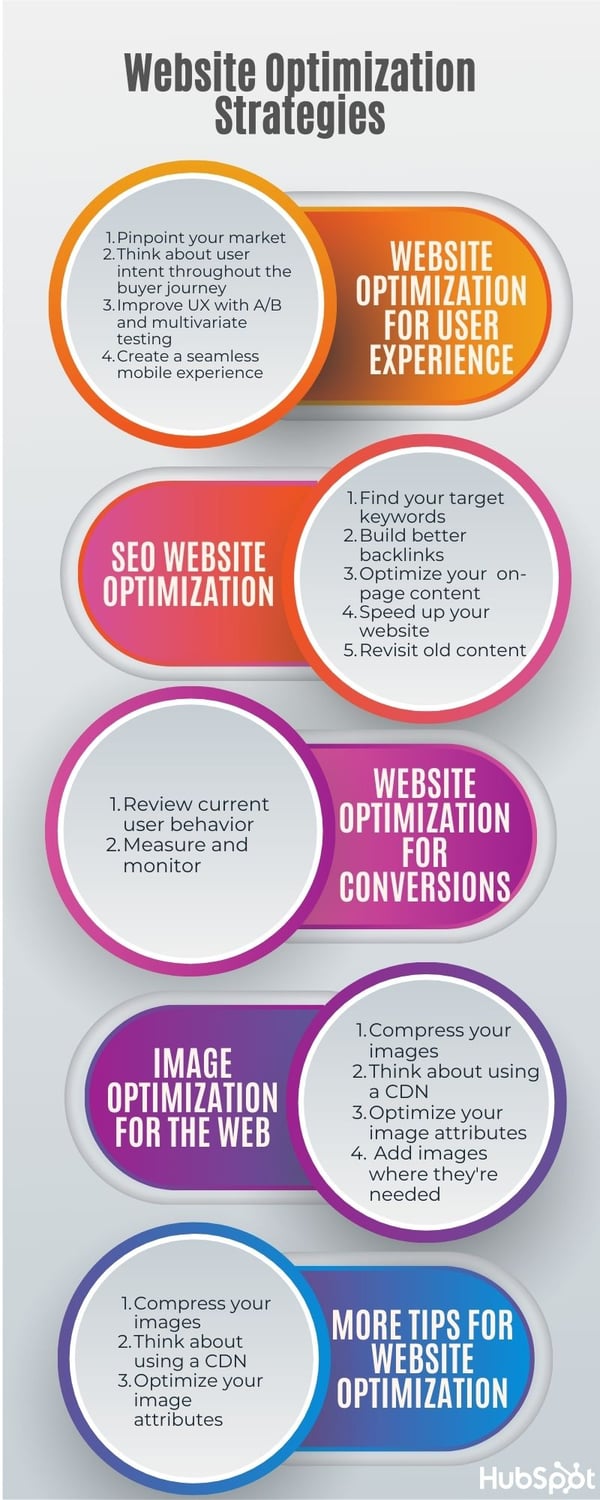
Credit: blog.hubspot.com
Analyzing Current Performance
Website optimization starts with understanding your current performance. Knowing how your site performs is essential. It helps you identify areas for improvement. This step involves looking at various metrics and using specific tools. Let’s explore these elements in detail.
Performance Metrics
Performance metrics are key indicators of your website’s health. They help you understand how well your site is performing. Some important metrics to monitor include:
- Page Load Time: The time it takes for a webpage to fully load.
- Time to First Byte (TTFB): The time the browser waits before receiving the first byte of data.
- Bounce Rate: The percentage of visitors who leave after viewing only one page.
- Conversion Rate: The percentage of visitors who take a desired action.
- Average Session Duration: The average time users spend on your site.
Tools And Software
Various tools and software can help you analyze your website’s performance. They provide valuable insights and data. Here are some popular options:
- Google Analytics: Tracks and reports website traffic. It offers detailed insights into user behavior.
- Google PageSpeed Insights: Analyzes the content of a web page. Then, it generates suggestions to make it faster.
- GTmetrix: Provides a detailed report on page performance. It offers recommendations for improvements.
- Pingdom: Monitors website performance and uptime. It helps identify bottlenecks.
- WebPageTest: Offers detailed performance data, including load times and render times.
By using these tools, you can gather critical data. This data helps you make informed decisions to improve your website’s performance.
Improving Page Load Speed
Page load speed is crucial for user experience and SEO. Faster websites keep visitors engaged. They also rank higher on search engines. Here, we will explore key techniques to improve your website’s load speed.
Image Optimization
Images often take up a lot of space. They can slow down your website. Optimizing images is essential.
- Resize images to the exact dimensions needed.
- Use the appropriate file format. JPEG for photos, PNG for graphics.
- Compress images without losing quality. Tools like TinyPNG can help.
- Use lazy loading to load images only when they appear on the screen.
These steps can reduce image size. They will load faster and improve page speed.
Minify Css And Javascript
CSS and JavaScript files can be large. They may include unnecessary characters. Minifying these files can reduce their size.
Minification removes whitespace, comments, and redundant code. This can make your website load faster.
| Before Minification | After Minification |
|---|---|
body {
|
body{background-color:#fff;margin:0;}
|
Use tools like UglifyJS or CSSNano for minification. This will reduce file size and improve load speed.

Credit: sematext.com
Enhancing Mobile Responsiveness
Enhancing mobile responsiveness is crucial for modern websites. With more users accessing the web on their smartphones, having a mobile-friendly site improves user experience and search engine rankings. This section will delve into effective techniques for enhancing mobile responsiveness.
Responsive Design
Responsive design ensures your website adapts to any screen size. This technique uses flexible grids and layouts. Media queries in CSS allow content to adjust based on the device’s screen.
Consider the following points:
- Use a fluid grid layout.
- Implement flexible images.
- Apply CSS media queries.
Here’s an example of a basic media query:
@media screen and (max-width: 600px) {
    body {
        background-color: lightblue;
    }
}
This code changes the background color for screens smaller than 600px. Responsive design creates a seamless experience across all devices.
Mobile-friendly Testing
Testing your site’s mobile-friendliness is essential. Use tools like Google’s Mobile-Friendly Test. These tools analyze your site and provide feedback.
Key areas to focus on during testing:
- Loading speed.
- Ease of navigation.
- Readability of text.
- Interactive elements’ usability.
Tables are useful for organizing test results:
| Test Area | Status |
|---|---|
| Loading Speed | Pass |
| Navigation | Pass |
| Text Readability | Needs Improvement |
| Usability | Pass |
Regular testing helps identify and fix issues. It ensures a smooth mobile experience for your users.
Leveraging Browser Caching
Website optimization is crucial for a seamless user experience and better search engine rankings. One effective technique is leveraging browser caching. This method can significantly reduce load times, improving overall performance. Let’s delve into some key aspects of browser caching.
Cache-control Headers
Cache-Control headers play an essential role in browser caching. They direct browsers on how to handle cached content. By setting proper Cache-Control headers, you can define rules for caching, reducing server load and speeding up page loading times.
Here is an example of a Cache-Control header:
Cache-Control: public, max-age=31536000This header tells the browser to cache the content for one year. Using Cache-Control headers, you can control:
- Public: Indicates that the response may be cached by any cache.
- Private: Indicates that the response is intended for a single user and should not be stored by shared caches.
- Max-age: Specifies the maximum amount of time a resource is considered fresh.
Expiration Dates
Expiration dates are another critical element in browser caching. They specify how long a resource should be cached before it is considered stale. Setting appropriate expiration dates ensures that users get the latest version of your content when necessary.
Here is an example of setting an expiration date:
Expires: Wed, 21 Oct 2023 07:28:00 GMTThis header provides a specific date and time after which the cached resource is no longer valid.
| Header Type | Purpose | Example |
|---|---|---|
| Cache-Control | Defines caching policies | Cache-Control: public, max-age=31536000 |
| Expires | Specifies expiration date | Expires: Wed, 21 Oct 2023 07:28:00 GMT |
By leveraging both Cache-Control headers and expiration dates, you can enhance your website’s performance and provide a better user experience. Proper caching reduces server load and speeds up content delivery.
Optimizing Server Performance
Improving server performance is crucial for website speed. A fast website keeps users happy and reduces bounce rates. This section covers two essential techniques: Server Response Time and CDN Utilization.
Server Response Time
Server response time refers to how fast your server sends data back to the browser. A slow server can make your website seem sluggish. Here are some ways to improve it:
- Use a Fast Web Host: Choose a reliable hosting provider with good speed.
- Optimize Database Queries: Ensure your database queries are efficient.
- Enable Caching: Caching can help reduce the load on your server.
Regularly monitor your server’s performance. Use tools like Google PageSpeed Insights. This helps identify bottlenecks and areas for improvement.
Cdn Utilization
A Content Delivery Network (CDN) can greatly enhance your website’s speed. A CDN distributes your content across various servers globally. This reduces the distance data travels to reach users.
| Benefits of Using a CDN | Details |
|---|---|
| Improved Load Times | Content is delivered faster due to closer server locations. |
| Reduced Latency | Data travels shorter distances, reducing delay. |
| Enhanced Security | CDNs offer protection against DDoS attacks. |
To utilize a CDN, sign up with a CDN provider. Configure your website to use the CDN’s servers. This can be done through your hosting provider or a plugin.
Reducing Http Requests
Reducing HTTP requests is essential for fast website performance. Each request made by the browser to the server adds to the page load time. Fewer requests mean faster pages. This keeps visitors on your site longer. Let’s dive into some effective methods.
Combining Files
Combining files can significantly reduce the number of HTTP requests. Instead of having multiple CSS or JavaScript files, merge them into a single file. This reduces the number of server requests.
For example, if you have three CSS files:
- styles.css
- header.css
- footer.css
Combine them into one:
This results in one HTTP request instead of three. Use tools like Gulp or Webpack to automate this process.
Lazy Loading
Lazy loading helps load images and videos only when needed. This reduces the initial load time. Content below the fold loads only when the user scrolls down.
Use the loading="lazy" attribute in your image tags:
This improves the performance of your website. Visitors get a faster and smoother experience.
Monitoring And Maintenance
Website optimization is not a one-time task. It requires ongoing monitoring and maintenance to ensure that your site performs at its best. Regular check-ups and updates help in identifying potential issues and keeping your website up to date. Below, we explore essential techniques for maintaining and monitoring your website effectively.
Regular Audits
Conducting regular audits is crucial for identifying performance issues and potential security risks. Audits help in assessing your website’s health and uncovering areas that need improvement. Here are key aspects to focus on:
- Page Load Speed
- Mobile Responsiveness
- SEO Performance
- Security Vulnerabilities
Use tools like Google Analytics and SEMrush for detailed insights. Regular audits ensure your site remains fast, secure, and user-friendly.
Updating Plugins And Themes
Outdated plugins and themes can expose your site to security threats and performance issues. Regularly updating them is essential for maintaining website health. Consider the following points:
- Check for updates weekly.
- Backup your site before updating.
- Test updates in a staging environment.
Keeping your plugins and themes updated ensures compatibility and security, enhancing overall site performance.
Frequently Asked Questions
What Is Website Optimization?
Website optimization is the process of improving site performance. It includes enhancing speed, usability, and search engine rankings. Optimized websites attract more visitors and provide better user experiences.
How Can I Improve Website Speed?
To improve website speed, compress images, minimize code, and leverage browser caching. Use Content Delivery Networks (CDNs) and optimize server response times. Regularly monitor and test site speed.
What Tools Are Used For Website Optimization?
Popular tools for website optimization include Google PageSpeed Insights, GTmetrix, and Pingdom. These tools analyze performance, provide insights, and suggest improvements. Regularly use these tools for optimal results.
Why Is Mobile Optimization Important?
Mobile optimization ensures your website performs well on smartphones and tablets. It improves user experience, increases engagement, and boosts search engine rankings. With growing mobile users, it’s essential for success.
Conclusion
Optimizing your website boosts user experience and search engine rankings. These techniques are essential. Focus on loading speed, mobile-friendliness, and quality content. Use SEO tools to track progress and make improvements. Consistency and regular updates are key. Stay informed about the latest trends and algorithms.
Applying these methods ensures better visibility and user engagement. Keep refining your strategies for long-term success. Your efforts will pay off in increased traffic and conversions.