

Website usability issues can frustrate users and drive them away. These issues can affect your site’s performance and reputation.
A website should be easy to navigate and user-friendly. Yet, many sites fail to meet these basic standards. Poor usability can lead to high bounce rates and lost revenue. Users expect a seamless experience, and any glitch can make them leave.
Addressing these problems is crucial for success. In this post, we will explore common usability issues. Understanding these can help you improve your site’s user experience. You don’t need to be a tech expert to grasp these concepts. Simple changes can make a big difference. So, let’s dive into the world of website usability and see how you can make your site better for everyone.
Importance Of Website Usability
Website usability is crucial for ensuring visitors have a positive experience. It impacts how users interact with your site, navigate through pages, and complete desired actions. A site that is difficult to use can frustrate users, leading to higher bounce rates and fewer conversions. Hence, focusing on website usability is essential for retaining visitors and achieving business goals.
User Experience Matters
User experience (UX) is a key aspect of website usability. A well-designed site enhances user satisfaction. Key elements of good UX include:
- Easy navigation
- Clear call-to-action buttons
- Fast loading times
- Responsive design for all devices
When users find what they need quickly, they are more likely to stay longer and engage more. A positive user experience also builds trust and encourages return visits.
Impact On Conversions
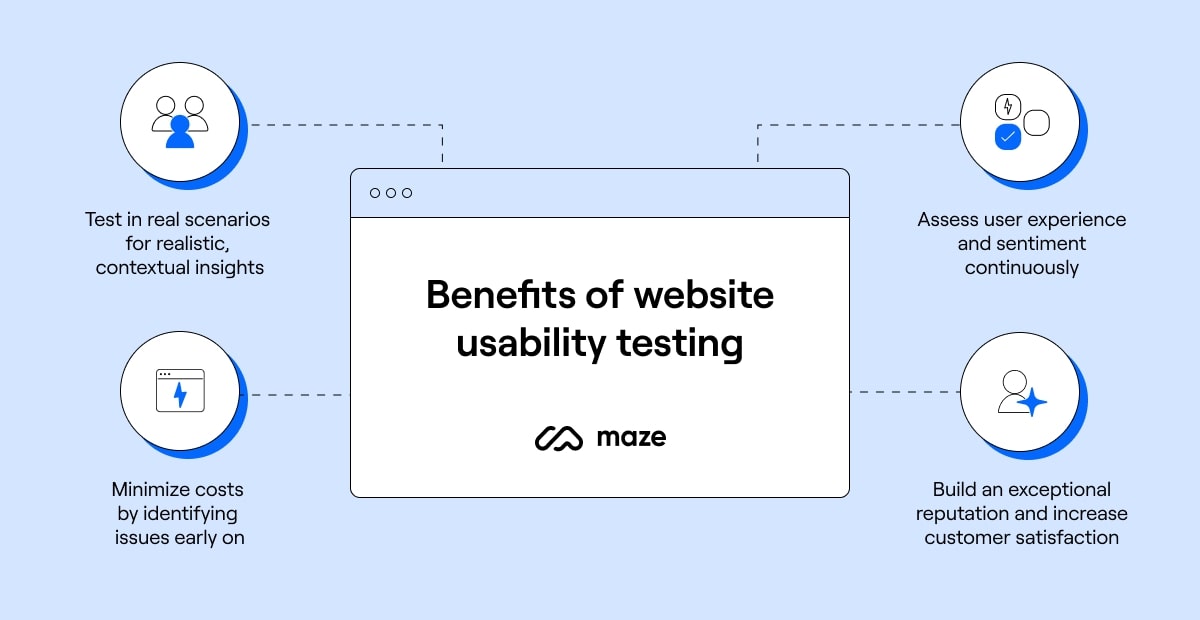
Website usability directly affects conversion rates. A user-friendly site can lead to higher conversions. Here are some ways usability impacts conversions:
- Clear Navigation: Users find products or information easily, leading to more purchases or sign-ups.
- Fast Loading Times: Slow sites can deter users. Fast sites keep users engaged.
- Responsive Design: Mobile-friendly sites cater to a larger audience, increasing potential conversions.
- Trustworthiness: A professional, easy-to-use site builds credibility, encouraging users to complete transactions.
Improving website usability is not just about design; it’s about understanding user needs and behaviors. By focusing on usability, businesses can enhance user experience and boost their conversion rates.
Credit: maze.co
Common Navigation Problems
Website usability is key to keeping visitors engaged. One major component is navigation. Poor navigation can lead to a frustrating user experience. Here, we discuss common navigation problems that many websites face.
Confusing Menus
Menus should be clear and simple. Confusing menus can frustrate users. They should not have to guess where to click. Common issues include:
- Too many menu items
- Unclear labels
- Nested menus that are too deep
Ensure each menu item is easy to understand. Limit the number of choices. Use clear and concise labels. Test your menu with real users to find issues.
Hidden Navigation
Navigation should be visible and easy to find. Hidden navigation can confuse users. They may not find important pages. Common hidden navigation issues include:
- Menus only visible on hover
- Navigation hidden behind icons
- Important links buried in content
Ensure your navigation is always visible. Avoid hiding menus behind icons. Place important links where users can see them. This improves usability and keeps visitors on your site.
Poor Mobile Optimization
Mobile optimization is crucial for any website. If your site isn’t mobile-friendly, users will leave quickly. Poor mobile optimization can lead to a high bounce rate, decreased conversions, and lower search engine rankings.
Responsive Design Issues
Responsive design ensures your site looks good on all devices. Without it, your site may look distorted on mobile screens. Users may struggle to navigate or read content. This can frustrate them and lead to them leaving your site.
To address this, ensure your website uses responsive design techniques. Use flexible grids and layouts. Scale images and text properly. Test your site on various devices to ensure a seamless experience.
Slow Load Times
Slow load times are a significant usability issue. Mobile users expect fast access to information. If your site takes too long to load, users may leave before it finishes.
Several factors can contribute to slow load times:
- Large images
- Unoptimized code
- Excessive use of JavaScript
To improve load times, optimize your images. Compress them without sacrificing quality. Clean up your code to ensure it runs smoothly. Minimize the use of JavaScript and other heavy elements.
By addressing these issues, you can create a better user experience. This will help retain visitors and improve your site’s performance.
Inconsistent Design Elements
Website usability is crucial for user satisfaction. One common issue is inconsistent design elements. These inconsistencies confuse visitors and reduce the website’s credibility. Addressing these problems can improve user experience and engagement.
Mismatched Styles
Consistency in design elements is key. Mismatched styles can distract users. For example, using different font types or sizes on the same page. This inconsistency makes the site look unprofessional. Users may struggle to read the content.
Avoid using too many colors. Stick to a cohesive color palette. Ensure buttons and links follow the same design. Consistent styles create a better user experience.
Unclear Branding
Unclear branding confuses visitors. Your brand should be easily recognizable. Use the same logo, colors, and fonts across all pages. Consistent branding helps build trust. Visitors should know they are on the same site.
Make sure your branding elements are clear. Include your logo in the same spot on each page. Keep your brand’s voice and tone consistent. This helps users feel comfortable and secure.
Here is a table summarizing the key points:
| Issue | Solution |
|---|---|
| Mismatched Styles | Use cohesive font types, sizes, and colors |
| Unclear Branding | Maintain consistent logo, colors, and fonts |
Lack Of Accessibility Features
Website usability is crucial for retaining users and ensuring a smooth browsing experience. A common issue is the lack of accessibility features. Accessibility ensures all users, including those with disabilities, can use your website without problems. Ignoring accessibility can alienate a significant portion of your audience and impact your site’s performance.
Ignoring Screen Readers
Screen readers are essential tools for visually impaired users. They read the text on the screen out loud. Ignoring screen readers means these users can’t access your content. Make sure your website supports screen readers. Use semantic HTML tags like , and . Add alt text to images so screen readers can describe them. This enhances the browsing experience for all users.
Poor Color Contrast
Poor color contrast can make text unreadable. Users with visual impairments, like color blindness, struggle the most. Ensure high contrast between text and background colors. This improves readability for everyone. You can use tools like the WebAIM Contrast Checker to test your site’s color contrast.
| Text Color | Background Color | Contrast Ratio |
|---|---|---|
| Black | White | 21:1 |
| Dark Gray | Light Gray | 7:1 |
| Red | Yellow | 4.8:1 |
Ensuring good contrast makes your website more accessible. It also makes it more pleasant to read for everyone.
Overloaded With Content
Website usability is crucial for keeping visitors engaged and satisfied. One common issue is overloading with content. This can lead to a poor user experience. Visitors may feel overwhelmed and leave your site. Ensuring your content is clear and accessible is key to retaining your audience.
Too Much Text
Having too much text on a webpage can be overwhelming. Users prefer to find information quickly. Long paragraphs can deter readers. Break text into shorter paragraphs. Use bullet points for easy scanning:
- Highlight key points
- Use subheadings
- Keep sentences short
Also, consider adding visuals. Images and graphics can break up the text. They also make the content more engaging. Remember, less is often more.
Cluttered Layout
A cluttered layout can confuse visitors. It makes navigation difficult. Keep your layout clean and organized. Ensure that content is easy to find.
| Issue | Solution |
|---|---|
| Too many elements | Prioritize important content |
| Lack of white space | Use margins and padding |
Organize content logically. Use whitespace effectively. A clean design enhances readability. It also improves user experience. Make sure your website is easy to navigate.
Complicated Forms
Complicated forms can create a frustrating experience for users. Forms are essential for gathering information, but if they are too complex, they can drive users away. Simplifying forms can improve user satisfaction and increase conversions.
Too Many Fields
Forms with too many fields can overwhelm users. Long forms take more time to complete, which can cause users to abandon the process. Keep forms short and ask only for essential information. This makes the process quick and easy for users.
| Form Length | Completion Rate |
|---|---|
| Short (1-5 fields) | High |
| Medium (6-10 fields) | Moderate |
| Long (10+ fields) | Low |
Unclear Instructions
Unclear instructions can confuse users. When form instructions are not clear, users may not know how to fill out the form correctly. This can lead to errors and frustration.
Provide clear, concise instructions for each field. Use simple language that everyone can understand. This will help users complete the form quickly and accurately.
- Use clear labels for each field.
- Provide examples if needed.
- Avoid jargon or technical terms.
By simplifying forms and making instructions clear, you can improve the user experience. This will increase the likelihood of users completing the forms and boost your site’s usability.
Credit: www.smashingmagazine.com
Missing Or Misleading Links
A website’s user experience can suffer greatly from missing or misleading links. Users expect links to lead them to the content they want. Disappointments occur when links are broken or unclear. This can lead to frustration and site abandonment. Below, we explore two common link issues: broken links and ambiguous link text.
Broken Links
Broken links are links that lead to non-existent pages. They can occur due to various reasons:
- Deleted pages
- Incorrect URLs
- Server issues
Broken links harm the user experience. They create dead ends and reduce trust in the website. Search engines also penalize sites with many broken links. Regularly check and fix broken links to ensure smooth navigation. Use tools like Dead Link Checker or Broken Link Check to find and repair these links.
Ambiguous Link Text
Ambiguous link text fails to tell users where the link leads. It can confuse and mislead users. For example, link texts like “click here” or “read more” are not specific. Instead, use descriptive link text. This improves clarity and helps users understand the link’s destination.
Consider these examples for better link text:
| Ambiguous Link Text | Descriptive Link Text |
|---|---|
| Click here | View our services |
| Read more | Learn about our history |
Descriptive link text also aids SEO. Search engines use link text to understand the linked page’s content. Therefore, be clear and precise with your links. Users and search engines will appreciate it.
Inadequate Search Functionality
Inadequate search functionality can greatly impact the usability of a website. Users rely on the search feature to find information quickly. If this feature is not working well, it can lead to frustration and a poor user experience. Two main issues that arise from inadequate search functionality are poor search results and lack of filters.
Poor Search Results
Poor search results can frustrate users. They expect the search feature to provide relevant and accurate information. If the results are not helpful, users may leave the site. This issue can occur due to:
- Incorrect indexing of content
- Outdated information
- Misspelled words in the search query
To improve search results, ensure that your content is properly indexed. Regularly update the information on your site. Implement spelling correction features to help users find what they need.
Lack Of Filters
Lack of filters in the search functionality can also be a problem. Filters help users narrow down their search results. Without filters, users may have to sift through too many irrelevant results. This can waste time and lead to frustration.
Consider adding the following filters:
- Category filters
- Date filters
- Price range filters
Adding these filters can help users find the information they need quickly and easily. It can improve the overall usability of your website.
Credit: www.bounteous.com
Ignoring User Feedback
Ignoring user feedback can cause serious website usability issues. When users visit your site, they bring valuable insights. Their feedback helps you understand what works and what doesn’t. Ignoring this feedback can lead to poor user experiences and lost opportunities. Let’s explore the critical aspects of this issue.
No Feedback Mechanism
Not having a feedback mechanism means you miss out on user insights. Users can’t share their thoughts or suggest improvements. This creates a gap between what users want and what your site offers.
Consider adding a feedback form, comment section, or survey. These tools help gather user opinions. They provide direct insight into user experiences. Below is a simple example of a feedback form:
Failure To Act On Feedback
Collecting feedback but failing to act on it is equally harmful. Users need to feel heard. If their suggestions are ignored, they may stop engaging with your site.
Here are steps to effectively act on feedback:
- Analyze the feedback for common issues.
- Prioritize changes based on impact and feasibility.
- Implement the changes and test them.
- Communicate the updates to your users.
Regularly updating your site based on user feedback improves user satisfaction. It shows that you value their input and are committed to enhancing their experience.
In summary, ignoring user feedback can lead to significant usability issues. Ensure you have a feedback mechanism in place and act on the feedback received. This approach will help create a user-friendly website.
Frequently Asked Questions
What Are Common Website Usability Issues?
Common website usability issues include slow loading times, difficult navigation, non-responsive design, unclear calls-to-action, and poor mobile optimization. These issues can frustrate users and lead to high bounce rates.
How Does Poor Navigation Affect Usability?
Poor navigation makes it hard for users to find information. This can lead to frustration and increased bounce rates. Clear, intuitive navigation improves user experience and keeps visitors engaged.
Why Is Mobile Optimization Important?
Mobile optimization ensures your website works well on smartphones and tablets. With increasing mobile usage, a mobile-friendly site enhances user experience and reduces bounce rates. It also improves your site’s ranking on search engines.
What Role Does Loading Speed Play In Usability?
Loading speed is crucial for user experience. Slow websites frustrate users and cause them to leave. Fast-loading websites keep users engaged and improve search engine rankings.
Conclusion
Addressing website usability issues can greatly improve user experience. Simple navigation, fast load times, and clear content are key. Regularly test your site to identify and fix problems. Listen to user feedback for valuable insights. Prioritize usability, and watch your audience grow.
A user-friendly site keeps visitors happy and engaged. Focus on these basics for a successful website.